AO posteffect is broken on Intel GPU
Nobody has claimed this yet.
- Dominant language
- C#
- Stars
- 7.8k
- Forks
- 1.2k
- Avg merge
- 2d 17h
- Merged PRs (30d)
- 49
Description
Release Type:
Official Release
Version:
3.0.0.6
Platform(s):
Windows
Describe the bug
AO looks patchy, blocky, lowres. When moving camera, effect "rolls" across geometry.
Can not tweak settings to look any good.
To Reproduce
Open any of the shipped example scenes, turn on AO.
Same in editor and running game.
Expected behavior
Decent AO effect like advertised in the docs.
Screenshots
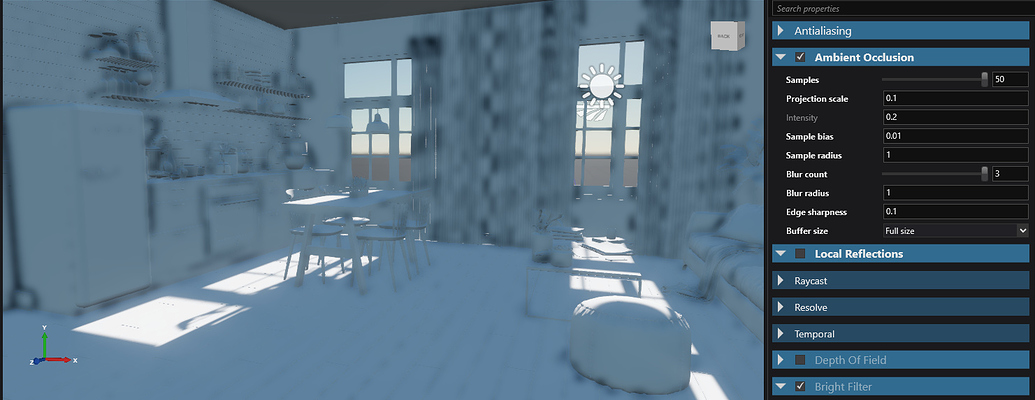


Additional context
Forum question: https://forums.xenko.com/t/ao-lowres-and-patchy/1721/6
Contributor guide
First steps
- Read the whole issue, then the project's contributing guide.
- Comment on the issue to say you are picking it up — it saves two people doing the same work.
- Fork the repository and make your change on a branch.
- Open a pull request that references the issue number.
Research direction
Run a shipped example scene on Windows with an Intel GPU, enable AO, and compare the patchy, blocky, low-resolution output and camera-dependent rolling against the documented effect. Trace the AO post-effect implementation from the example's AO setting and determine what change restores a stable, decent result like the documentation describes.
Written by the indexing model from the issue text.
Assessment
- Tech stack
- csharp
- Domain
- computer-graphics, game-dev
- Issue type
- Bug
- Difficulty
- 4/5
- Estimated time
- 3-5 days
- Activity status
- Stale
- Clarity
- Needs clarification
- Newbie friendliness
- 25/100