[Editor] [Feature Request] A quick way to show/hide parts of the scene
Nobody has claimed this yet.
- Dominant language
- C#
- Stars
- 7.8k
- Forks
- 1.2k
- Avg merge
- 2d 17h
- Merged PRs (30d)
- 49
Description
It would be nice to be able to quickly show/hide parts of the tree when using the editor, for instance if certain models overlap or you just want to hide non-essential elements quickly (or a whole subtree, but making it a scene for that purpose is heavyweight)
Screenshots
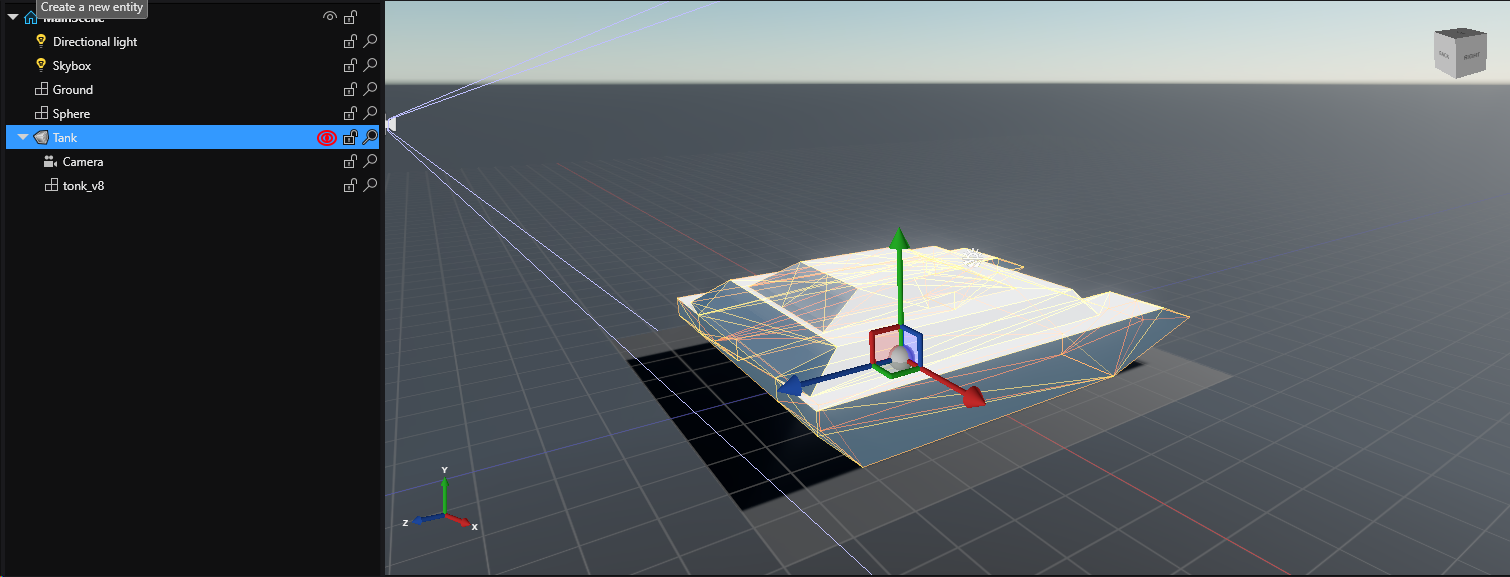
.. a small mockup, where the idea is for any entity that has a child that renders something in the viewport, you have the possibility to show/hide it with a button press in the tree to the side.
I realise this may be a bit more work in something like Xenko where it's all ECS instead of the straight up inheritance hierarchy in something like Godot, but I think a show/hide any given subtree could be quite useful when working in the editor.
Thoughts? 👀
Additional context
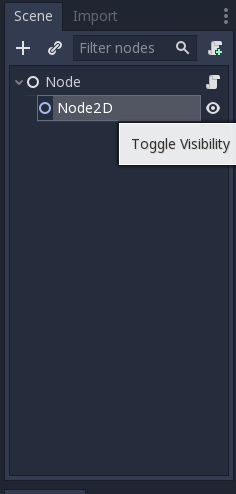
Example of a similar thing in Godot:
Contributor guide
First steps
- Read the whole issue, then the project's contributing guide.
- Comment on the issue to say you are picking it up — it saves two people doing the same work.
- Fork the repository and make your change on a branch.
- Open a pull request that references the issue number.
Research direction
The issue names no files, tests, or entry points. Start by locating the editor's scene tree and entity hierarchy, then determine how show/hide state could apply to an entity and its subtree in the ECS-based editor. Done means an agreed design and an editor control for quickly showing or hiding relevant scene-tree parts.
Written by the indexing model from the issue text.
Assessment
- Tech stack
- csharp
- Domain
- game-dev, tooling
- Issue type
- Feature
- Difficulty
- 5/5
- Estimated time
- Over a week
- Activity status
- Stale
- Clarity
- Needs clarification
- Newbie friendliness
- 25/100