GraphicsCompositor is broken in some cases
Nobody has claimed this yet.
- Dominant language
- C#
- Stars
- 7.8k
- Forks
- 1.2k
- Avg merge
- 2d 17h
- Merged PRs (30d)
- 49
Description
Release Type: Official Release
Version: 3.0.0.6
Platform(s): Windows
Describe the bug
See steps to reproduce and screenshots.
To Reproduce
[Case 1]
-
Create a NewGame project.
-
Open the GraphicsCompositor asset.
-
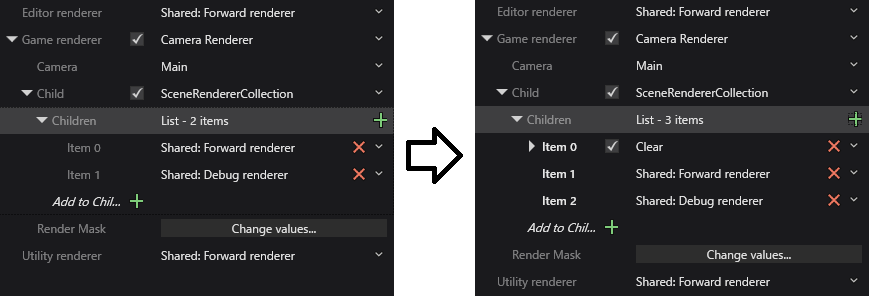
Edit Camera Renderer's Child(SceneRendererCollection).
- Change "Shared: Forward renderer" to "Clear".
- Change "Shared: Debug renderer" to "Shared: Forward renderer"(top forward renderer in dropdownlist).
- Add "Shared: Debug renderer".
-
Save and reload the project.
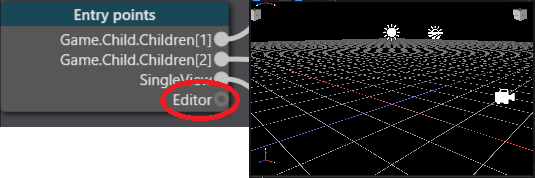
Result: "Editor renderer" is not connected to "Forward renderer".
[Case 2]
-
Create a NewGame project.
-
Open the GraphicsCompositor asset.
-
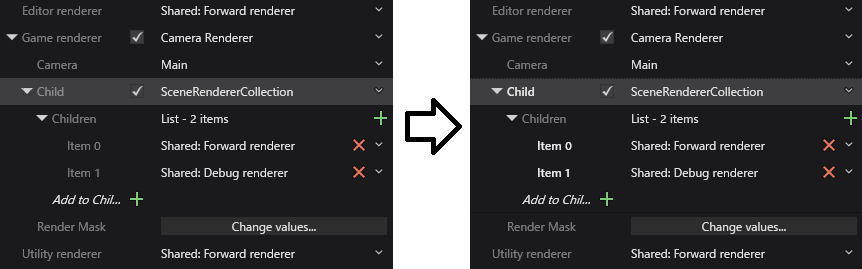
Edit Camera Renderer's Child(SceneRendererCollection).
- Change "SceneRendererCollection" to "None"
- Change "None" to "SceneRendererCollection"
- Add "Shared: Forward renderer"(top forward renderer in dropdownlist).
- Add "Shared: Debug renderer".
-
Save and reload the project.
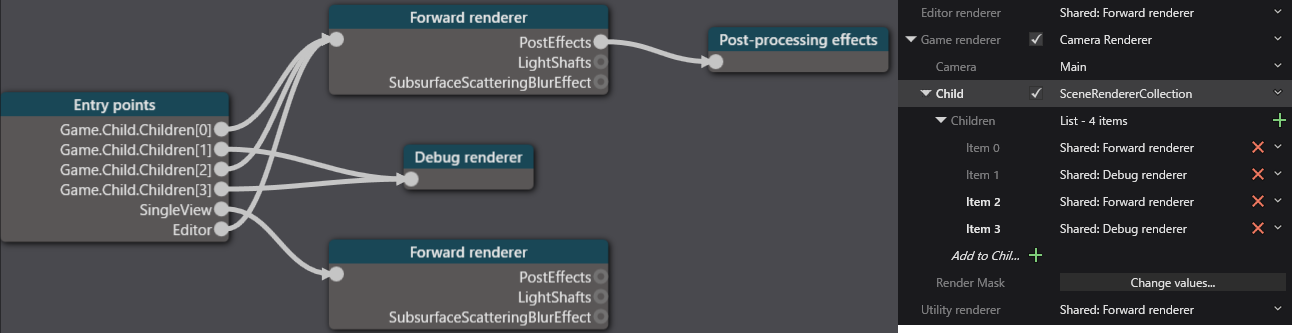
Result: Some renderers are automatically added in SceneRendererCollection.
Expected behavior
GraphicsCompositor is saved and loaded without extra changes.
Screenshots
Case 1, step 3
Case 1, result
Case 2, step 3
Case 2, result
Log and callstacks
Additional context
Windows10 Pro x64(1803)
Visual Studio Community 2017(15.8.8)
Contributor guide
First steps
- Read the whole issue, then the project's contributing guide.
- Comment on the issue to say you are picking it up — it saves two people doing the same work.
- Fork the repository and make your change on a branch.
- Open a pull request that references the issue number.
Research direction
Reproduce both cases in a NewGame project by editing the GraphicsCompositor asset and its Camera Renderer Child(SceneRendererCollection), then saving and reloading. Inspect the GraphicsCompositor and SceneRendererCollection handling involved in persistence; done means renderer connections remain unchanged and no extra renderers are added after reload.
Written by the indexing model from the issue text.
Assessment
- Tech stack
- csharp
- Domain
- computer-graphics, game-dev
- Issue type
- Bug
- Difficulty
- 4/5
- Estimated time
- 3-5 days
- Activity status
- Stale
- Clarity
- Mostly clear
- Newbie friendliness
- 35/100