DebugPhysicsShapes not rendering in layers other than group0+ flickering
Nobody has claimed this yet.
- Dominant language
- C#
- Stars
- 7.8k
- Forks
- 1.2k
- Avg merge
- 2d 17h
- Merged PRs (30d)
- 49
Description
Release Type: Official Release
Version: 4.2.0.2122
Platform(s): Windows
Describe the bug
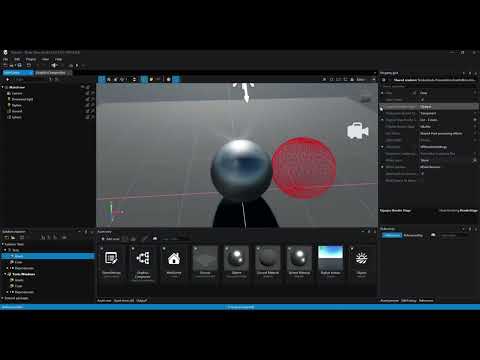
Debug physics wireframe shapes are not being rendered using DebugPhysicsShapes
To Reproduce
Steps to reproduce the behavior:
- Add any type of entity (could be a entity with a existing shpere, for example)
- Add a static collider with atleast 1 shape specified
- Add a DebugPhysicsShapes script into the object or scene
- Press Ctrl+Shift+P to show the colliders. There's nothing being shown.
Flickering:
- Set the render group to 0
- Start the project
- Obvious rendering artifacts.
Expected behavior
Wireframe of the colliders being shown. Graphics not being broken when using group0.
Video
(www.youtube.com/watch?v=-voNclIgNAc)
Additional context
Found while investigating https://github.com/stride3d/stride/issues/395 .
Contributor guide
First steps
- Read the whole issue, then the project's contributing guide.
- Comment on the issue to say you are picking it up — it saves two people doing the same work.
- Fork the repository and make your change on a branch.
- Open a pull request that references the issue number.
Research direction
Reproduce the issue on Windows with Stride 4.2 using DebugPhysicsShapes, comparing render group 0 with higher groups and the Ctrl+Shift+P toggle. Use issue 395 as additional context. Done means collider wireframes render in every relevant group without flickering or other rendering artifacts.
Written by the indexing model from the issue text.
Assessment
- Tech stack
- csharp
- Domain
- computer-graphics, game-dev
- Issue type
- Bug
- Difficulty
- 4/5
- Estimated time
- 3-5 days
- Activity status
- Stale
- Clarity
- Mostly clear
- Newbie friendliness
- 35/100