Mark all assets in folder as RootAsset
Nobody has claimed this yet.
- Dominant language
- C#
- Stars
- 7.8k
- Forks
- 1.2k
- Avg merge
- 2d 17h
- Merged PRs (30d)
- 49
Description
Is your feature request related to a problem? Please describe.
I have a online game where the server informs the client which asset will be used. Ex. "Entity 5 has hair style 7". The client looks at the index of the hair style, finds the matching asset and renders it in the screen.
This means that in my game, most assets are dynamically loaded and not explicitly used in build time. Also, there's a high number of these "dynamic" assets - body types, different races, etc.
Currently, there's no way to quickly (and recursively) add all assets in a directory tree as RootAsset. You have to visit all directories and subdirectories, select all sprites and mark them as RootAsset.
Describe the solution you'd like
On the Stride Game Studio, I'd like to right click an asset directory and have the option to "Mark all assets in folder as RootAsset". This would recursively navigate the directory tree and add all assets to the AssetRoot list.
Describe alternatives you've considered
In addition to the option above, I think it would be interesting to be able to mark directories that are RootAssets by default - meaning, any asset in that directory tree would automatically be considered a RootAsset, without the user explicitly marking them as such.
Additional context
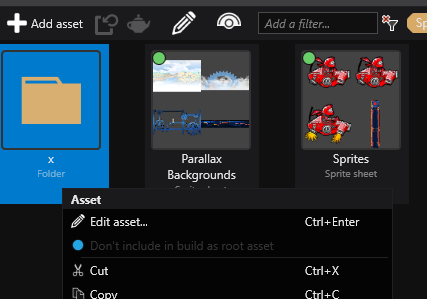
Currently, right clicking a directory the asset view shows a "Don't include in build as root asset", but this option is always disabled and has the same text, regardless if then contents on the folder are included as RootAssets or not.
Contributor guide
First steps
- Read the whole issue, then the project's contributing guide.
- Comment on the issue to say you are picking it up — it saves two people doing the same work.
- Fork the repository and make your change on a branch.
- Open a pull request that references the issue number.
Research direction
Start in the Stride Game Studio asset view and inspect the directory context-menu handling for the existing root-asset option. Trace how asset roots are represented and updated, then verify that the requested action recursively marks the folder contents and that the menu text and enabled state reflect their current status.
Written by the indexing model from the issue text.
Assessment
- Tech stack
- csharp
- Domain
- game-dev, tooling
- Issue type
- Feature
- Difficulty
- 4/5
- Estimated time
- 3-5 days
- Activity status
- Stale
- Clarity
- Mostly clear
- Newbie friendliness
- 35/100