GameStudio Fails to Display Components With Serialization Errors and Cannot Recover from Such Errors
Nobody has claimed this yet.
- Dominant language
- C#
- Stars
- 7.8k
- Forks
- 1.2k
- Avg merge
- 2d 17h
- Merged PRs (30d)
- 49
Description
Release Type: Official Release
Version: 4.0.1.1381-beta
Platform(s): Windows
Describe the bug
- GameStudio fails to show script component that is not serializable.
- GameStudio fails to recover from a script that had properties that couldn't be serialized.
To Reproduce
Steps to reproduce the behavior:
- Create a script (I used StartupScript)
- Add a public property of type
SortedSet<int>, initializing it as an empty set. - Add the script to an entity in GameStudio. This should appear to not work. In my experience, nothing shows up in the studio, but that's a graphical glitch. The component is added, it just can't be displayed.
- Edit the script to remove the sorted set, I also added a new int property so my script would have something in the editor.
- Return to GameStudio and you should see an exception in the output window (attached below).
In my experience, the only way to get GameStudio out of this state was to restart the application.
Expected behavior
- GameStudio should display a script component with serialization errors by adding the component then, instead of displaying properties, just display a warning message such as "Couldn't load asset do to {reason}"
- If GameStudio can't serialize/deserialize a component when the type changes, there should be some user interaction to allow the user to dump any old attempt at serialization and start over fresh
Screenshots
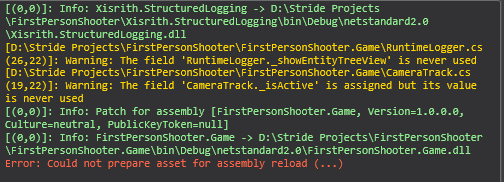
Log and callstacks
exception.txt
Additional context
Add any other context about the problem here.
Contributor guide
First steps
- Read the whole issue, then the project's contributing guide.
- Comment on the issue to say you are picking it up — it saves two people doing the same work.
- Fork the repository and make your change on a branch.
- Open a pull request that references the issue number.
Research direction
Start by reproducing the issue in GameStudio using the SortedSet property steps, then review the attached exception and output window details. The fix is complete when components with serialization errors remain visible with a warning and users can discard invalid serialized data and recover without restarting the application.
Written by the indexing model from the issue text.
Assessment
- Tech stack
- csharp
- Domain
- game-dev, tooling
- Issue type
- Bug
- Difficulty
- 4/5
- Estimated time
- 3-5 days
- Activity status
- Stale
- Clarity
- Mostly clear
- Newbie friendliness
- 40/100