Stencil Component attributes are missing typing info in Angular
Nobody has claimed this yet.
Assessment
- Difficulty
- 4/5
- Estimated time
- 3-5 days
- Newbie friendliness
- 45/100
- Issue type
- Bug
- Clarity
- Mostly clear
- Activity status
- Stale
- Tech stack
- angular, typescript
- Domain
- frontend
Research direction
Reproduce the issue in a fresh Angular app using the Angular output target with DuetDS or Ionic, then inspect the generated Angular component bindings and their component interfaces. Compare the generated typings for properties such as variation, fill, or iconPlacement with a native Angular @Input; done means Angular IntelliSense exposes the expected property types and the existing reproduction behaves correctly.
Written by the indexing model from the issue text.
Description
Stencil version:
@stencil/core@2.5.2
I'm submitting a:
[x] bug report
[ ] feature request
[ ] support request => Please do not submit support requests here, use one of these channels: https://stencil-worldwide.herokuapp.com/ or https://forum.ionicframework.com/
Current behavior:
After building my components with Stencil and generating an Angular version of it using the output target, I can access my component and its attributes. However, my attributes don't have any typing information in Angular.
After seeing this in my own component library, I tried to do the same with some public ones built in Stencil: DuetDS and Ionic. I got the exact same results.
Expected behavior:
Intellisense/Autocompletion would tell me what type the attribute expects (at least string), just like it would for an Angular component which has an @Input() defined.
Steps to reproduce:
The easiest way would be to:
- create a new Angular application
- add DuetDS (
npm install @duetds/angular) and/or Ionic (ng add @ionic/angular) - for DuetDS: add
DuetComponentsto theimports: []array inapp.module.ts - go to
app.component.htmland at the button write:- DuetDS:
<duet-button [variation]=""></duet-button>, and hover over[variation] - Ionic:
<ion-button [fill]=""></ion-button>and hover over[fill]
- DuetDS:
Both libraries do not display the values that the attribute accepts. You can find the attributes by following the type definitions in both libraries.
Related code:
If my component has this @Prop:
@Prop() iconPlacement: 'left' | 'right = 'left';
Inside a fresh Angular app (v12), I get this as typing info:

In contrast: if we generate an Angular component and give it the following code:
@Input() placement: 'left' | 'right' = 'left';
This is what Intellisense/Autocompletion would display:

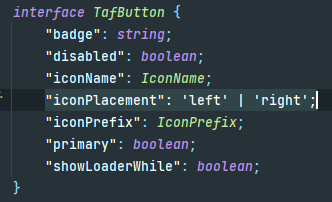
Following the type definitions (I work in IntelliJ, so I follow it using Ctrl+Click), you can see that the definitions are present on the component interface:
Other information:
- Dominant language
- TypeScript
- Stars
- 13.1k
- Forks
- 855
- Avg merge
- 4h 7m
- Merged PRs (30d)
- 44
Contributor guide
First steps
- Read the whole issue, then the project's contributing guide.
- Comment on the issue to say you are picking it up — it saves two people doing the same work.
- Fork the repository and make your change on a branch.
- Open a pull request that references the issue number.
More from stenciljs/core
-
Stencil v5
Difficulty 2/5 1-3 hours Newbie friendliness 68/100
-
Stencil v5
Difficulty 4/5 3-5 days Newbie friendliness 55/100
-
Bug: Validated Stencil v5
Difficulty 4/5 3-5 days Newbie friendliness 48/100
-
Feature: Want this? Upvote it!
Difficulty 5/5 Over a week Newbie friendliness 25/100
-
Feature: Want this? Upvote it!
Difficulty 4/5 3-5 days Newbie friendliness 48/100
Similar issues
-
clawsweeper:fix-shape-clear clawsweeper:queueable-fix clawsweeper:source-repro impact:ux-friction issue-rating: 🦞 diamond lobster no-stale P3
Difficulty 2/5 1-3 hours Newbie friendliness 78/100
-
community first-timers-only good first issue hacktoberfest help wanted low hanging fruit up-for-grabs
Difficulty 1/5 Under an hour Newbie friendliness 76/100
-
code-quality refactoring
Difficulty 2/5 1-3 hours Newbie friendliness 84/100
github/gh-aw-firewall#8816 ·
-
integration:quickjs org:external priority:backlog topic:code-interpreter topic:middleware type:feature
Difficulty 2/5 1-3 hours Newbie friendliness 74/100
langchain-ai/deepagents#6450 ·
-
Difficulty 1/5 Under an hour Newbie friendliness 88/100
vercel/react-tweet#225 ·