sqlitebrowser / sqlitebrowser/sqlitebrowser
[Feature Request] - Add Glyph To Denote Field Is ROWID Alias
Nobody has claimed this yet.
- Dominant language
- C++
- Stars
- 24.6k
- Forks
- 2.4k
- Avg merge
- 3d 49m
- Merged PRs (30d)
- 3
Description

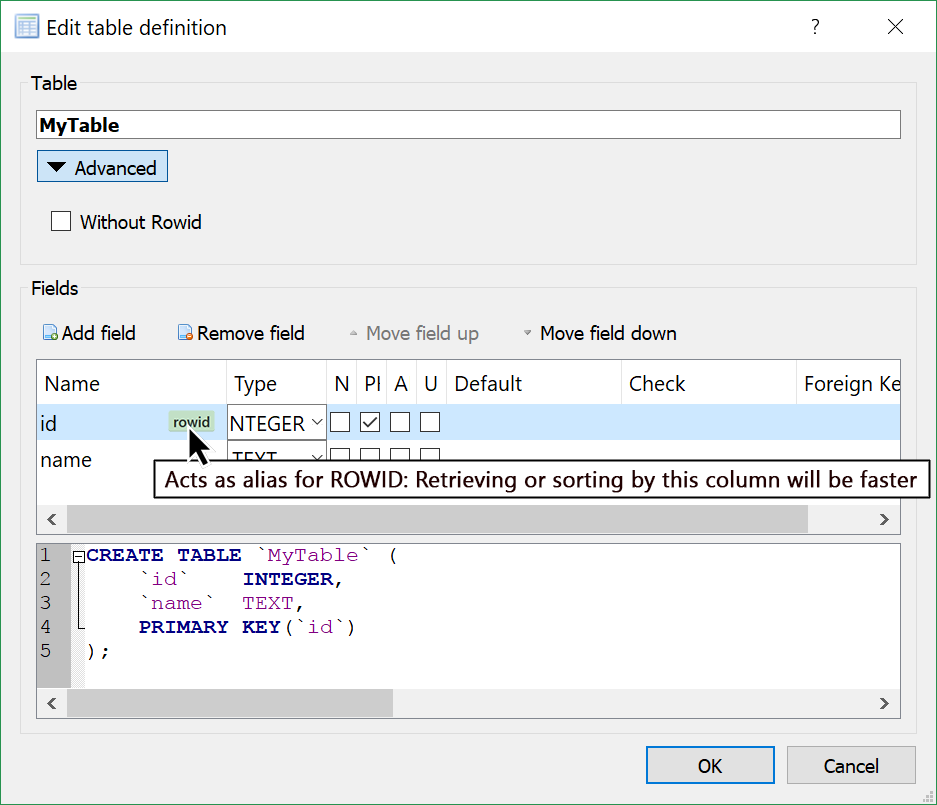
SQLite is very particular about when a column is going to be an alias for ROWID. It's easy enough if work out if you stumble upon the right page of documentation, but for the casual user, who might not fully appreciate ROWID aliasing, it would be helpful to see a ROWID tag appear and disappear when they click on things, leading them to ask why, and allowing them to get some insight into the otherwise opaque workings of the database.
The user would see the "ROW ID" tag disappear in certain circumstances, for example, if the type is changed from Integer to BigInt (two types which are synonymous everywhere except in the special case of the magical INTEGER PRIMARY KEY — something not mentioned in SQLite's datatype documention, not that I'm bitter). Also AUTOINCREMENT should be grayed out when the column is not a ROW ID. It would helpful just to have a simple tag like this to help show the user what's going on.
If it's too intrusive, perhaps the tag could only be displayed when "Advanced" is clicked, but I'll leave details for the devs. I'm no graphic designer.
Just putting it out there.
Cheers
I'm opening this issue because:
- DB4S is crashing
- DB4S has a bug
- DB4S needs a feature
- DB4S has another problem
I'm using DB4S on:
- Windows: ( version: ___ )
- Linux: ( distro: ___ )
- Mac OS: ( version: ___ )
- Other: ___
I'm using DB4S version:
- 3.10.1
- 3.10.0
- 3.9.1
- Other: ___
I have also:
- Tried out the latest nightly version: https://github.com/sqlitebrowser/sqlitebrowser#nightly-builds
- Searched for an existing similar issue: https://github.com/sqlitebrowser/sqlitebrowser/issues?utf8=%E2%9C%93&q=is%3Aissue%20
Contributor guide
No contributing guide indexed for this repository
First steps
- Read the whole issue, then the project's contributing guide.
- Comment on the issue to say you are picking it up — it saves two people doing the same work.
- Fork the repository and make your change on a branch.
- Open a pull request that references the issue number.
Research direction
Start with the schema or table-design UI described by the screenshots and review SQLite's ROWID aliasing documentation linked in the issue. Determine where column types, PRIMARY KEY, and AUTOINCREMENT state are presented. Done means the interface visibly identifies ROWID aliases, updates the tag when the relevant type changes, and handles AUTOINCREMENT appropriately.
Written by the indexing model from the issue text.
Assessment
- Tech stack
- cpp, sqlite
- Domain
- database, desktop
- Issue type
- Feature
- Difficulty
- 4/5
- Estimated time
- 3-5 days
- Activity status
- Stale
- Clarity
- Mostly clear
- Newbie friendliness
- 38/100