software-mansion / software-mansion/react-native-svg
The "childs" elements of <Svg> overlaps the "root" element
Nobody has claimed this yet.
- Dominant language
- TypeScript
- Stars
- 8k
- Forks
- 1.2k
- Avg merge
- 10d 9h
- Merged PRs (30d)
- 2
Description
Bug
When we put any element(Rect, Circle, Symbol) and set the position "off-svg", they overlaps the <Svg> limits and shapes.
Unexpected behavior
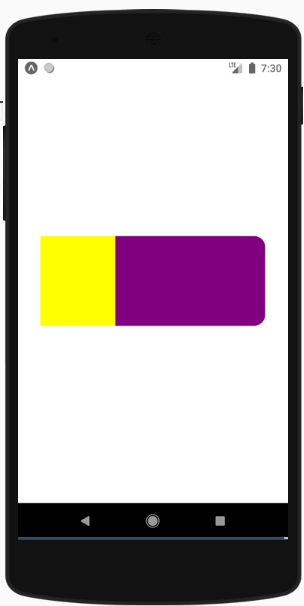
The <Svg> element has borderRadius, but the "yellow" <Rect> overlaps his shape.
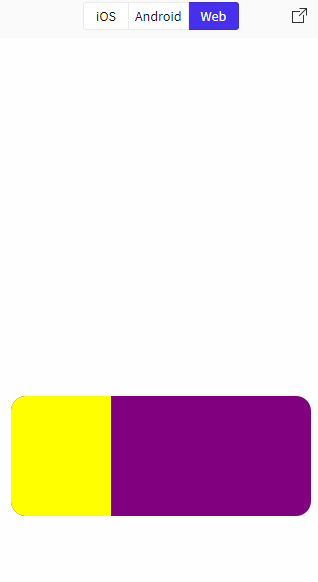
This is different from what happens in the browser:

import * as React from 'react';
import { View, StyleSheet } from 'react-native';
import { Svg, Rect } from 'react-native-svg';

export default function App() {
  return (
    <View style={styles.container}>
      <Svg width="300" height="120" style={{borderRadius:15, backgroundColor: 'purple'}} viewBox="0 0 300 120">
      <Rect x="0" y="0" width="100" height="120" fill="yellow"/>
    </Svg>
    </View>
  );
}

const styles = StyleSheet.create({
  container: {
    flex: 1,
    alignItems: 'center',
    justifyContent: 'center'
  }
});
https://snack.expo.io/@igao92/svg-overlapping
Environment info
React native info output:
 System:
    OS: Windows 10 10.0.18362
    CPU: (8) x64 Intel(R) Core(TM) i7-7700K CPU @ 4.20GHz
    Memory: 7.57 GB / 15.94 GB
  Binaries:
    Node: 13.12.0 - C:\Program Files\nodejs\node.EXE
    Yarn: 1.21.1 - C:\Program Files (x86)\Yarn\bin\yarn.CMD
    npm: 6.14.4 - C:\Program Files\nodejs\npm.CMD
    Watchman: Not Found
  SDKs:
    Android SDK: Not Found
  IDEs:
    Android Studio: Version  3.6.0.0 AI-192.7142.36.36.6308749
  Languages:
    Python: 2.7.17 - C:\Python27\python.EXE
  npmPackages:
    @react-native-community/cli: Not Found
    react: 16.11.0 => 16.11.0
    react-native: 0.62.0 => 0.62.0
  npmGlobalPackages:
    *react-native*: Not Found
Library version: ^12.0.3
Steps To Reproduce
- Import the react-native-svg to file
- Create an
<Svg>component - Style it with
borderRadius:15, for example - Put any element inside
<Svg>(Circle, Rect, Polygon, etc...) - Set it "off-svg" component, with
styleor coordinates props (x,y) - npx react-native run-android
Describe what you expected to happen:
- The elements inside the
<Svg>must respect dimensions and shapes(like border radius).
Contributor guide
First steps
- Read the whole issue, then the project's contributing guide.
- Comment on the issue to say you are picking it up — it saves two people doing the same work.
- Fork the repository and make your change on a branch.
- Open a pull request that references the issue number.
Research direction
Start with the provided Expo reproduction and run the example on Android to observe how an off-SVG Rect interacts with an Svg using borderRadius. Compare the Android result with the linked browser example, then trace the relevant react-native-svg rendering path. Done means child shapes respect the Svg dimensions and rounded boundary.
Written by the indexing model from the issue text.
Assessment
- Tech stack
- react-native
- Domain
- mobile
- Issue type
- Bug
- Difficulty
- 3/5
- Estimated time
- 1-2 days
- Activity status
- Stale
- Clarity
- Mostly clear
- Newbie friendliness
- 45/100