sequelize / sequelize/sequelize
NULL is coerced to empty string on Instance.update() for DATE field
Nobody has claimed this yet.
- Dominant language
- TypeScript
- Stars
- 30.4k
- Forks
- 4.3k
- Avg merge
- 1d 6h
- Merged PRs (30d)
- 68
Description
What you are doing?
Trying to set a field to NULL on update().
User.findOne({ where: { confirmed_token: confirmToken } })
  .then((obj) => {
    const user = obj;

    return user.update({
      confirmed_expires: null,
    }, { fields: ['confirmed_expires'] });
  })
What do you expect to happen?
I would like the value to be updated to NULL
What is actually happening?
The value of confirmed_expires is being set to an empty string when passed to update and then somewhere downstream being set to Invalid Date in the SQL query before entering the DB.
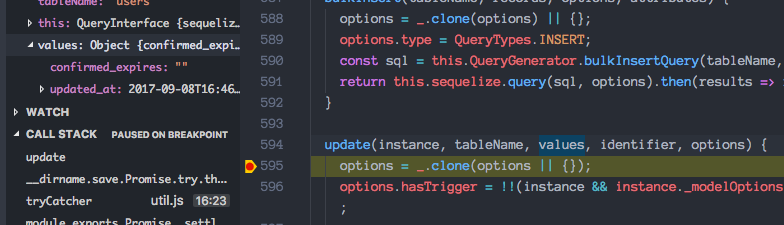
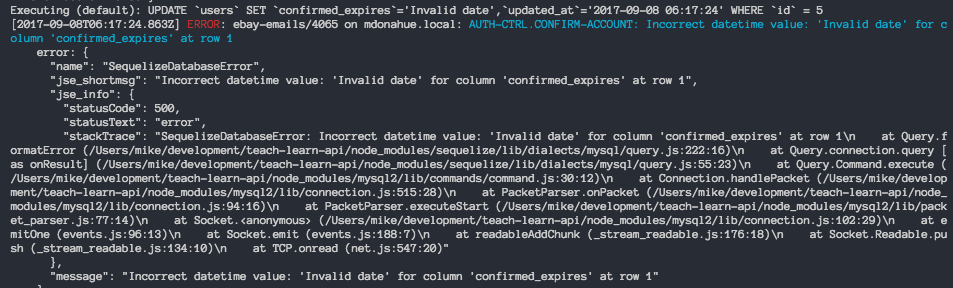
Dialect: mysql
Database version: Ver 14.14 Distrib 5.7.18, for osx10.12
Sequelize version: 4.7.5
Additional Context:
This works just fine. Value is set to NULL as I would expect.
user.confirmed_expires = null;
user.save(['confirmed_expires']);
This does NOT work.
user.confirmed_expires = null;
user.save({fields: ['confirmed_expires']});
My User Model:
const User = sequelize.define('user', {
  confirmed_expires: {
    type: DataTypes.DATE,
    allowNull: true,
    defaultValue: null,
    validate: {
      isDate: true,
      suspicious: (value) => {
        v.suspicious(value);
      },
    },
  },
}, {
  underscored: true,
  deletedAt: 'deleted_at',
  paranoid: true,
});

// Methods
User.prototype.hashPassword = password => bcrypt.hash(password, 10).then(hash => hash);

User.prototype.comparePassword = function comparePassword(userPassword) {
  return bcrypt.compare(userPassword, this.password).then(isMatch => isMatch);
};

module.exports = User;
The problem seems to be that a DATE field, even with allowNull: true and defaultValue: null set, does not accept a null value.
Contributor guide
First steps
- Read the whole issue, then the project's contributing guide.
- Comment on the issue to say you are picking it up — it saves two people doing the same work.
- Fork the repository and make your change on a branch.
- Open a pull request that references the issue number.
Research direction
Start at Instance.update() and the DATE field handling described in the report, comparing it with the working user.save(['confirmed_expires']) path. Reproduce the MySQL case with confirmed_expires set to null and verify that the generated SQL preserves NULL rather than converting it to an empty or invalid date.
Written by the indexing model from the issue text.
Assessment
- Tech stack
- javascript, mysql
- Domain
- database
- Issue type
- Bug
- Difficulty
- 4/5
- Estimated time
- 3-5 days
- Activity status
- Stale
- Clarity
- Mostly clear
- Newbie friendliness
- 38/100