selfteaching / selfteaching/selfteaching-python-camp
Day03 关于交互模式python interactive的一点理解
Nobody has claimed this yet.
- Dominant language
- Python
- Stars
- 151
- Forks
- 875
- PR merge metrics
- No merged PRs in 30d
Description
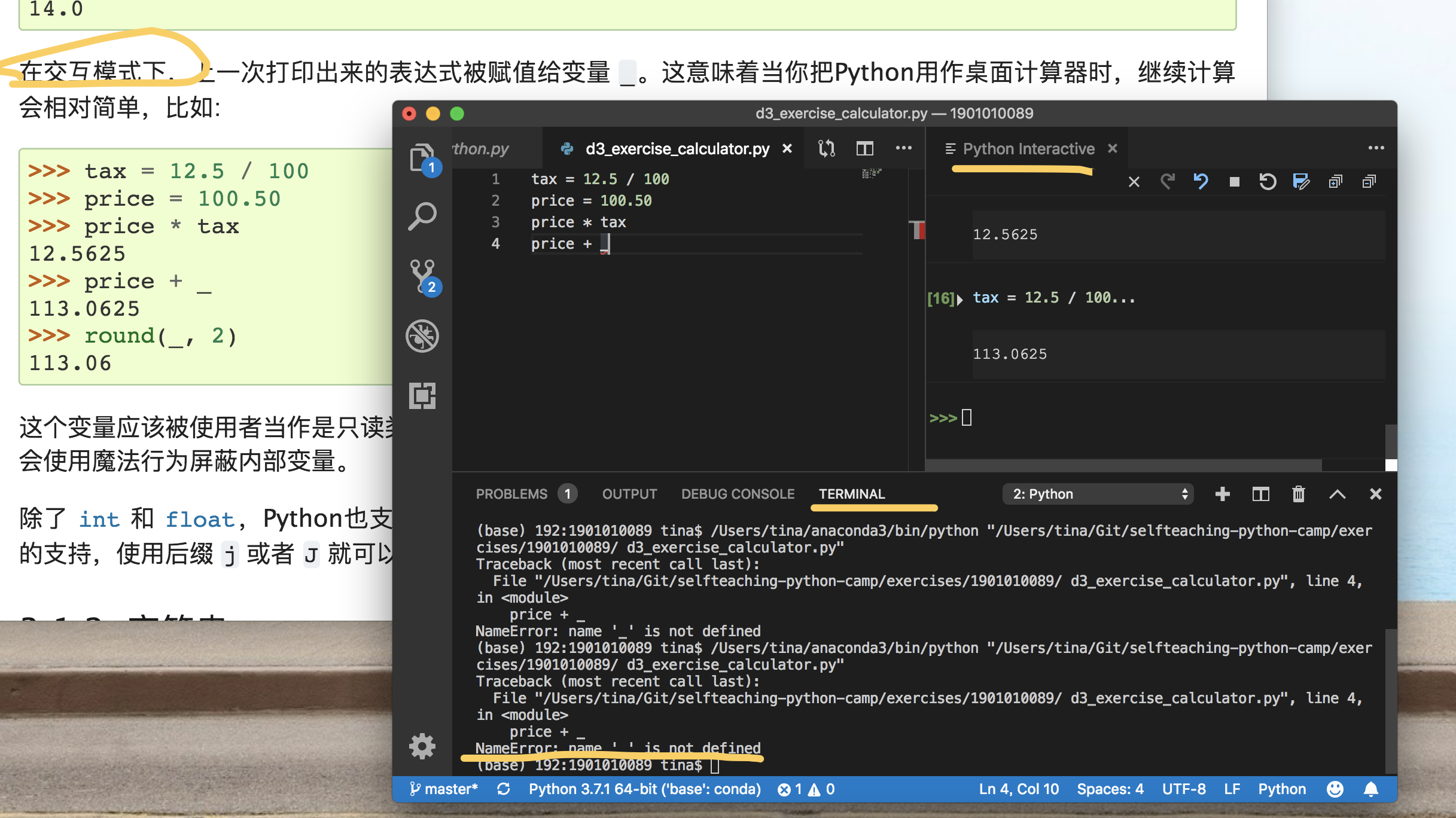
day3的参考资料是python官方教程的第3节。
这个章节介绍的是python可实现的一些简单计算,包括对数字、字符串和列表进行的操作。整个章节的运行是在 交互模式 下进行的。
什么是交互模式?怎么进入交互模式?这里说一下我的大概理解。
官方文件是有对交互模式的解释的,但是目前不得不承认我看不懂。搜索之后我认为交互模式就像一个虚拟的环境一样,在这里面可以随时执行每一条你刚刚输入的语句,看看效果,而终端每次都是从头到尾的运行,于是就会出现图片中显示的终端和交互模式执行结果不一样的画面。
关于如何进入交互模式在不同的操作系统下方法不一样,我说一下我的方法:
在Visual Studio Code里面输入代码后shift+enter直接执行当前一行语句会打开一个小窗口python interactive,在这里面就显示的是这一行的执行结果。也可以全选然后再shift+enter,这样就从头到尾开始执行。
另外,有的语句在python interactive可执行在terminal会报错,有的相反,这个问题只能留待后面边学边研究。
Contributor guide
No contributing guide indexed for this repository
First steps
- Read the whole issue, then the project's contributing guide.
- Comment on the issue to say you are picking it up — it saves two people doing the same work.
- Fork the repository and make your change on a branch.
- Open a pull request that references the issue number.
Research direction
Start by reading the issue alongside section 3 of the official Python tutorial and the described VS Code Python Interactive workflow. No repository file or test is identified, and the issue does not specify a concrete documentation change; completion would require defining the intended clarification and where it should be added.
Written by the indexing model from the issue text.
Assessment
- Tech stack
- python, vscode
- Domain
- content, documentation
- Issue type
- Documentation
- Difficulty
- 2/5
- Estimated time
- 1-3 hours
- Activity status
- Stale
- Clarity
- Needs clarification
- Newbie friendliness
- 25/100