selfteaching / selfteaching/selfteaching-python-camp
Day11 以网易126邮箱为例 分享如何设置邮箱SMTP以及授权码
Open
Nobody has claimed this yet.
学习心得分享
- Dominant language
- Python
- Stars
- 151
- Forks
- 875
- PR merge metrics
- No merged PRs in 30d
Description
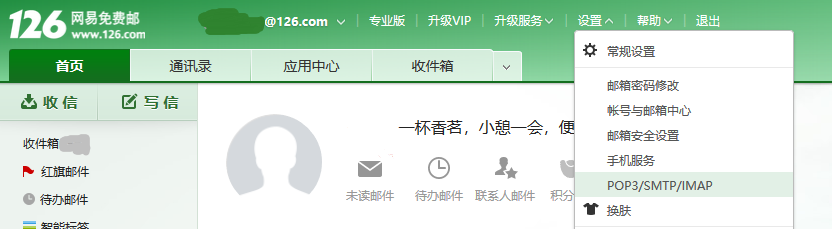
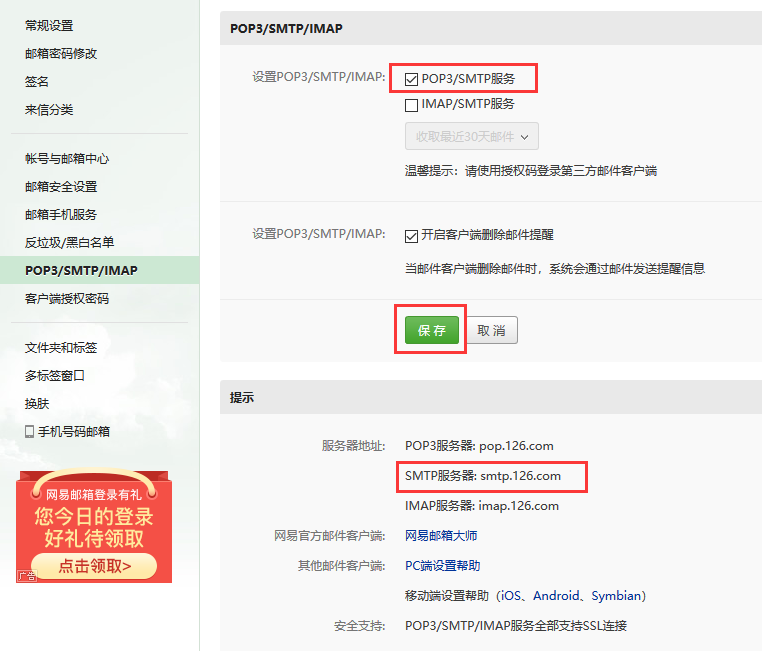
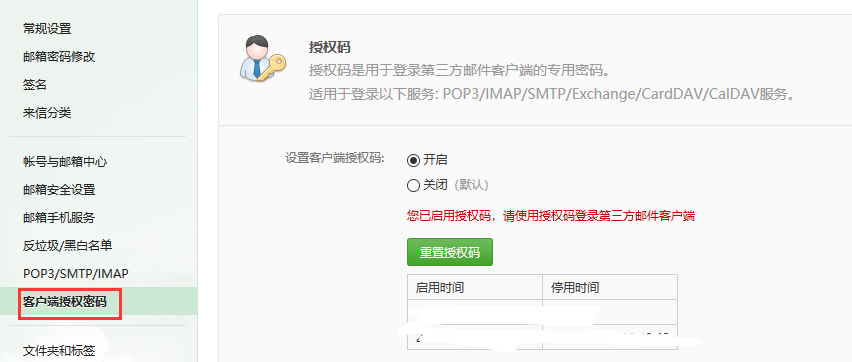
Contributor guide
No contributing guide indexed for this repository
First steps
- Read the whole issue, then the project's contributing guide.
- Comment on the issue to say you are picking it up — it saves two people doing the same work.
- Fork the repository and make your change on a branch.
- Open a pull request that references the issue number.
Research direction
No repository file, test, or entry point is named. Start by checking where the Day11 learning materials are stored and whether this issue is intended to add the SMTP guide. Done means placing the guide in the project's expected documentation location while preserving its setup steps and screenshots.
Written by the indexing model from the issue text.
Assessment
- Domain
- documentation
- Issue type
- Documentation
- Difficulty
- 1/5
- Estimated time
- Under an hour
- Activity status
- Stale
- Clarity
- Needs clarification
- Newbie friendliness
- 35/100