n00b observations / questions :)
Nobody has claimed this yet.
Assessment
- Difficulty
- 2/5
- Estimated time
- 1-3 hours
- Newbie friendliness
- 25/100
- Issue type
- Documentation
- Clarity
- Needs clarification
- Activity status
- Stale
- Tech stack
- aws, node.js
- Domain
- cloud, documentation
Research direction
No source file or test is named. Review the installation documentation and its AWS prerequisites, including the required AWS software and S3 access configuration; the documentation is done when a new user can identify these requirements and understand where to resolve permission errors.
Written by the indexing model from the issue text.
Description
Let me preface this by saying, I have never used Node.js. I was able to fiddle around to get it installed and now have PublicFolder running. I'm really close to having it work because I do have it reading my local watchFolder:
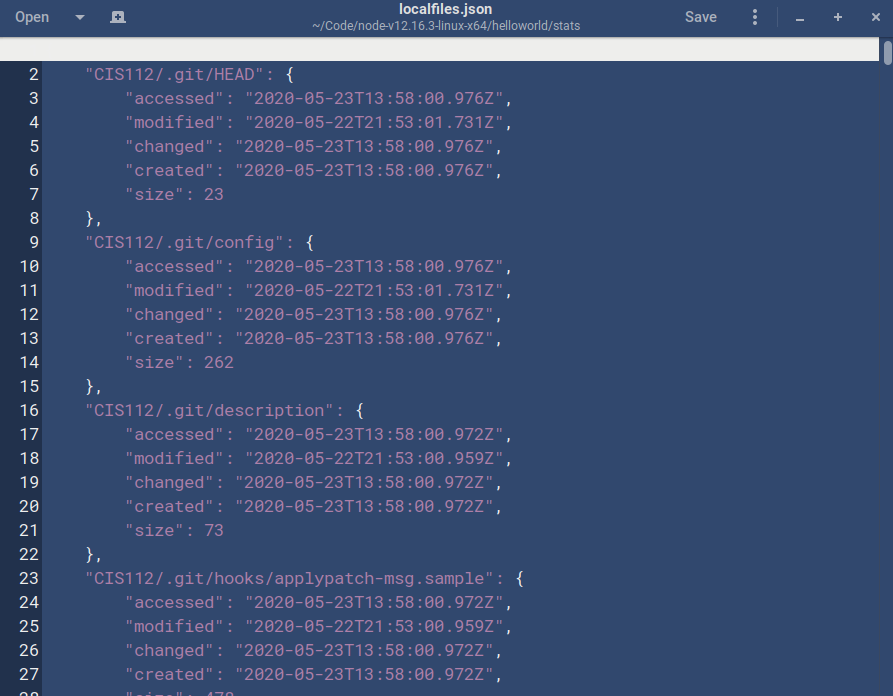
One thing that I didn't realize from the documentation is that aside from having Node.js installed, you also have to install the AWS software. When I read "the AWS software, which is part of publicFolder" I mistook "part of publicFolder" to mean it's already in there. ;)
Anyway, it was a quick "apt install" for me on Linux once I realized this.
My only issue now (I think) at this point is app/user access to my S3 bucket. I did create a user and assigned it S3 permissions. Got my access key and secret key. I then used the "aws configure" command to set these which created a configuration file in .aws, so all good on that. But getting access denied when running helloworld.js with node:
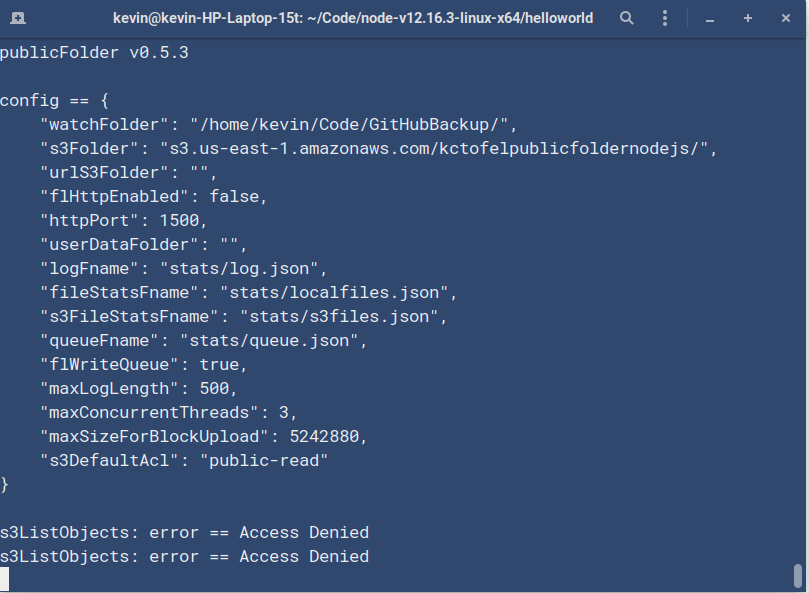
I totally get that this is an AWS permissions issue I'm running into, which is beyond the scope of publicFolder; I'll keep tinkering in the AWS web console because I think that's where I have to fix this or attach this user to my bucket somehow. Cheers!
- Dominant language
- JavaScript
- Stars
- 35
- Forks
- 3
- PR merge metrics
- No merged PRs in 30d
Contributor guide
No contributing guide indexed for this repository
First steps
- Read the whole issue, then the project's contributing guide.
- Comment on the issue to say you are picking it up — it saves two people doing the same work.
- Fork the repository and make your change on a branch.
- Open a pull request that references the issue number.
More from scripting/publicfolder
-
Difficulty 4/5 3-5 days Newbie friendliness 30/100
scripting/publicfolder#6 · 9 comments ·
-
Difficulty 5/5 Over a week Newbie friendliness 15/100
scripting/publicfolder#3 · 6 comments · 2 reactions ·
All issues in scripting/publicfolder
Similar issues
-
code-quality refactoring
Difficulty 2/5 1-3 hours Newbie friendliness 84/100
github/gh-aw-firewall#8816 ·
-
integration:quickjs org:external priority:backlog topic:code-interpreter topic:middleware type:feature
Difficulty 2/5 1-3 hours Newbie friendliness 74/100
langchain-ai/deepagents#6450 ·
-
optimization optimization:agents-md-curator
Difficulty 2/5 1-3 hours Newbie friendliness 86/100
githubnext/gh-aw-cao#13143 ·
-
status: needs triage
Difficulty 2/5 1-3 hours Newbie friendliness 88/100
-
Difficulty 2/5 1-3 hours Newbie friendliness 88/100