scratchfoundation / scratchfoundation/scratch-blocks
Sensing Of block can show "backdrop # of sprite" in the blocks pallet
Nobody has claimed this yet.
- Dominant language
- JavaScript
- Stars
- 2.8k
- Forks
- 1.6k
- Avg merge
- 4h 51m
- Merged PRs (30d)
- 12
Description
Expected Behavior
the sensing of block should only be able to show backdrop #s of the stage and costume #s of sprites.
Actual Behavior
In the blocks pallet, when the stage is selected in the right hand dropdown of the sensing "of" block you can set the left hand dropdown to backdrop #. Then, if you change the right hand dropdown to a sprite it does not update the left side dropdown.

Similarly, you can select a sprite in the right hand dropdown and then set the left hand dropdown to costume # and then switch the right hand menu to the stage. This shows "costume # of stage."

You can also get other mismatches like this, like x position of stage, etc.
You can then drag these incorrect blocks into the workspace.
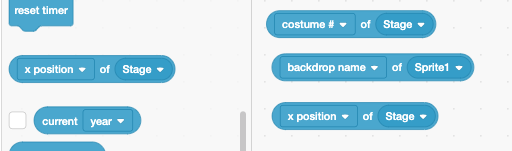
It's worth mentioning that if you change the right side of that block while it's on the workspace the left side updates to an acceptable option immediately. That is the correct behavior.
Steps to Reproduce
Create a project
Add a second sprite to the project (doesn't matter how)
scroll the blocks pallet to the sensing category
Set the right side of the "_ of " block to the stage
set the left side of the " of " block to say "backdrop #
set the right side of the " of _" block to the other sprite
note: it doesn't update the block so it shows legitimate options
drag the block onto the workspace
note: it appears on the workspace
You can set these blocks in the workspace to a number of incorrect versions of the blocks
Operating System and Browser
Mac Chrome
Contributor guide
First steps
- Read the whole issue, then the project's contributing guide.
- Comment on the issue to say you are picking it up — it saves two people doing the same work.
- Fork the repository and make your change on a branch.
- Open a pull request that references the issue number.
Research direction
Start with the sensing "of" block in the blocks palette and compare its dropdown behavior with the same block on the workspace. Reproduce the stage/sprite and backdrop/costume mismatches described above; done means the palette block only offers valid combinations and updates when the selected target changes.
Written by the indexing model from the issue text.
Assessment
- Tech stack
- javascript
- Domain
- frontend
- Issue type
- Bug
- Difficulty
- 3/5
- Estimated time
- 1-2 days
- Activity status
- Stale
- Clarity
- Clearly specified
- Newbie friendliness
- 35/100