rust-lang / rust-lang/rust-analyzer
VSCode Side panel proposal (along with required LSP extension)
Nobody has claimed this yet.
- Dominant language
- Rust
- Stars
- 16.9k
- Forks
- 2.2k
- Avg merge
- 1d 12h
- Merged PRs (30d)
- 72
Description
@vsrs in https://github.com/rust-analyzer/rust-analyzer/pull/4222#discussion_r418934113
I've been thinking about something like this (rough RA Side Panel extension sketch with druid crate as an example):If you agree that the rust-analyzer may(should?) have such a feature I'll open an issue for design details discussion.
@matklad in https://github.com/rust-analyzer/rust-analyzer/pull/4222#discussion_r418934578
Yes, I do think we need something like this. I am not sure if we needModules(they are sufficiently 1-to-1 with the file system structure), but dependencies and crates structure would be very useful.I have certain doubts about maintenance, as this seems to be only a nice-to-have feature, but it requires some custom client-side code. But it probably won't be too bad.

UI/UX part
A side panel with 3 sections: Targets, Dependencies, and Modules.
I think Modules pane might be useful, as it can show how modules tree changes on different cfg conditions (target_os=.., feature=.., etc.). Personally, I use cargo modules a lot just to see what I'll get on Windows and what on Mac with different features enabled.
For all panes we can borrow the approach used in the vscode-cmake-tools extension:
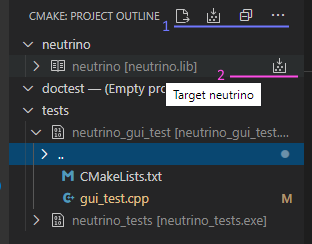
A pane has an always visible pane toolbar 1 and each treeview item optionally has its own hover toolbar 2
Targets pane
There can be two target kinds: Build Target and Runnable Target. Obviously, any Runnable Target is also a Build Target. The only possible nonrunnable targets are libraries and example libraries without unit tests. All other targets are runnable: unit test, unit test module, any library with unit tests, all binaries, integration tests, and benches.
Any Build Target has check, build, clean commands in the hover toolbar. A Runnable Target additionally has run and debug commands.
The targets pane itself has check all, build all, clean all, and refresh in the pane toolbar.
If a workspace has multiple crates that each crate gets its own root node with unit tests\examples\etc. items as child nodes. If there is only one child node such a hierarchy should be collapsed.
Dependencies pane
Nothing special here, just a tree of the dependencies with version or path.
Pane toolbar has flatten, update, and refresh commands.
flatten switches the view to a list, sorted by name. It'll help visually identify similar deps with a different version:
- bitflags 1.2.1
- bitflags 1.1.0
We can also mark such deps with a red icon, for example. Unfortunately, tree decoration API is private (see https://github.com/microsoft/vscode/issues/54938) and we can not do more at the moment.
update runs cargo update or similar command, refresh requests the dependencies from the server once again.
It'd be nice to mark unused dependencies, have add and remove commands, etc. It requires featured cargo.toml parser\writer, and I did not find something similar in the sources. So, not in the first version.
Modules pane
A modules tree with visibility and cfg information.
Pane toolbar has a filter: features list. Looks like it will be useful only with rust-analyzer.cargoFeatures.allFeatures option enabled.
Implementation details
Where to get project structure
rust-analyzer already has all information about targets and dependencies: ra_project_model::ProjectWorkspace . I think we can just add to the ProjectWorkspace two new methods to_targets and dependencies.
Cargo variant implementation is almost obvious.
Json (rust-project.json based) one is a bit trickier. But the following heuristics should be sufficient:
- any crate from JsonProject::crates with
lib.rsin the Crate::root_module is a library (with possible unit test in it), all other - binaries. - compilation artifact name - always the crate root module name for binaries and
lib<N>for libraries. Or if the root_module matches the pattern ".../<project_name>/src/lib.rs" we can get project_name from it.
How to find all modules and tests in a crate
I need some help here. I'm not familiar enough with the sources\architecture yet.
Existing code changes
Now there is a Runnable concept: TS client part and server part
interface Runnable {
    range: lc.Range;
    label: string;
    bin: string;
    args: Vec<string>;
    extraArgs: Vec<string>;
    env: FxHashMap<string, string>;
    cwd: Option<string>;
}
It looks very close to the abovementioned Runnable Target. But there are a few problems:
- I do not like the mix of source information and shell command configuration.
Runnablemay also be debugged and in this case, requires completely different args and bin values. Runnableis a per-file object. WhileRunnable Targetshould be available globally.
So I want to replace it with
interface Target {
    /** Globally unique id */
    unique_id: number;

    /** Location adds DocumentUri to the Range.
    *   for a library target location.range whould be empty
    */
    location: lc.Location;

    /** A human readable name for this target. */
    displayName: string;

    /** For the Targets treeview */
    parent?: number;

    /* Lib, Test, Example, etc. */
    kind: TargetKind;

    /* Any runnable is also a debuggable */
    runnable: boolean;

    // maybe some more fields,
    // but definitely not a cargo args
}
Next section explains how to use such Target
LSP extension
I've found build-server-protocol, but at a glance, the protocol does not look suitable for the Rust compilation model. Also, it's only a draft and not widely supported. To my mind, it makes little to no sense trying to implement it. Please correct me if I'm wrong.
Instead, I propose to add a few methods to the rust-analyzer
Sent from the client to the server:
-
rust-analyzer/targets, optionally gets RunnablesParams as a param.If the param exists, returns all runnables for a selection (existing behavior), if not returns all known targets.
-
rust-analyzer/queryTargetCommand
params:QueryTargetParams
result:ShellCommand[]interface QueryTargetParams { queryKind: 'check' | 'build' | 'clean' | 'run'; targetId: number; } interface ShellCommand { bin: string; args: Vec<string>; env: FxHashMap<string, string>; cwd: Option<string>; }The client knows nothing about project structure, whether it cargo.toml based or rust-project.json based. It just asks the server for a shell command to execute. The server, on the other hand, knows the concrete bin\args values, but do not run any process by itself.
-
rust-analyzer/queryDebugExecutable
params:number// targetId
result:DebugConfigurationinterface DebugConfiguration extends ShellCommand { sourceMap: FxHashMap<string, string>; }This is the most tricky method because in case of cargo project the server has to run cargo to get the real executable file name. It might take some time, produce some valuable output (errors), etc. So, the server might send several progress (LSP
$/progress) notifications with stderr data before the actual response. -
rust-analyzer/dependenciesandrust-analyzer/modules
I did not think a lot about these methods. It seems that they should be pretty obvious and anyway I want to start with targets first.
Sent from the server to the client:
rust-analyzer/targetsChangedrust-analyzer/dependenciesChangedrust-analyzer/modulesChanged
Self-explanatory. If the server detects that something has changed, it notifies the client.
That's it for the start. Please share what you think.
Thanks.
Contributor guide
First steps
- Read the whole issue, then the project's contributing guide.
- Comment on the issue to say you are picking it up — it saves two people doing the same work.
- Fork the repository and make your change on a branch.
- Open a pull request that references the issue number.
Research direction
Start by reading ra_project_model::ProjectWorkspace and the existing Runnable definitions in editors/code/src/rust-analyzer-api.ts and crates/ra_ide/src/runnables.rs. The proposal identifies targets as the first phase, with dependencies and modules later. Done would require an agreed design for the target model and the proposed rust-analyzer LSP methods.
Written by the indexing model from the issue text.
Assessment
- Tech stack
- rust, typescript, vscode
- Domain
- api, devtools, tooling
- Issue type
- Feature
- Difficulty
- 5/5
- Estimated time
- Over a week
- Activity status
- Stale
- Clarity
- Mostly clear
- Newbie friendliness
- 25/100