rust-lang / rust-lang/rust-analyzer
Command/Code Action to add all missing imports
Nobody has claimed this yet.
- Dominant language
- Rust
- Stars
- 16.9k
- Forks
- 2.2k
- Avg merge
- 1d 12h
- Merged PRs (30d)
- 72
Description
The current VS Code extension already offers code actions to add missing imports, but users have to iterate over all missing ones manually to add them. This effort is compounded when a large mod/function is copied/pasted into a different file, without the imports it uses. Users would manually have to:
- Find the line with the diagnostic/error about the missing import.
- Trigger code actions list.
- Execute the
Add Foocode action. - Possibly choose between multiple possible import sources.
- Save the file.
- Wait for updated diagnostics from
cargo check. - Look for the next error.
- Rinse and repeat for each one.
My suggestion is to offer a new command (and possibly a code action) titled Add all missing imports. Since the functionality is already there, I suspect it is just a matter of:
- Iterate on all current "missing imports" diagnostics, and for each:
- If import already added, skip it.
- Add the missing import, and record it.
- If there are multiple possible import sources, let the user choose one.
This way, the user workflow becomes:
- Execute the
Add all missing importscommand. - If all missing imports have a single source, we are done!
- If not, the choose dialogs can be shown in order, to select the ambiguous ones.
I suspect this is not perfect, and there can be corner cases, like importing two different symbols with the same name, but different paths. But for the amount of time this will save, I think most users would be ecstatic to quickly review the added imports afterwards to fix any issues. At least I would be :)
Feature already exists in other languages like TypeScript: [Release Notes] [Source Code]
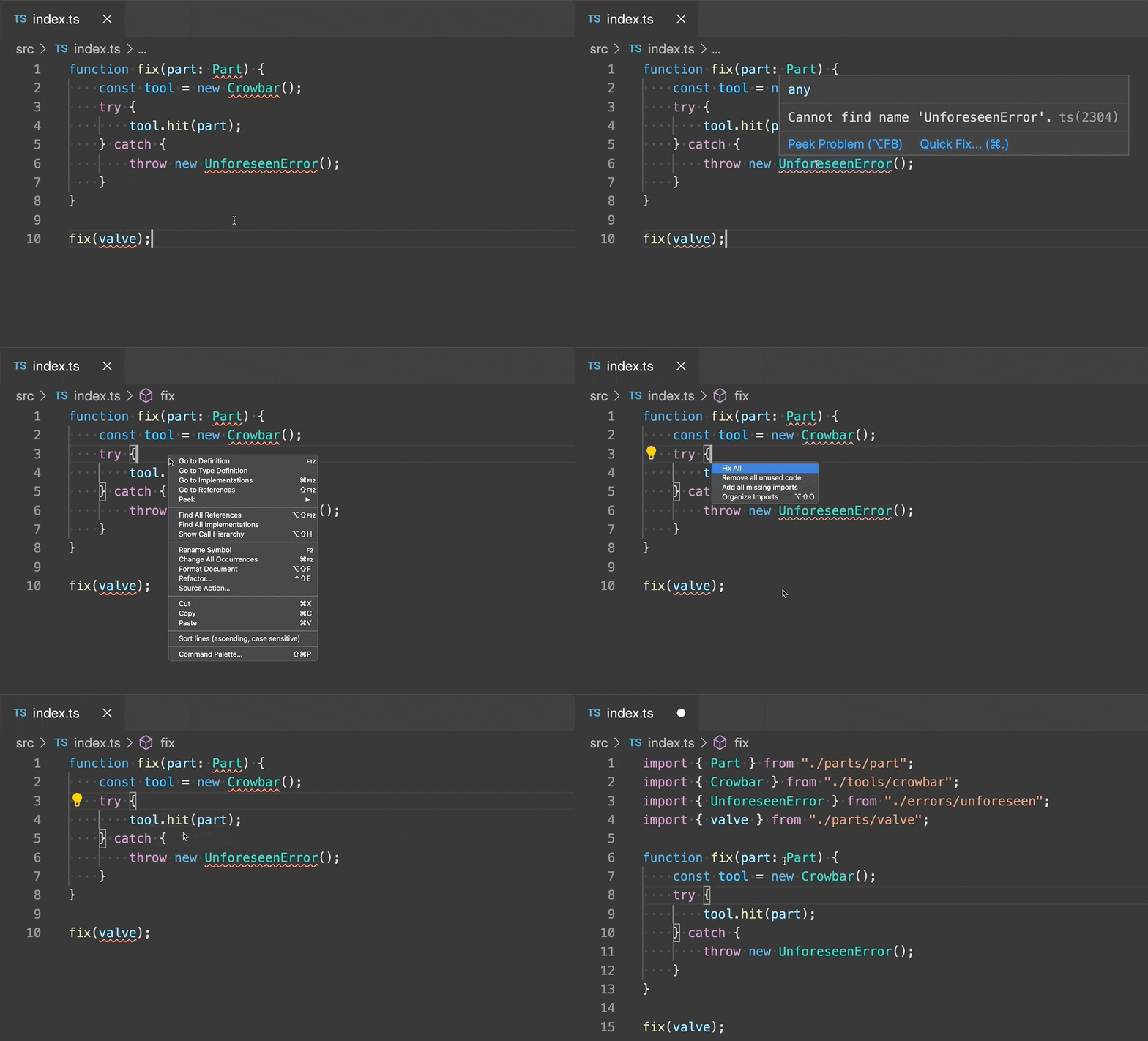
Related to and possibly complements #5131 for improving the overall UX when working with large file imports.
Thanks for the amazing work on the extension!
Contributor guide
First steps
- Read the whole issue, then the project's contributing guide.
- Comment on the issue to say you are picking it up — it saves two people doing the same work.
- Fork the repository and make your change on a branch.
- Open a pull request that references the issue number.
Research direction
Start by tracing the existing VS Code code actions for missing imports and how their diagnostics are supplied by cargo check. Review the linked TypeScript import-all implementation for comparison, then define the command's behavior for single-source and ambiguous imports. Done means one command processes all current missing-import diagnostics, skips imports already added, and prompts for ambiguous choices.
Written by the indexing model from the issue text.
Assessment
- Tech stack
- rust, vscode
- Domain
- developer-experience, tooling
- Issue type
- Feature
- Difficulty
- 4/5
- Estimated time
- 3-5 days
- Activity status
- Stale
- Clarity
- Mostly clear
- Newbie friendliness
- 45/100