rust-lang / rust-lang/rust-analyzer
RA in VSCode, Show Syntax Tree highlighting out of place with non-ASCII
Nobody has claimed this yet.
- Dominant language
- Rust
- Stars
- 16.9k
- Forks
- 2.2k
- Avg merge
- 1d 12h
- Merged PRs (30d)
- 72
Description
rust-analyzer version: 0.0.0 (6fc5c3cd2 2022-06-20)
rustc version: rustc 1.61.0 (fe5b13d68 2022-05-18)
relevant settings: none
OS: windows 10 x64
vscode info:
Version: 1.67.0 (user setup)
Commit: 57fd6d0195bb9b9d1b49f6da5db789060795de47
Date: 2022-05-04T12:06:02.889Z
Electron: 17.4.1
Chromium: 98.0.4758.141
Node.js: 16.13.0
V8: 9.8.177.13-electron.0
OS: Windows_NT x64 10.0.19044
When dealing with non-ASCII characters (Chinese, Japanese, Korean, French and so on), the highlighting and subscripts of Show Syntax Tree are wrong.
For example:
// 你好

fn main() {}
The output of RA is:
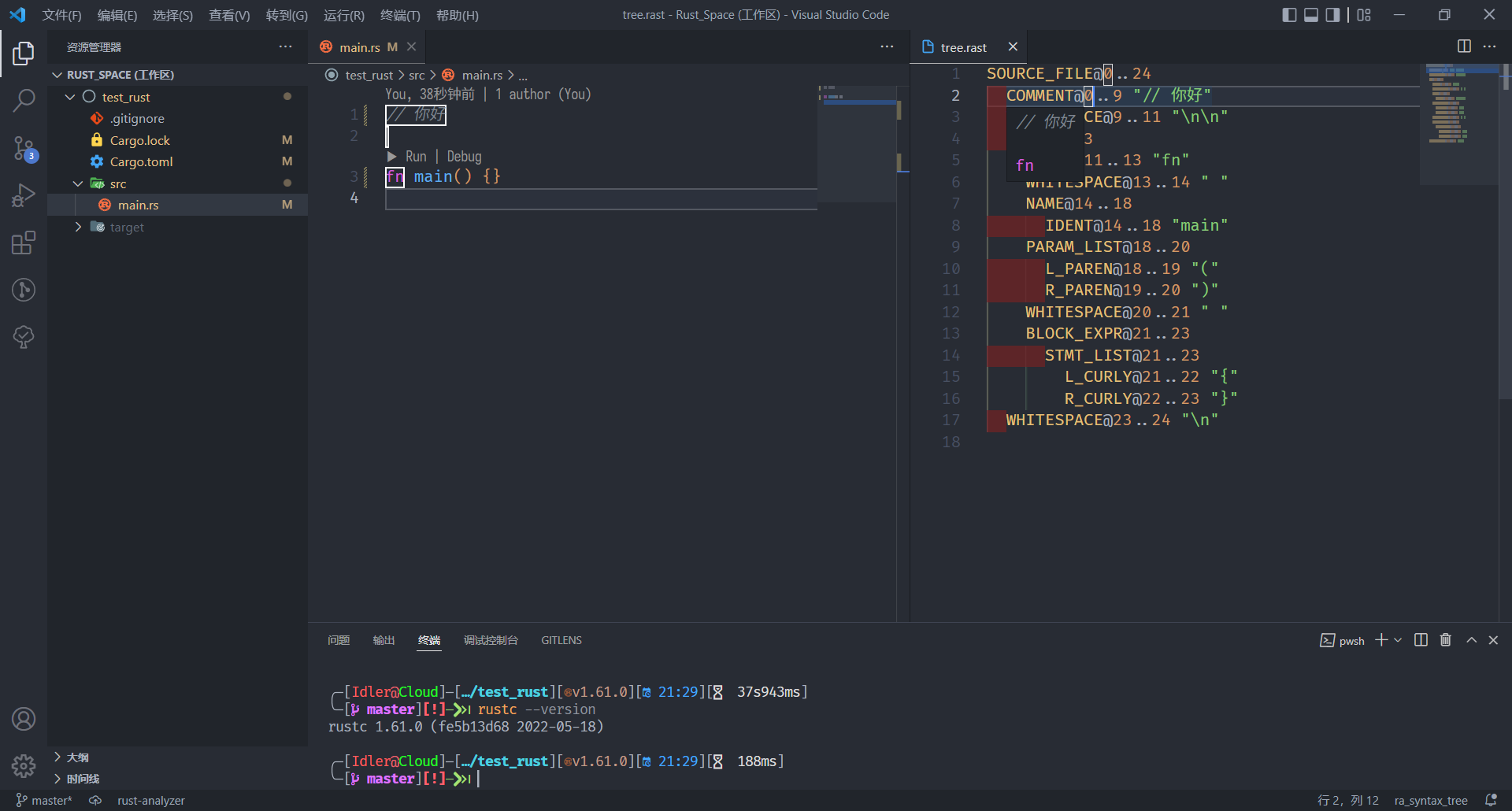
It seems that RA regards the number of bytes of Unicode as its length?
Contributor guide
First steps
- Read the whole issue, then the project's contributing guide.
- Comment on the issue to say you are picking it up — it saves two people doing the same work.
- Fork the repository and make your change on a branch.
- Open a pull request that references the issue number.
Research direction
Reproduce the issue in VSCode with the provided Rust example containing non-ASCII text, then compare the Show Syntax Tree highlighting and subscripts with the source positions. Trace the Show Syntax Tree path in rust-analyzer and its VSCode presentation; done means positions remain aligned for Unicode text.
Written by the indexing model from the issue text.
Assessment
- Tech stack
- rust
- Domain
- devtools
- Issue type
- Bug
- Difficulty
- 3/5
- Estimated time
- 1-2 days
- Activity status
- Stale
- Clarity
- Mostly clear
- Newbie friendliness
- 45/100