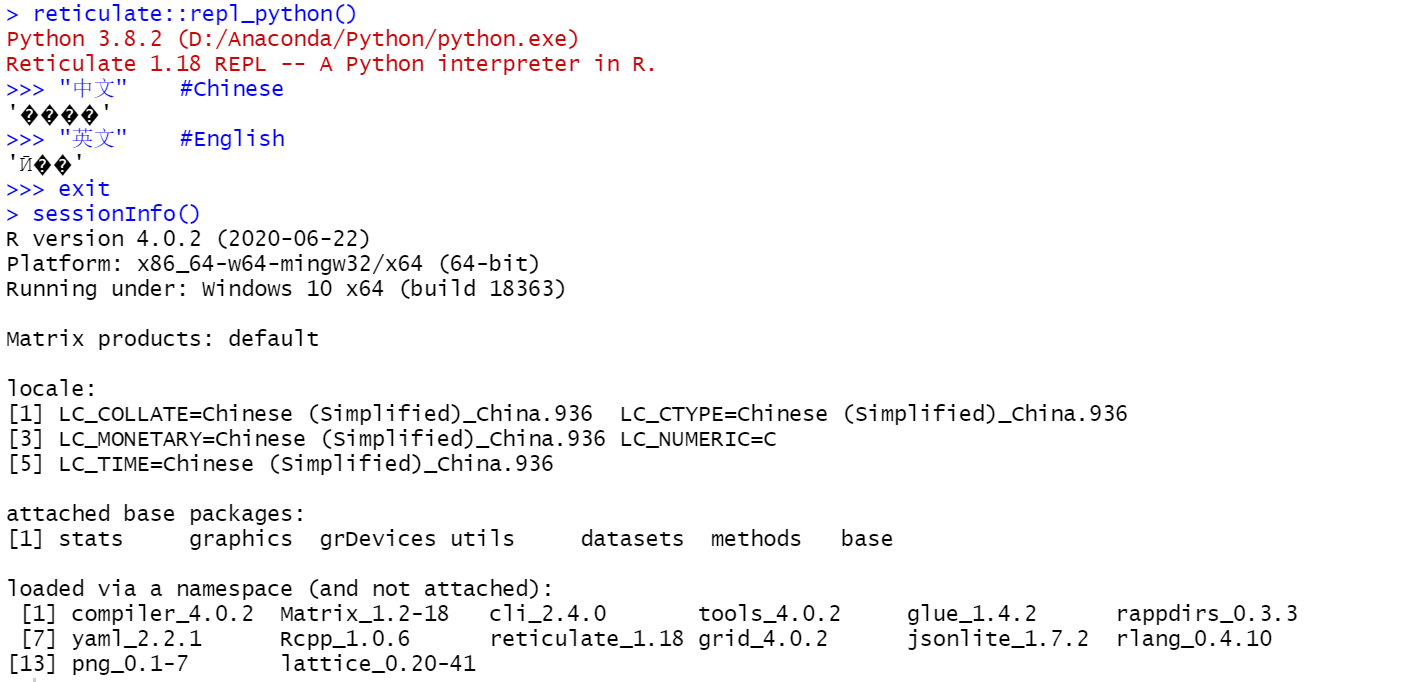
reticulate_1.18 run Chinese character string garbled
Nobody has claimed this yet.
- Dominant language
- R
- Stars
- 1.8k
- Forks
- 349
- Avg merge
- 5h 13m
- Merged PRs (30d)
- 4
Description
When I use the old version of Rstudio(version 1.3.1093) and reticulate(version 1.16), the above problem does not appear.
At the same time, if I use the new version of Rstudio (1.4.1106) and the old version of reticulate (1.16), Rstudio will crash when running matplotlib drawing commands (such as plt.figure(figsize=(12,8))).
Contributor guide
No contributing guide indexed for this repository
First steps
- Read the whole issue, then the project's contributing guide.
- Comment on the issue to say you are picking it up — it saves two people doing the same work.
- Fork the repository and make your change on a branch.
- Open a pull request that references the issue number.
Research direction
No source file, test, or entry point is named. Start by reproducing the Chinese-string output with the reported RStudio and reticulate versions, then compare the old and new combinations; done means Chinese text displays correctly and the matplotlib crash is not reintroduced.
Written by the indexing model from the issue text.
Assessment
- Tech stack
- python, r
- Domain
- internationalization
- Issue type
- Bug
- Difficulty
- 4/5
- Estimated time
- 3-5 days
- Activity status
- Stale
- Clarity
- Needs clarification
- Newbie friendliness
- 25/100