Install Build Tools Problem
Nobody has claimed this yet.
- Dominant language
- R
- Stars
- 409
- Forks
- 89
- PR merge metrics
- No merged PRs in 30d
Description
Hi there,
I am having issues selecting the "Use packrat with this project" option in the "Project Options" dialog. Every time, the following "Install Build Tools" dialog pops up, I say yes, and it installs the new build tools.
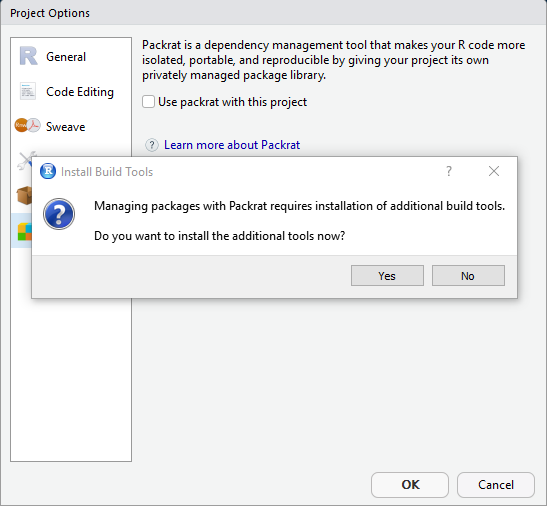
When it has finished installing, the "Use packrat with this project" option is still unchecked, so I check it again just to get the same "Install Build Tools" dialog. I've tried this several times and have restarted the computer as well with no luck.
System info:
- Windows 10, 64-bit operating system
- R version 3.5.0
- RStudio version 1.1.456
Any help on this issue would be appreciated!
Thanks,
Billy
Contributor guide
No contributing guide indexed for this repository
First steps
- Read the whole issue, then the project's contributing guide.
- Comment on the issue to say you are picking it up — it saves two people doing the same work.
- Fork the repository and make your change on a branch.
- Open a pull request that references the issue number.
Research direction
Start by reproducing the repeated "Install Build Tools" prompt when selecting "Use packrat with this project" on Windows 10 with R 3.5.0 and RStudio 1.1.456. Trace the activation and installation flow to determine why the option remains unchecked; done means the build tools install completes and the Packrat option stays enabled.
Written by the indexing model from the issue text.
Assessment
- Tech stack
- r
- Domain
- tooling
- Issue type
- Bug
- Difficulty
- 4/5
- Estimated time
- 3-5 days
- Activity status
- Stale
- Clarity
- Needs clarification
- Newbie friendliness
- 20/100