如何在每次聚焦的时候展示当前的 asciimode 指示器?
Open
Nobody has claimed this yet.
- Dominant language
- Swift
- Stars
- 6.4k
- Forks
- 554
- PR merge metrics
- No merged PRs in 30d
Description
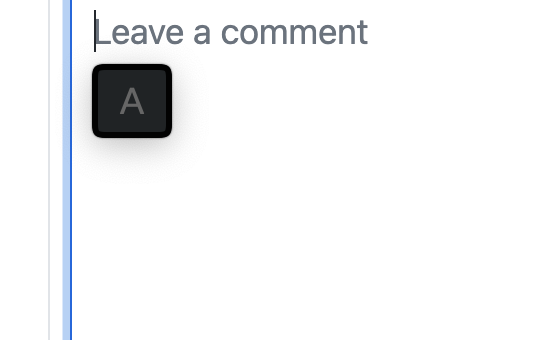
就是下面这个图,希望在每次输入框聚焦的时候显示一下当前的状态。
直接改代码我自己编译也是可以的,希望可以指点下应该改哪个方法。
我这找到了按 shift 时下面展示这个指示器的代码,但不知道应该在哪里触发(应该就是聚焦的回调方法)
Contributor guide
No contributing guide indexed for this repository
First steps
- Read the whole issue, then the project's contributing guide.
- Comment on the issue to say you are picking it up — it saves two people doing the same work.
- Fork the repository and make your change on a branch.
- Open a pull request that references the issue number.
Research direction
The issue points to the existing indicator code shown when Shift is pressed, but names no file or method. Start by tracing that trigger and the input-field focus callback; done means the current asciimode indicator appears whenever the input field gains focus. No test or exact entry point is provided.
Written by the indexing model from the issue text.
Assessment
- Tech stack
- macos, swift
- Domain
- desktop
- Issue type
- Feature
- Difficulty
- 3/5
- Estimated time
- 1-2 days
- Activity status
- Stale
- Clarity
- Mostly clear
- Newbie friendliness
- 35/100