鼠须管0.14.0版本五笔+拼音混输方案实现符号自定义及custom_phrase.txt遇到难题了
Open
Nobody has claimed this yet.
- Dominant language
- Swift
- Stars
- 6.4k
- Forks
- 553
- PR merge metrics
- No merged PRs in 30d
Description
各位尊敬的大佬,小弟目前已经实现了五笔+拼音混输模式下相关功能。目前符号|custom_phrase.txt实现不了,我想要的结果如下:
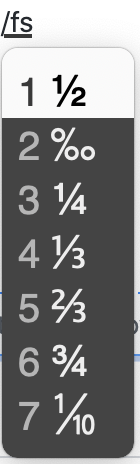
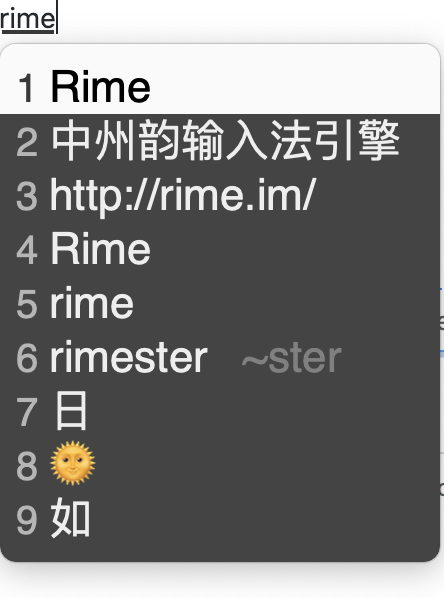
我的wubi_pinyin.schema.yaml配置如下所示,但仍然不行
# Rime schema settings
# encoding: utf-8
schema:
schema_id: wubi_pinyin
name: "五笔·拼音"
version: "0.9"
author:
- 發明人 王永民先生
description: |
五筆字型86版+漢語拼音混合輸入。
碼表源自 ibus-table
dependencies:
- pinyin_simp
patch:
switches:
- name: ascii_mode
reset: 0
states: ["中文", "西文"]
- name: full_shape
states: ["半角", "全角"]
- name: extended_charset
states: [ 常用, 增廣 ]
- name: simplification
reset: 0
states: ["汉字", "漢字"]
- options: ["utf8", "gbk", "gb2312"] # (※2)字符集选单
reset: 0 # 默认 UTF8
states:
- UTF-8
- GBK
- GB2312
- name: show_emoji
reset: 1
states: [ "🈚️️\uFE0E", "🈶️️\uFE0F" ]
- name: ascii_punct
states: [ 。,, ., ]
simplifier:
opencc_config: s2t.json # 简入繁出
engine/filters:
- simplifier
- uniquifier
- simplifier@emoji_conversion
emoji_conversion:
opencc_config: emoji.json
option_name: show_emoji
tags: abc
engine: # 输入引擎设定,即挂接组件的「处方]
processors: # 一、这批组件处理各类按键消息
- ascii_composer # # ※ 處理西文模式及中西文切換
- recognizer # # ※ 與 matcher 搭配,處理符合特定規則的輸入碼,如網址、反查等
- key_binder # # ※ 在特定條件下將按鍵綁定到其他按鍵,如重定義逗號、句號爲候選翻頁鍵
- speller # # ※ 拼寫處理器,接受字符按鍵,編輯輸入碼
- punctuator # ※ 句讀處理器,將單個字符按鍵直接映射爲文字符號
- selector # ※ 選字處理器,處理數字選字鍵、上、下候選定位、換頁鍵
- navigator # ※ 處理輸入欄內的光標移動鍵
- express_editor # ※ 處理輸入欄內的光標移動鍵
segmentors: # 二、這批組件識別不同內容類型,將輸入碼分段
- ascii_segmentor # ※ 標識西文段落
- matcher # ※ 標識符合特定規則的段落,如網址、反查等
- abc_segmentor # ※ 標識符合特定規則的段落,如網址、反查等
- punct_segmentor # ※ 標識符合特定規則的段落,如網址、反查等
- fallback_segmentor # ※ 標識其他未標識段落
translators: # ※ 標識其他未標識段落
- punct_translator # ※ 轉換標點符號
- reverse_lookup_translator # ※ 反查翻譯器,用另一種編碼方案查碼
- table_translator # ※ 碼表翻譯器,用於倉頡、五筆等基於碼表的輸入方案,替換 script_translator
speller:
delimiter: " ;'"
#max_code_length: 4 # 四碼頂字上屏
translator:
dictionary: wubi86
prism: wubi_pinyin
enable_charset_filter: true
enable_sentence: true
enable_encoder: true
encode_commit_history: true
max_phrase_length: 4
disable_user_dict_for_patterns:
- "^z.*$"
abc_segmentor:
extra_tags:
- reverse_lookup
reverse_lookup:
dictionary: pinyin_simp
prefix: "`"
suffix: "'"
tips: 〔拼音〕
preedit_format:
- xform/([nl])v/$1ü/
- xform/([nl])ue/$1üe/
- xform/([jqxy])v/$1u/
# 符号快速输入和部分符号的快速上屏
punctuator:
import_preset: symbols
symbols:
"/fs": [½, ‰, ¼, ⅓, ⅔, ¾, ⅒ ]
"/bq": [😂️, 😅️, ☺️, 😱️, 😭️, 😇️, 🙃️, 🤔️, 💊️, 💯️, 👍️, 🙈️, 💩️, 😈️ ]
"/dn": [⌘, ⌥, ⇧, ⌃, ⎋, ⇪, , ⌫, ⌦, ↩︎, ⏎, ↑, ↓, ←, →, ↖, ↘, ⇟, ⇞]
"/fh": [ ©, ®, ℗, ⓘ, ℠, ™, ℡, ␡, ♂, ♀, ☉, ☊, ☋, ☌, ☍, ☐, ☑︎, ☒, ☜, ☝, ☞, ☟, ✎, ✄, ♻, ⚐, ⚑, ⚠]
"/xh": [ *, ×, ✱, ★, ☆, ✩, ✧, ❋, ❊, ❉, ❈, ❅, ✿, ✲]
half_shape:
"#": "#"
"*": "*"
"`": "`"
"~": "~"
"@": "@"
"=": "="
"/": ["/", "÷",]
'\': "、"
"_" : "──"
"'": {pair: ["「", "」"]}
"[": ["【", "["]
"]": ["】", "]"]
"$": ["¥", "$", "€", "£", "¢", "¤"]
"<": ["《", "〈", "«", "<"]
">": ["》", "〉", "»", ">"]
recognizer/patterns/punct: "^/([a-z]+|[0-9]0?)$"
custom_phrase:
dictionary: ""
user_dict: custom_phrase
db_class: stabledb
enable_completion: false
enable_sentence: false
initial_quality: 1
custom_phrase.txt配置如下
馬上到! msd
什麼玩意兒!	wtf	2
What the fuck!	wtf	1
WTF	wtf	3
星際我爭霸	starcraft
HorizonZeroDawn	hzd	4
地平线:黎明时分	hzd	2
正在開會,一會給你回復:)	meet
中州韻輸入法引擎	rime	2
又双叒叕	yyy
http://rime.im/	rime	1
Rime	rime	3
⌘	cmd
⌃	ctl
⌥	opt
⇧	shift
GBK	gbk
UTF-8	utfba
scomper@gmail.com	smail
scomper	scomper
macOS High Sierra	macoshs
我希望能在上述文件添加B超这样的中英文词,可以实现简繁体自由转换,目前卡在这里面了,读了下教程,也没配置正确,希望大佬帮帮我。感谢
Contributor guide
No contributing guide indexed for this repository
First steps
- Read the whole issue, then the project's contributing guide.
- Comment on the issue to say you are picking it up — it saves two people doing the same work.
- Fork the repository and make your change on a branch.
- Open a pull request that references the issue number.
Research direction
Start by reviewing the wubi_pinyin.schema.yaml configuration alongside custom_phrase.txt, focusing on the custom_phrase, punctuator, and simplification sections. Verify how mixed Wubi/Pinyin input, custom phrases, and simplified/traditional conversion are expected to interact; done means the requested Chinese-English entries work with the desired conversion behavior.
Written by the indexing model from the issue text.
Assessment
- Tech stack
- macos, yaml
- Domain
- desktop, internationalization
- Issue type
- Feature
- Difficulty
- 4/5
- Estimated time
- 3-5 days
- Activity status
- Stale
- Clarity
- Needs clarification
- Newbie friendliness
- 20/100