在 VS Code 中 Esc 清空输入会输出控制字符
Open
@lotem is already working on this.
Since Oct 20, 2018.
- Dominant language
- Swift
- Stars
- 6.4k
- Forks
- 553
- PR merge metrics
- No merged PRs in 30d
Description
Squirrel 版本 0.9.26.1,在 Visual Studio Code 中输入文字时按 Esc 清空输入,有一定机率会输出一个控制字符。设置 inline_preedit: false ,复现机率较高。步骤如下:
- 开始输入文字,会在输入位置插入一个空白字符占位。
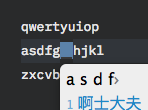
- 按 Esc 清空,空白字符仍然存在。
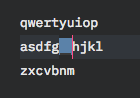
- 移动光标,空白字符消失。
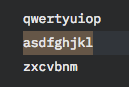
- 此时「g」和「h」两个字符之间出现了一个隐藏字符,可以看到选中的字符数比实际多了一个。
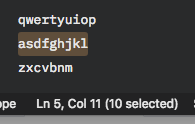
隐藏字符的 byte code 是 28,即 file separator 符。请问如何避免这种现象?
Contributor guide
No contributing guide indexed for this repository
First steps
- Read the whole issue, then the project's contributing guide.
- Comment on the issue to say you are picking it up — it saves two people doing the same work.
- Fork the repository and make your change on a branch.
- Open a pull request that references the issue number.
Assessment
This issue has not been assessed yet.