redhat-developer / redhat-developer/yaml-language-server
[Regression] Intellisense/Auto-Completion won't work for subschemas with type array since 1.11
Nobody has claimed this yet.
- Dominant language
- TypeScript
- Stars
- 1.5k
- Forks
- 352
- Avg merge
- 2d 7h
- Merged PRs (30d)
- 11
Description
This is a clone of https://github.com/redhat-developer/vscode-yaml/issues/879 since there was no acknowledgment of the bug for months.
Describe the bug
We rely on custom yaml configuration to setup particular systems. We validate these yaml files with json schema, and rely on the Intellisense/Autocompletion feature of this yaml extensions to expose the possible values, alongside a relevant description, since we have hundreds of values which need to be correct.
We recently had reports of developers that when accessing Intellisense (Control + Space ) , they suddenly had an empty box, with no longer the possible values.
Further investigation showed that the fault was on vscode auto-updating the YAML extension to 1.11 . Reverting to 1.10 succesfully restored functionality, but this is breaking workflows revolving around dynamic development environments, in the browser for example. Since we cannot specify required version in suggested workspace extensions ( .vscode/extensions.json), the remote environment will try to setup with the latest of every extensions - thus requiring a manual downgrade step.
Expected Behavior
Before 1.10
✅ String type with const

✅ Array type with const

✅ Array type with enum
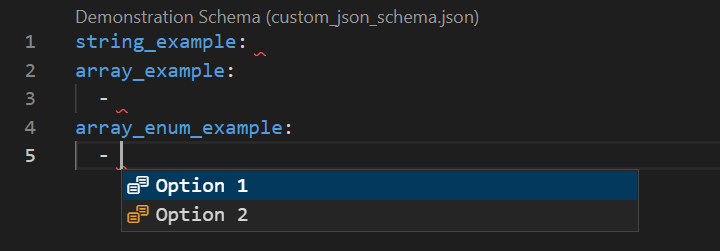
Current Behavior
From 1.11
✅ String type with const

❌ Array type with const
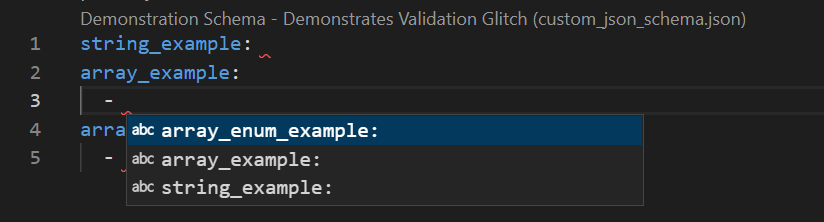
Note that the validation aspect still works :
Note that the validation aspect still works, despite the autocompletion issue :
⚠️ Array type with const - validates, but does not autocomplete
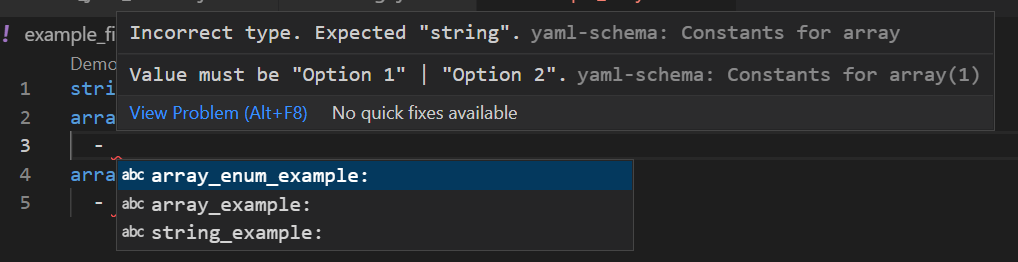
✅ Array type with enum

Steps to Reproduce
- Create a workspace, where VSCode will validate yaml files using the demo schema below (in our case using
.vscode/settings.json). - Make sure you use the YAML extension version
1.10.1- may need downgrading on the extension page - Create a yaml file and test the validation and autocompletion
- Upgrade to
1.11and compare behaviours
⚙️ settings.json
{
    "yaml.schemas": {
        ".\\custom_json_schema.json": "*.yaml",
      }
}
📝 Demonstration schema
{
    "title": "Demonstration Schema",
    "description": "Demonstrates Validation Glitch",
    "$schema": "http://json-schema.org/draft-07/schema#",
    "additionalProperties": false,
    "required": [
        "string_example",
        "array_example",
        "array_enum_example"
    ],
    "properties": {
        "string_example": {
            "title": "Constants for string",
            "type": "string",
            "description": "Shows behaviour when using a string with constants subschemas",
            "oneOf": [
                {
                    "const": "Option 1",
                    "description": "Sample Option 1",
                    "markdownDescription": "_Sample Option 1_"
                },
                {
                    "const": "Option 2",
                    "description": "Sample Option 2",
                    "markdownDescription": "_Sample Option 2_"
                }
            ]
        },

        "array_example": {
            "title": "Constants for array",
            "type": "array",
            "description": "Shows behaviour when using an array with constants subschemas",
            "items": {
                "type": "string",
                "anyOf": [
                    {
                        "const": "Option 1",
                        "description": "Sample Option 1",
                        "markdownDescription": "_Sample Option 1_"
                    },
                    {
                        "const": "Option 2",
                        "description": "Sample Option 2",
                        "markdownDescription": "_Sample Option 2_"
                    }
                ]
            }

        },

        "array_enum_example": {
            "title": "Enum for array",
            "type": "array",
            "description": "Shows behaviour when using an enum with constants subschemas",
            "items": {
                "type": "string",
                "enum": ["Option 1", "Option 2"]
            }

        }
    }
}
Environment
- Windows
- Mac
- Linux
- other (please specify)
Contributor guide
First steps
- Read the whole issue, then the project's contributing guide.
- Comment on the issue to say you are picking it up — it saves two people doing the same work.
- Fork the repository and make your change on a branch.
- Open a pull request that references the issue number.
Research direction
Start by reproducing the regression with the provided settings.json and demonstration schema, comparing YAML extension versions 1.10.1 and 1.11. Investigate the autocomplete path for array items using anyOf with const subschemas. Done means array constants again appear in Intellisense with their descriptions, while validation and enum completion continue to work.
Written by the indexing model from the issue text.
Assessment
- Tech stack
- typescript, yaml
- Domain
- developer-experience, tooling
- Issue type
- Bug
- Difficulty
- 4/5
- Estimated time
- 3-5 days
- Activity status
- Stale
- Clarity
- Mostly clear
- Newbie friendliness
- 35/100