redhat-developer / redhat-developer/yaml-language-server
Problems reported must include information about schema being used
Nobody has claimed this yet.
- Dominant language
- TypeScript
- Stars
- 1.5k
- Forks
- 352
- Avg merge
- 2d 7h
- Merged PRs (30d)
- 11
Description
Is your enhancement related to a problem? Please describe.
Based on discussions from https://github.com/redhat-developer/yaml-language-server/issues/310#issuecomment-784198962 we identified a real need to disclose the schema that was used for a particular file.
Describe the solution you would like
I will list several approaches with the note that addressing any of them should be enough.
Information we need to expose:
- Schema name (that is not the title of the element from within the schema that generated the issues)
- Schema link
- What determined the use of the schema: which match pattern, if it came from file-header, settings.json or schemaStore
We should not underestimate the chance of using the wrong schema due to wrong patterns, so all of these will help user identify the source of the problem and avoid creating
UI Locations:
- Find a way to expose schema used on the status bar, either by adding this information into the tooltip from YAML block, which now display a static text "Select Language Mode", or by adding a new status bar item that can display that info if the other cannot be altered
- Output category YAML Support should log a "message" level entry when is processing data that includes schema identification (link). Right now all we can see is "Sending response 'custom/schema/request" and activating verbose mode tracing does produce such a verbosity that makes impossible to use in practice (even so schema is still not mentioned)
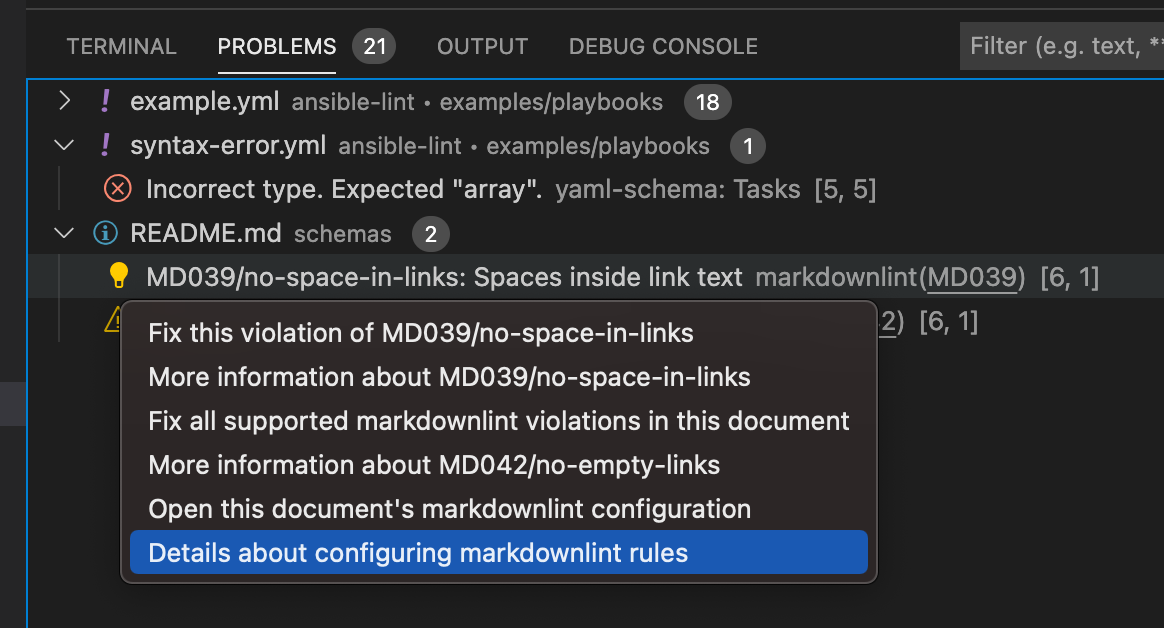
- Problems reported by YAML extension do not include any contextual options (lightbulb), which would be another way to expose information about schema, like a goto schema option. I do see other extension exposing that.
Describe alternatives you have considered
Additional context
Contributor guide
First steps
- Read the whole issue, then the project's contributing guide.
- Comment on the issue to say you are picking it up — it saves two people doing the same work.
- Fork the repository and make your change on a branch.
- Open a pull request that references the issue number.
Research direction
Start with the linked issue 310 discussion and the YAML Support output around the custom/schema/request message. Compare the requested status-bar, output-log, and problem-context options, then define one accepted path that exposes the schema name, link, and selection source; done means users can identify which schema produced a problem.
Written by the indexing model from the issue text.
Assessment
- Tech stack
- typescript
- Domain
- developer-experience, tooling
- Issue type
- Feature
- Difficulty
- 5/5
- Estimated time
- Over a week
- Activity status
- Stale
- Clarity
- Needs clarification
- Newbie friendliness
- 25/100