redhat-developer / redhat-developer/vscode-yaml
CodeLens Not Easily Disabled
Nobody has claimed this yet.
- Dominant language
- TypeScript
- Stars
- 829
- Forks
- 260
- Avg merge
- 5h 43m
- Merged PRs (30d)
- 1
Description
Hi there, first of all, thanks for your continued work on this extension, very useful! 🙌
Describe the bug
The CodeLens that is shown at the top of every .yml file in .github/workflows/ (see screenshot below) has some UX downsides.
Here is a screenshot of such a CodeLens with the text GitHub Workflow - YAML schema for GitHub Workflow (github-workflow.json):
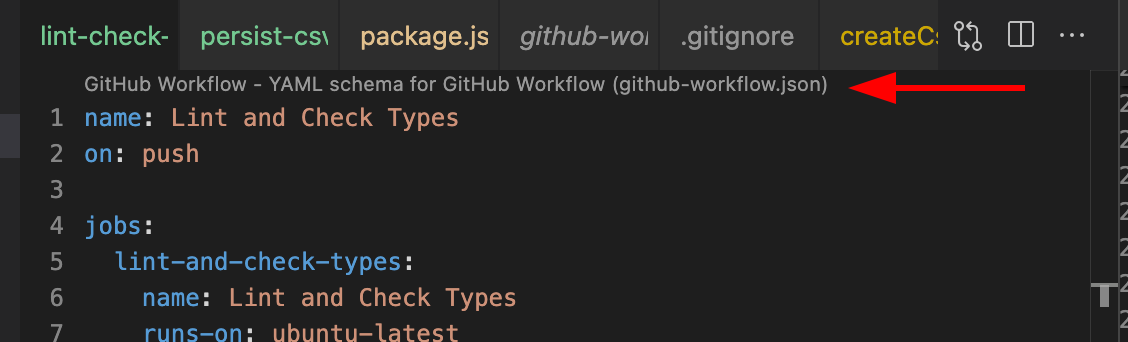
Clicking on the CodeLens (even right clicking) will open another file, which may be inexplicable to users:
https://user-images.githubusercontent.com/1935696/218256730-efb3b5ec-5c44-49b2-828c-2e3808070a05.mp4
Specifically, it is unclear:
- What this CodeLens is - also, what the official name of this feature is (although, this is probably more something for VS Code itself to resolve)
- Where this CodeLens is coming from - in this situation, contributed by an extension
- How to disable it
There is no UI provided by VS Code to help discover any of these things. I reported a new issue also in the VS Code repo about this: https://github.com/microsoft/vscode/issues/174141
Expected Behavior
It should be:
- Easy to find out where this CodeLens is coming from (eg. the CodeLens text should mention the name of the YAML extension)
- Possible to disable ONLY this CodeLens, leaving all other CodeLens contributions intact, eg. also other YAML CodeLens contributions from other extensions
Current Behavior
It is not easy to find out where it's from and it's not possible to disable only this CodeLens.
Experienced users may guess to configure [yaml].editor.codeLens: false in their settings.json (or find https://github.com/redhat-developer/yaml-language-server/pull/424#issuecomment-823244614 or the comment hidden in the readme), but this is a very hidden / undocumented setting, and also disables all CodeLens contributions, instead of just this single one:
{
  "[yaml]": {
    // Disable CodeLens "GitHub Workflow - YAML Schema for GitHub Workflow (github-workflow.json)" in YAML files
    "editor.codeLens": false
  }
}
Steps to Reproduce
- Open a GitHub Workflow file in VS Code with the YAML extension installed
- Try to figure out how to disable the CodeLens at the top of the file (or even what it's called, as an inexperienced user)
Environment
- Windows
- Mac: macOS Ventura 13.2 (22D49)
- Linux
- other (please specify)
Contributor guide
First steps
- Read the whole issue, then the project's contributing guide.
- Comment on the issue to say you are picking it up — it saves two people doing the same work.
- Fork the repository and make your change on a branch.
- Open a pull request that references the issue number.
Research direction
Start with the YAML extension's GitHub Workflow CodeLens and the existing [yaml].editor.codeLens setting, then trace how this contribution is exposed in VS Code. Confirm that the change can identify this CodeLens and disable it independently while preserving other YAML CodeLens contributions; validate the behavior in a GitHub Workflow file.
Written by the indexing model from the issue text.
Assessment
- Tech stack
- typescript, vscode
- Domain
- developer-experience, tooling
- Issue type
- Feature
- Difficulty
- 4/5
- Estimated time
- 3-5 days
- Activity status
- Stale
- Clarity
- Mostly clear
- Newbie friendliness
- 35/100