redhat-developer / redhat-developer/vscode-yaml
defaultSnippets with list indentation
@msivasubramaniaan is already working on this.
Since Dec 22, 2021.
- Dominant language
- TypeScript
- Stars
- 829
- Forks
- 260
- Avg merge
- 5h 43m
- Merged PRs (30d)
- 1
Description
Summary
I'm playing with json-schema defaultSnippets. When snippet is used for 'object', indentation is ok, but with 'list' item is wrong.
I'm not sure if it's the extension issue or something wrong on my side.
simple json-schema for testing:
{
  "allOf": [{ "$ref": "#/$defs/objectA" }, { "$ref": "#/$defs/objectB" }],

  "$defs": {

    "objectA": {
      "type": "object",
      "title": "Object A",
      "properties": {
        "objA": {
          "type": "array",
          "items": {
            "type": "object",
            "properties": {
              "name": { "type": "string", "description": "name" },
              "color": { "type": "string", "description": "color" }
            },
            "required": ["name"],
            "additionalProperties": false,
            "defaultSnippets": [
              {
                "label": "Object A - item",
                "description": "Create item for objA",
                "TEST1_body": [{ "name": "$1", "color": "$2" }],
                "TEST2_body": { "name": "$1", "color": "$2" },
                "body": { "name": "$1", "color": "$2" }
              }
            ]
          }
        }
      }
    },

    "objectB": {
      "type": "object",
      "title": "Object B",
      "properties": {
        "objB": {
          "type": "object",
          "properties": {
            "name": { "type": "string", "description": "name" },
            "size": { "enum": ["S", "M", "L", "XL"] }
          },
          "required": ["name", "size"],
          "additionalProperties": false,
          "defaultSnippets": [
              {
                "label": "Object B - object",
                "description": "Create object for objB",
                "body": { "name": "$1", "size": "$2" }
              }
            ]
        }
      }
    }
  }
}
json-schema defaultSnippet for 'Object B' is working as expected:
step1:
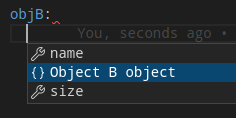
step2:
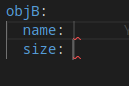
json-schema defaultSnippet for 'Object A' (item) is working but with wrong indent:
step1:
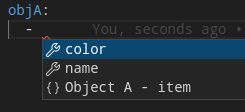
step2:
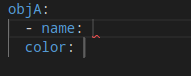
step3:
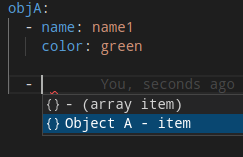
step4:
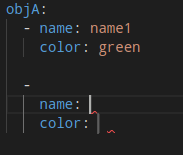
Relevant information
YAML extension: v1.2.2
vscode:
Version: 1.62.3
Commit: ccbaa2d27e38e5afa3e5c21c1c7bef4657064247
Date: 2021-11-17T08:00:36.721Z
Electron: 13.5.2
Chrome: 91.0.4472.164
Node.js: 14.16.0
V8: 9.1.269.39-electron.0
OS: Linux x64 5.11.0-41-generic snap
Contributor guide
First steps
- Read the whole issue, then the project's contributing guide.
- Comment on the issue to say you are picking it up — it saves two people doing the same work.
- Fork the repository and make your change on a branch.
- Open a pull request that references the issue number.
Assessment
This issue has not been assessed yet.