redhat-developer / redhat-developer/vscode-xml
Schema binding by file association with variable works only for active file
Nobody has claimed this yet.
- Dominant language
- TypeScript
- Stars
- 328
- Forks
- 101
- Avg merge
- 1d 17h
- Merged PRs (30d)
- 7
Description
Hello,
I'm struggling with file association binding of xml schema.
Consider the following data (all files provided in attached test.zip):
- 2 xml files named data1.xml and data2.xml
- 2 matching schemas data1.xsd and data2.xsd
- binding is provided by file association in VS Code settings as follows:
    "xml.fileAssociations": [
        {
            "pattern": "data*.xml",
            "systemId": "${fileBasenameNoExtension}.xsd"
        }
     ]
Now, xml validation works fine for each file individually, but problems are systematically reported for other files:
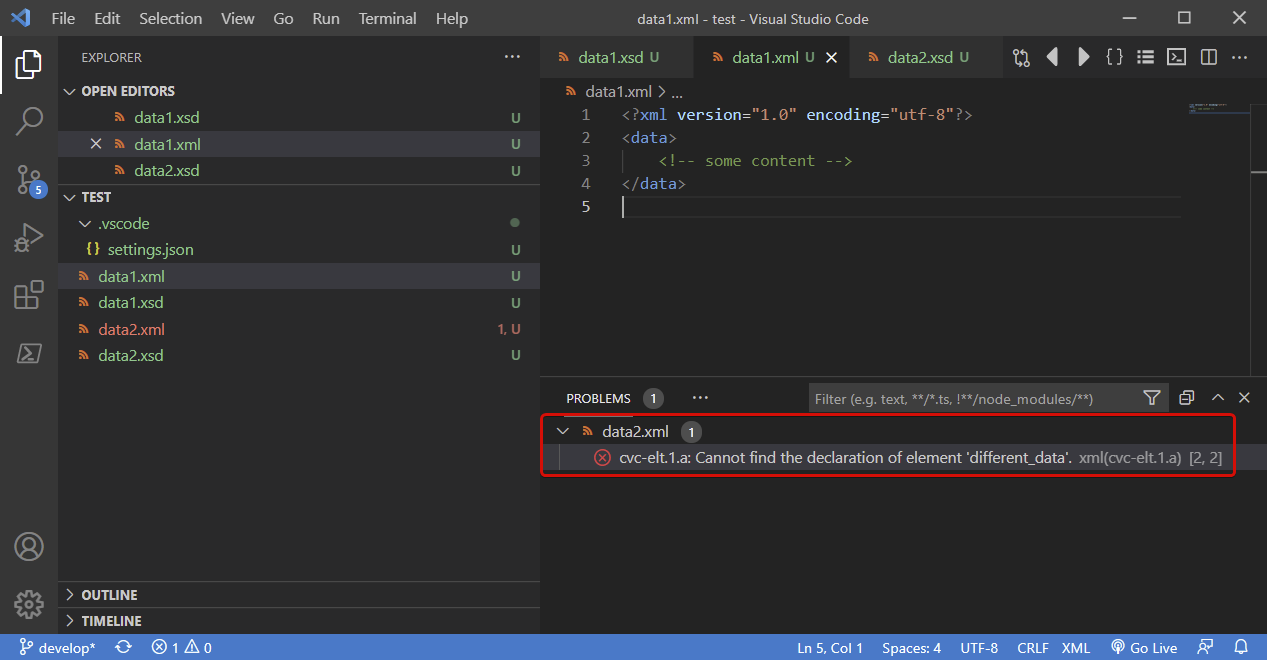
Selecting data1.xml, it shows that everything is ok in that one, which is correct. But at the same time, in the Problems panel, an error is reported for data2.xml
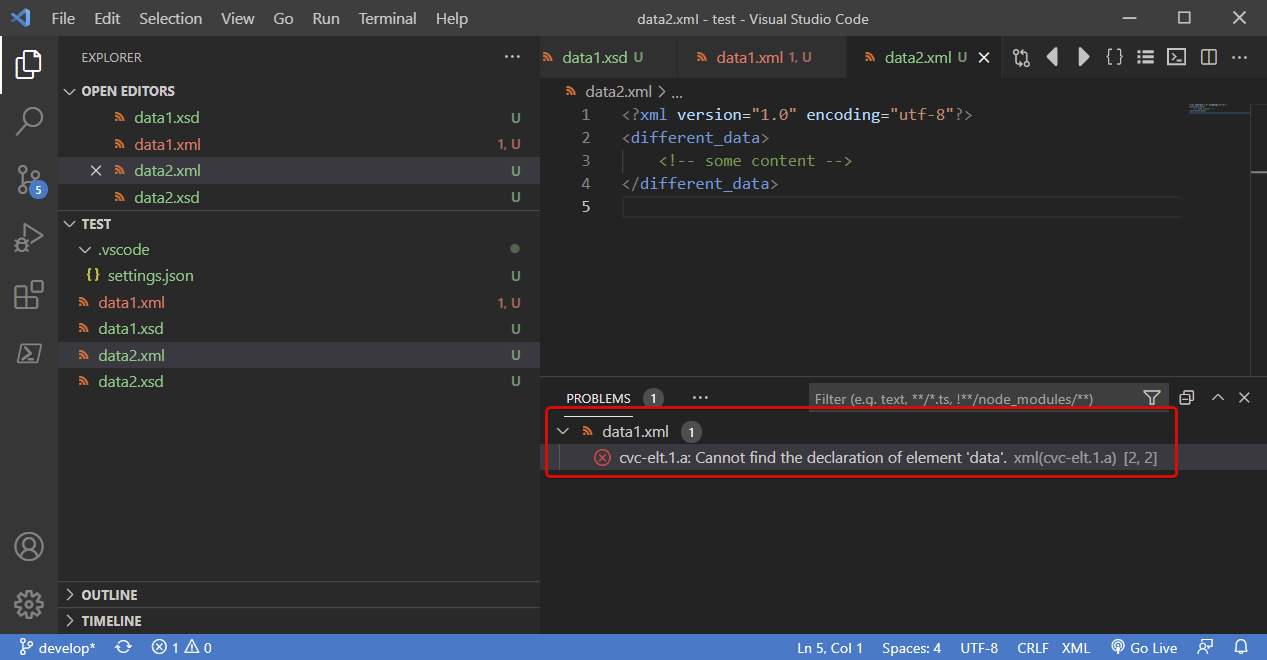
Same behavior - reversed - when selecting data2.xml:
And when another file is selected, e.g. settings.json, then errors are reported in both xml files:
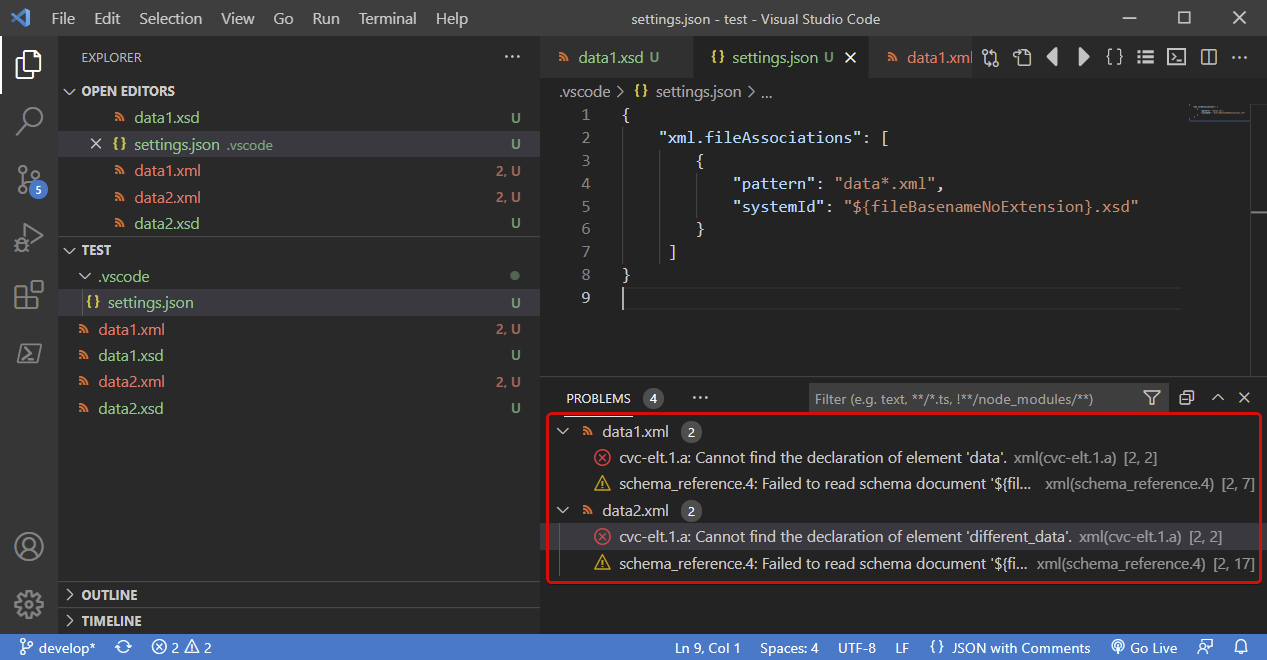
The problem is, that the predefined variable ${fileBasenameNoExtension} points to the current active file. Consequently the validation schema is selected on the basis of the active file, and that schema is applied to all validated files, which produces wrong validation results.
Would there be a way to correctly retrieve the name of the validated file instead of the name of the active file?
Note: at the moment, I'm generating explicit bindings for each individual file (no predefined variable). Not very elegant, but it works fine in all cases. The thing is, my real dataset is much more elaborate than that simple example, and explicit binding of each file generates a pretty large workspace configuration file.
Contributor guide
First steps
- Read the whole issue, then the project's contributing guide.
- Comment on the issue to say you are picking it up — it saves two people doing the same work.
- Fork the repository and make your change on a branch.
- Open a pull request that references the issue number.
Research direction
Start with the attached test.zip and reproduce the behavior using the xml.fileAssociations setting shown in the issue. Trace how ${fileBasenameNoExtension} is resolved when multiple XML files are validated, then verify that each file uses its own schema and that the Problems panel reports no cross-file validation errors.
Written by the indexing model from the issue text.
Assessment
- Tech stack
- typescript, vscode
- Domain
- devtools
- Issue type
- Bug
- Difficulty
- 4/5
- Estimated time
- 3-5 days
- Activity status
- Stale
- Clarity
- Mostly clear
- Newbie friendliness
- 35/100