redhat-developer / redhat-developer/vscode-java
Bug in vs code - Loading and Checking for quick fixes
Nobody has claimed this yet.
- Dominant language
- TypeScript
- Stars
- 2.3k
- Forks
- 546
- Avg merge
- 20h 1m
- Merged PRs (30d)
- 11
Description
Hi, after last update fix error does not working, only when I reload vs code windows and after a new error the same problem appear. I provide an image. I tried to downgrade version of the pluguin "Language support of java by Red hat" but did not fix the problem.
Same problem using vs code on Windows and Mac. And all my students have the same problem.
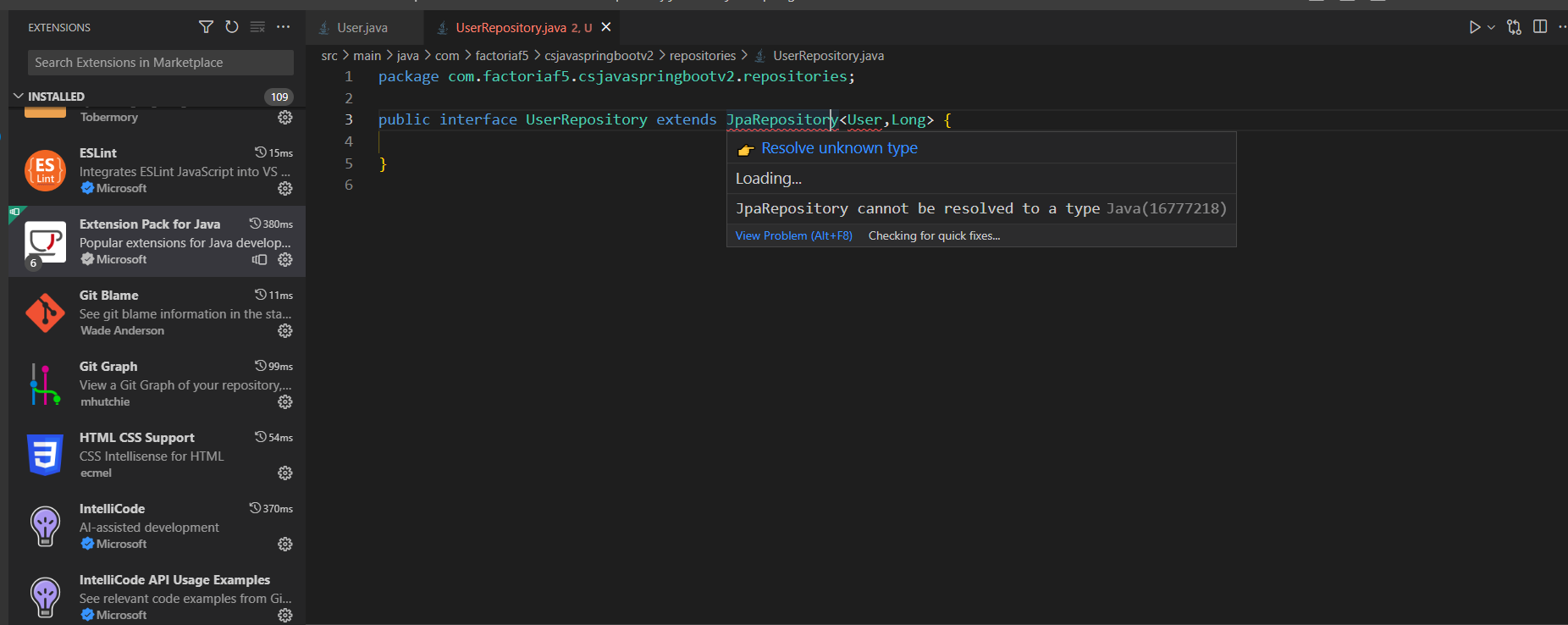
Kind Regards,
Giacomo
Originally posted by @giacomoF5 in https://github.com/redhat-developer/vscode-java/issues/2922#issuecomment-1431843793
Contributor guide
First steps
- Read the whole issue, then the project's contributing guide.
- Comment on the issue to say you are picking it up — it saves two people doing the same work.
- Fork the repository and make your change on a branch.
- Open a pull request that references the issue number.
Research direction
Start by reviewing the originating issue 2922 and the attached screenshot, then reproduce the quick-fix loading problem in VS Code using the Java language support extension on Windows or Mac. Check whether quick fixes remain available after a new error without reloading the window; done means the reported behavior no longer requires a window reload.
Written by the indexing model from the issue text.
Assessment
- Tech stack
- java, typescript, vscode
- Domain
- developer-experience, tooling
- Issue type
- Bug
- Difficulty
- 4/5
- Estimated time
- 3-5 days
- Activity status
- Stale
- Clarity
- Needs clarification
- Newbie friendliness
- 25/100