redhat-developer / redhat-developer/vscode-java
"The type X is not accessible" in modular Maven project
Open
Nobody has claimed this yet.
bug
Maven
- Dominant language
- TypeScript
- Stars
- 2.3k
- Forks
- 546
- Avg merge
- 20h 1m
- Merged PRs (30d)
- 11
Description
When opening the attached project, errors are reported on the Main.java file, even though something like mvn clean build is successful.
Environment
- Operating System: Windows 10
- JDK version: 13.0.1
- Visual Studio Code version: 1.43.0
- Java extension version: 0.58.0
Steps To Reproduce
- unzip foo.zip
- add the unzipped folder to the workspace
- open the Main.java file
Current Result
problems are reported:
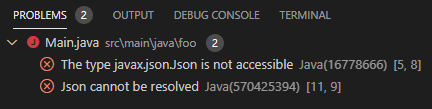
Expected Result
no problems are reported
Contributor guide
First steps
- Read the whole issue, then the project's contributing guide.
- Comment on the issue to say you are picking it up — it saves two people doing the same work.
- Fork the repository and make your change on a branch.
- Open a pull request that references the issue number.
Research direction
Unzip foo.zip, add it as a workspace, and open Main.java in VS Code; compare the reported accessibility errors with the successful mvn clean build result. Use the Java extension version and modular project in the reproduction to trace the discrepancy, and consider the issue done when Main.java shows no problems while the Maven build still succeeds.
Written by the indexing model from the issue text.
Assessment
- Tech stack
- java, typescript, vscode
- Domain
- developer-experience, tooling
- Issue type
- Bug
- Difficulty
- 4/5
- Estimated time
- 3-5 days
- Activity status
- Stale
- Clarity
- Mostly clear
- Newbie friendliness
- 35/100