redhat-developer / redhat-developer/vscode-java
The extension displays a wrong task name when open a multi root workspace
Nobody has claimed this yet.
- Dominant language
- TypeScript
- Stars
- 2.3k
- Forks
- 546
- Avg merge
- 20h 1m
- Merged PRs (30d)
- 11
Description
The multiple root structure:
- a maven project such as spring-petclinic
- a nodejs project
When opening multi root workspace in VS Code, the extension will show "Importing Maven projects" on node_modules folder.
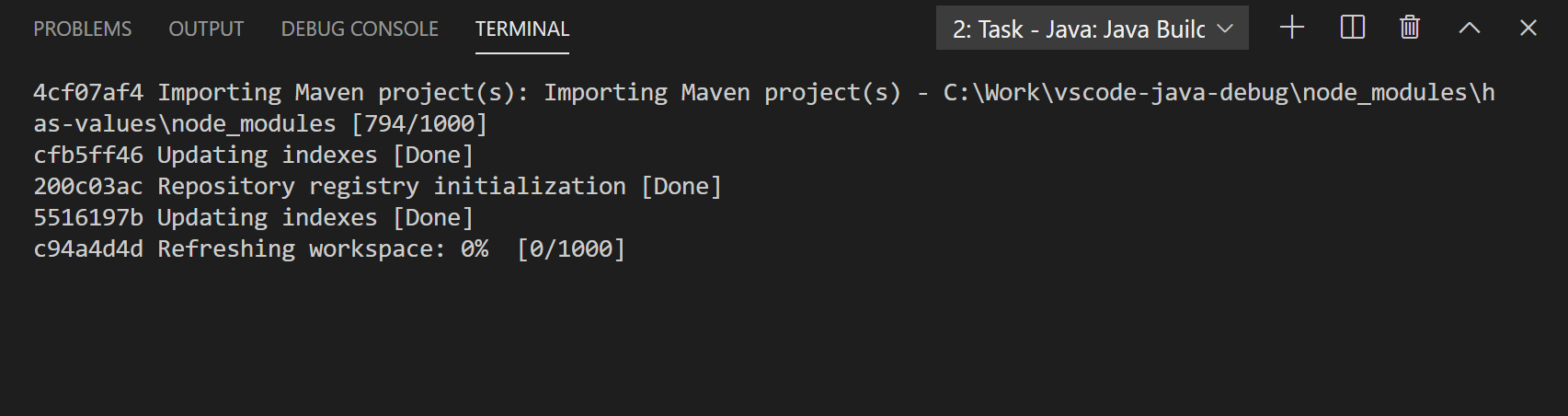
The actual task for the node_modules is the maven scan task. The task name seems a stale name from the previous importer. The importer for each root shared the same progress reporter. The scan task for the second root didn't update the task name, so it reused the previous task name.
Contributor guide
First steps
- Read the whole issue, then the project's contributing guide.
- Comment on the issue to say you are picking it up — it saves two people doing the same work.
- Fork the repository and make your change on a branch.
- Open a pull request that references the issue number.
Research direction
Start by tracing multi-root workspace importers and the shared progress reporter used by each scan task. Reproduce the Maven and Node.js roots described in the issue, then verify that each root's scan displays its own task name rather than reusing the previous importer's name.
Written by the indexing model from the issue text.
Assessment
- Tech stack
- typescript
- Domain
- tooling
- Issue type
- Bug
- Difficulty
- 3/5
- Estimated time
- 1-2 days
- Activity status
- Stale
- Clarity
- Mostly clear
- Newbie friendliness
- 35/100