redhat-developer / redhat-developer/vscode-java
关于 Status Bars 显示 Java Build Status 的问题
Nobody has claimed this yet.
- Dominant language
- TypeScript
- Stars
- 2.3k
- Forks
- 546
- Avg merge
- 20h 1m
- Merged PRs (30d)
- 11
Description
更新 Language Support for Java(TM) by Red Hat 插件后,原先在tate Status Bar 动态显示的 Java build status 改为在新的 terminal 里显示,很不直观,希望可以修改为之前版本那样在tate Status Bar 动态显示 Java build status ,或者增加选项让用户自主选择。
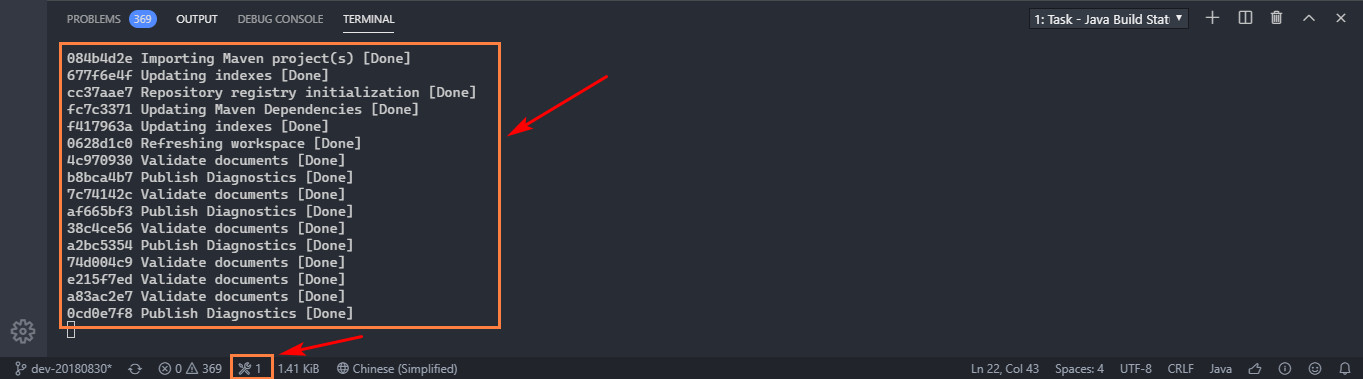
Extension version: 0.54.1
VS Code version: Code 1.40.2 (f359dd69833dd8800b54d458f6d37ab7c78df520, 2019-11-25T14:54:45.096Z)
OS version: Windows_NT x64 10.0.17134
Contributor guide
First steps
- Read the whole issue, then the project's contributing guide.
- Comment on the issue to say you are picking it up — it saves two people doing the same work.
- Fork the repository and make your change on a branch.
- Open a pull request that references the issue number.
Research direction
Reproduce the behavior with Language Support for Java 0.54.1 in VS Code 1.40.2 on Windows and compare the status bar with the terminal output. Trace the extension entry points responsible for Java build-status reporting and determine whether the prior status-bar display or a user-selectable option is feasible. Done means build status is visible in the status bar or the choice is configurable, with coverage for the selected behavior.
Written by the indexing model from the issue text.
Assessment
- Tech stack
- java, typescript
- Domain
- tooling
- Issue type
- Feature
- Difficulty
- 4/5
- Estimated time
- 3-5 days
- Activity status
- Stale
- Clarity
- Mostly clear
- Newbie friendliness
- 35/100