Code block breaks the pages width
Open
Nobody has claimed this yet.
- Dominant language
- JavaScript
- Stars
- 11.8k
- Forks
- 7.9k
- Avg merge
- 1d 11h
- Merged PRs (30d)
- 11
Description
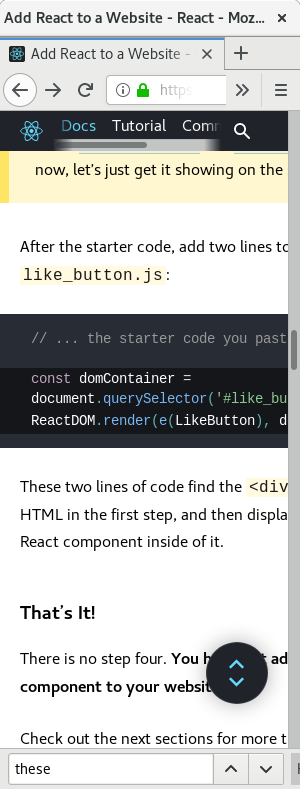
The code block word wrap doesn't work in this case of
const domContainer = document.querySelector('#like_button_container');
breaks the width of the page
Maybe add https://prismjs.com/plugins/normalize-whitespace/
break-lines?
PrismJS doesn't handle line wrap of document.querySelector('#like_button_container'); dot or string, it treat it as a whole thing.
Contributor guide
First steps
- Read the whole issue, then the project's contributing guide.
- Comment on the issue to say you are picking it up — it saves two people doing the same work.
- Fork the repository and make your change on a branch.
- Open a pull request that references the issue number.
Research direction
Start by reproducing the overflowing code block shown in the issue on the React documentation website, then inspect the code-block rendering and styling entry points. Compare the behavior with PrismJS's line-wrapping options. Done means long unbroken code such as document.querySelector('#like_button_container') wraps without widening the page.
Written by the indexing model from the issue text.
Assessment
- Tech stack
- javascript, react
- Domain
- documentation, frontend
- Issue type
- Bug
- Difficulty
- 3/5
- Estimated time
- 1-2 days
- Activity status
- Stale
- Clarity
- Mostly clear
- Newbie friendliness
- 45/100