flex: 1 does not set flexGrow: 1
Nobody has claimed this yet.
- Dominant language
- C++
- Stars
- 18.9k
- Forks
- 1.6k
- Avg merge
- 1m
- Merged PRs (30d)
- 1
Description
Description
Setting the style flex: 1 is supposed to set flexGrow: 1, flexShrink: 1 and flexBasis: "auto".
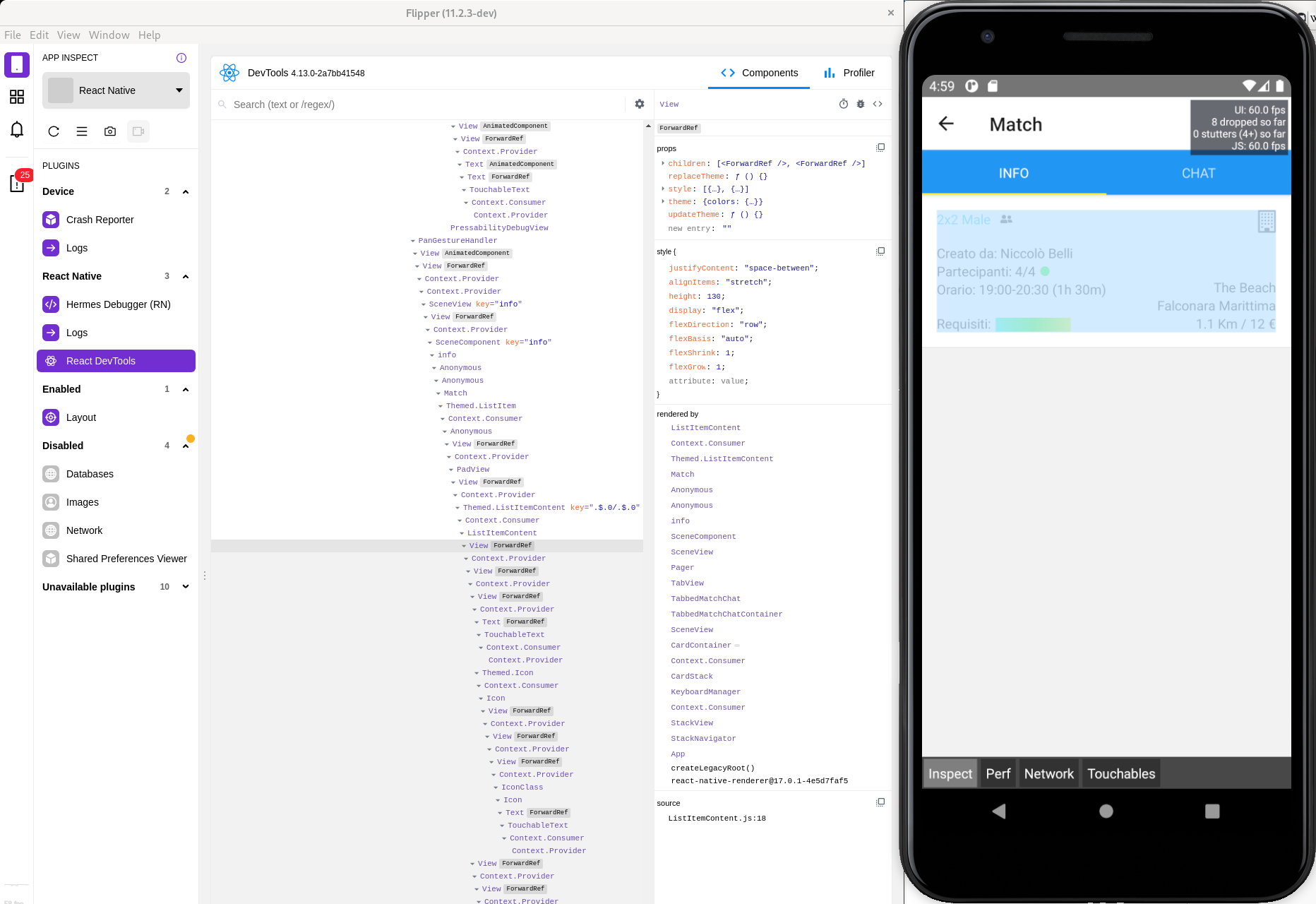
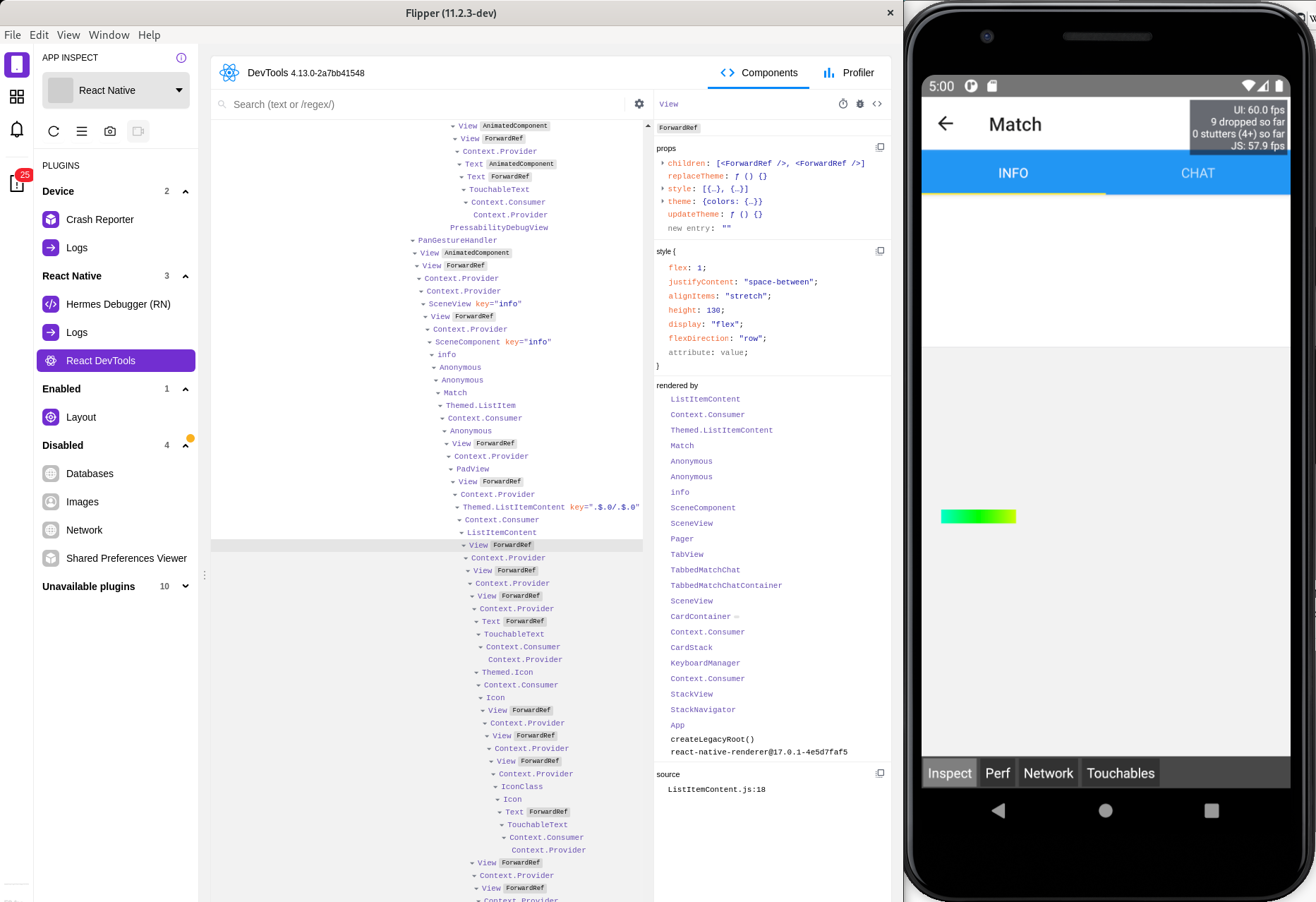
Apparently it doesn't work because setting flex: 1 produces a different output than flexGrow: 1, flexShrink: 1 and flexBasis: "auto" (see screenshots below).
React Native version:
$ yarn react-native info
yarn run v1.22.10
$ /home/niko/devel/beach/client/node_modules/.bin/react-native info
info Fetching system and libraries information...
System:
    OS: Linux 5.11 Fedora 34 (Workstation Edition) 34 (Workstation Edition)
    CPU: (8) x64 AMD Ryzen 5 2400G with Radeon Vega Graphics
    Memory: 33.34 GB / 62.81 GB
    Shell: 5.1.0 - /bin/bash
  Binaries:
    Node: 12.22.1 - /tmp/yarn--1620659398547-0.22115473234857919/node
    Yarn: 1.22.10 - /tmp/yarn--1620659398547-0.22115473234857919/yarn
    npm: 6.14.13 - ~/.nvm/versions/node/v12.22.1/bin/npm
    Watchman: 0.0.0 - /usr/bin/watchman
  SDKs:
    Android SDK: Not Found
  IDEs:
    Android Studio: Not Found
  Languages:
    Java: Not Found
  npmPackages:
    @react-native-community/cli: Not Found
    react: ~17.0.2 => 17.0.2
    react-native: 0.64.1 => 0.64.1
  npmGlobalPackages:
    *react-native*: Not Found
Done in 0.83s.
react-native-elements is at version 3.4.1.
Steps To Reproduce
The view you see in the Flipper screenshots below is the one created by react-native-elements's ListItem.Content, which applies the styles in styles.container to its children View (which gets automatically created):
}) => {
  return (
    <ListItem bottomDivider>
      <ListItem.Content style={styles.container}>
        <Everythingelse />
      </ListItem.Content>
    </ListItem>
  );
};

export const ITEM_HEIGHT = 130;

const styles = StyleSheet.create({
  container: {
    height: ITEM_HEIGHT,
    flexGrow: 1,
    flexShrink: 1,
    flexBasis: 'auto',
    display: 'flex',
    flexDirection: 'row',
    justifyContent: 'space-between',
    alignItems: 'stretch',
  },
react-native-elements's ListItem.Content also applies flex: 1 to its automatically created children View, but despite that if I omit flexGrow: 1 in styles.container the layout breaks. That means that the shorthand flex: 1 somehow does not set flexGrow: 1.
Expected Results
flex: 1 should automatically set flexGrow: 1, flexShrink: 1 and flexBasis: "auto". It shouldn't be necessary to manually set flexGrow: 1.
Snack, code example, screenshot, or link to a repository:
flexGrow: 1 + flexShrink: 1 + flexBasis: "auto":
flex: 1:
Contributor guide
First steps
- Read the whole issue, then the project's contributing guide.
- Comment on the issue to say you are picking it up — it saves two people doing the same work.
- Fork the repository and make your change on a branch.
- Open a pull request that references the issue number.
Research direction
Start with the React Native and react-native-elements ListItem.Content example in the report, comparing the layout produced by flex: 1 with the explicit flexGrow, flexShrink, and flexBasis styles. Investigate Yoga's flex shorthand handling; the issue is done when both forms produce the expected equivalent layout.
Written by the indexing model from the issue text.
Assessment
- Tech stack
- cpp, react-native
- Domain
- frontend
- Issue type
- Bug
- Difficulty
- 3/5
- Estimated time
- 1-2 days
- Activity status
- Stale
- Clarity
- Mostly clear
- Newbie friendliness
- 35/100