Layout error when sets the width and height of percentage
Open
Nobody has claimed this yet.
Algorithm
- Dominant language
- C++
- Stars
- 18.9k
- Forks
- 1.6k
- Avg merge
- 1m
- Merged PRs (30d)
- 1
Description
Report
- I have searched existing issues and this is not a duplicate
Issues and Steps to Reproduce
I use Yoga in this HTML page.
<!DOCTYPE html>
<html>
<head>
    <meta charset="utf-8">
</head>
<body style="display: flex;width: 652px;height: 100%;justify-content: center;">
<div style="display: flex;width: 90%;height: 100%;border: 2px solid #990000;flex-direction: row">
    <div style="width: 20%;height:50px;background-color: red;">
    </div>
    <div style="width: 20%;height:50px;background-color: red;">
    </div>
    <div style="width: 20%;height:50px;background-color: red;">
    </div>
    <div style="width: 20%;height:50px;background-color: red;">
    </div>
    <div style="width: 20%;height:50px;background-color: red;">
    </div>
</div>
</body>
</html>
Expected Behavior
The red background fills the entire Div
Actual Behavior

Yoga log:
 1.{*wm: LAY_AT_MOST, hm: LAY_AT_MOST, aw: 1904.000000 ah: 990.000000 initial
  2.{*wm: LAY_EXACTLY, hm: LAY_UNDEFINED, aw: 668.000000 ah: 1006.000000 flex_layout
   3.{*wm: LAY_EXACTLY, hm: LAY_UNDEFINED, aw: 586.799988 ah: 990.000000 flex_layout
    4.{*wm: LAY_EXACTLY, hm: LAY_EXACTLY, aw: 116.559998 ah: 50.000000 flex_layout
    4.}*wm: LAY_EXACTLY, hm: LAY_EXACTLY, d: (116.559998, 50.000000) flex_layout
    4.{*wm: LAY_EXACTLY, hm: LAY_EXACTLY, aw: 116.559998 ah: 50.000000 flex_layout
    4.}*wm: LAY_EXACTLY, hm: LAY_EXACTLY, d: (116.559998, 50.000000) flex_layout
    4.{*wm: LAY_EXACTLY, hm: LAY_EXACTLY, aw: 116.559998 ah: 50.000000 flex_layout
    4.}*wm: LAY_EXACTLY, hm: LAY_EXACTLY, d: (116.559998, 50.000000) flex_layout
    4.{*wm: LAY_EXACTLY, hm: LAY_EXACTLY, aw: 116.559998 ah: 50.000000 flex_layout
    4.}*wm: LAY_EXACTLY, hm: LAY_EXACTLY, d: (116.559998, 50.000000) flex_layout
    4.{*wm: LAY_EXACTLY, hm: LAY_EXACTLY, aw: 116.559998 ah: 50.000000 flex_layout
    4.}*wm: LAY_EXACTLY, hm: LAY_EXACTLY, d: (116.559998, 50.000000) flex_layout
   3.}*wm: LAY_EXACTLY, hm: LAY_UNDEFINED, d: (586.799988, 54.000000) flex_layout
  2.}*wm: LAY_EXACTLY, hm: LAY_UNDEFINED, d: (652.000000, 54.000000) flex_layout
 1.}*wm: LAY_AT_MOST, hm: LAY_AT_MOST, d: (668.000000, 70.000000) initial
<div layout="width: 668; height: 70; top: 0; left: 0;" style="flex-direction: row; align-content: stretch; flex-grow: 0; flex-shrink: 1; max-width: 1904px; max-height: 990px; left: 0px; right: 0px; top: 0px; bottom: 0px; " >
  <div layout="width: 0; height: 0; top: 0; left: 0;" style="flex-direction: row; align-content: stretch; flex-grow: 0; flex-shrink: 1; display: none; left: 0px; right: 0px; top: 0px; bottom: 0px; " >
    <div layout="width: 0; height: 0; top: 0; left: 0;" style="flex-direction: row; align-content: stretch; flex-grow: 0; flex-shrink: 1; left: 0px; right: 0px; top: 0px; bottom: 0px; " ></div>
  </div>
  <div layout="width: 652; height: 54; top: 8; left: 8;" style="flex-direction: row; justify-content: center; align-content: stretch; flex-grow: 0; flex-shrink: 1; margin: 8px; width: 652px; height: 100%; left: 0px; right: 0px; top: 0px; bottom: 0px; " >
    <div layout="width: 586; height: 54; top: 0; left: 33;" style="flex-direction: row; align-content: stretch; flex-grow: 0; flex-shrink: 1; border: 2px; width: 90%; height: 100%; left: 0px; right: 0px; top: 0px; bottom: 0px; " >
      <div layout="width: 116; height: 50; top: 2; left: 2;" style="flex-direction: row; align-content: stretch; flex-grow: 0; flex-shrink: 1; width: 20%; height: 50px; left: 0px; right: 0px; top: 0px; bottom: 0px; " ></div>
      <div layout="width: 117; height: 50; top: 2; left: 119;" style="flex-direction: row; align-content: stretch; flex-grow: 0; flex-shrink: 1; width: 20%; height: 50px; left: 0px; right: 0px; top: 0px; bottom: 0px; " ></div>
      <div layout="width: 116; height: 50; top: 2; left: 235;" style="flex-direction: row; align-content: stretch; flex-grow: 0; flex-shrink: 1; width: 20%; height: 50px; left: 0px; right: 0px; top: 0px; bottom: 0px; " ></div>
      <div layout="width: 117; height: 50; top: 2; left: 352;" style="flex-direction: row; align-content: stretch; flex-grow: 0; flex-shrink: 1; width: 20%; height: 50px; left: 0px; right: 0px; top: 0px; bottom: 0px; " ></div>
      <div layout="width: 116; height: 50; top: 2; left: 468;" style="flex-direction: row; align-content: stretch; flex-grow: 0; flex-shrink: 1; width: 20%; height: 50px; left: 0px; right: 0px; top: 0px; bottom: 0px; " ></div>
    </div>
  </div>
</div>
There is an error in the left calculation here
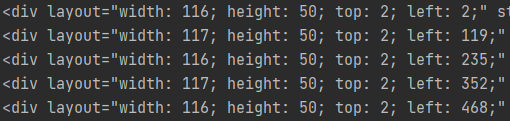
...
When I delete “justify-content: center”, the problem seems to disappear, so the key point is “justify-content: center”??
Contributor guide
First steps
- Read the whole issue, then the project's contributing guide.
- Comment on the issue to say you are picking it up — it saves two people doing the same work.
- Fork the repository and make your change on a branch.
- Open a pull request that references the issue number.
Research direction
Start with the HTML reproduction and compare the Yoga layout log with the expected red-child sizing, focusing on the interaction between percentage dimensions and justify-content: center. Use the logged positions and widths to identify the incorrect left calculation; done means the reproduction lays out the five percentage-width children across the container without the reported offset.
Written by the indexing model from the issue text.
Assessment
- Tech stack
- cpp
- Domain
- frontend
- Issue type
- Bug
- Difficulty
- 4/5
- Estimated time
- 3-5 days
- Activity status
- Stale
- Clarity
- Mostly clear
- Newbie friendliness
- 35/100