react-navigation / react-navigation/react-navigation
Custom Component with <PanGestureHandler/> not work when used in React Navigation
Nobody has claimed this yet.
- Dominant language
- TypeScript
- Stars
- 24.5k
- Forks
- 5.1k
- Avg merge
- 1d 5h
- Merged PRs (30d)
- 18
Description
Current Behavior
I'm trying to create a modal component with of gesture handler,
Here's my CustomComponent.js:
import React from 'react';
import {View, Dimensions, Text, TouchableOpacity, Animated, TextInput, Modal, FlatList} from 'react-native';
import {PanGestureHandler, gestureHandlerRootHOC, State} from 'react-native-gesture-handler';

const {width, height} = Dimensions.get('window');

export default class CustomComponent extends React.Component {
  constructor(props) {
    console.log('prop', props);
    super(props);
    this.state = {
      translateY: new Animated.Value(0),
      isModalOpen: false
    };
  }

  openModal() {
    this.setState({isModalOpen: true});
  }

  closeModal() {
    this.setState({isModalOpen: false});
  }

  handleGesture = (e) => {
    this.state.translateY.setValue(e.nativeEvent.translationY);
  };

  handlerChange = (e) => {
    if (e.nativeEvent.oldState === State.ACTIVE) {
      this.state.translateY.setValue(0)
    }
  };

  renderModalContent = gestureHandlerRootHOC(() => (
    <View style={{flex:1, justifyContent:'center', backgroundColor:'rgba(0,0,0,0.5)'}}>
      <PanGestureHandler
        onGestureEvent={this.handleGesture}>
        <Animated.View style={{alignItems: 'center', paddingVertical: 14, transform:[{translateY:this.state.translateY}] }}>
          <View
            style={{
              width: 80,
              height: 8,
              backgroundColor: 'red',
              borderRadius: 4,
            }}
          />
        </Animated.View>
      </PanGestureHandler>
    </View>
  ));

  render() {
    return (
      <View style={{flex: 1}}>
        <Modal visible={this.state.isModalOpen} transparent={true} onRequestClose={()=>this.closeModal()}>
          {this.renderModalContent()}
        </Modal>
        <TouchableOpacity onPress={() => this.openModal()}>
          <Text>Open Modal</Text>
        </TouchableOpacity>
      </View>
    );
  }
}
and in App.js if i used CustomComponent directly, it work as expected:
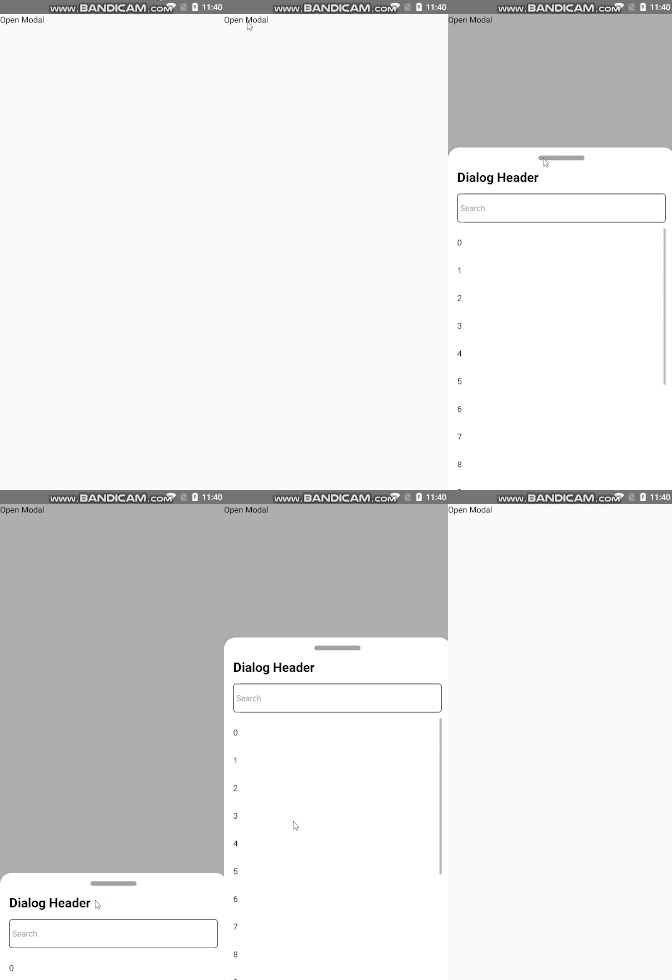
function HomeScreen() {
  return (
    <View style={{ flex: 1, alignItems: 'center', justifyContent: 'center' }}>
      <CustomComponent/>
    </View>
  );
}
const Stack = createStackNavigator();
function App() {
  return(<HomeScreen/>) //work as expected for PanGestureHandler
}
export default App;
but it doesn't work if CustomComponent wrapped in React Navigation:
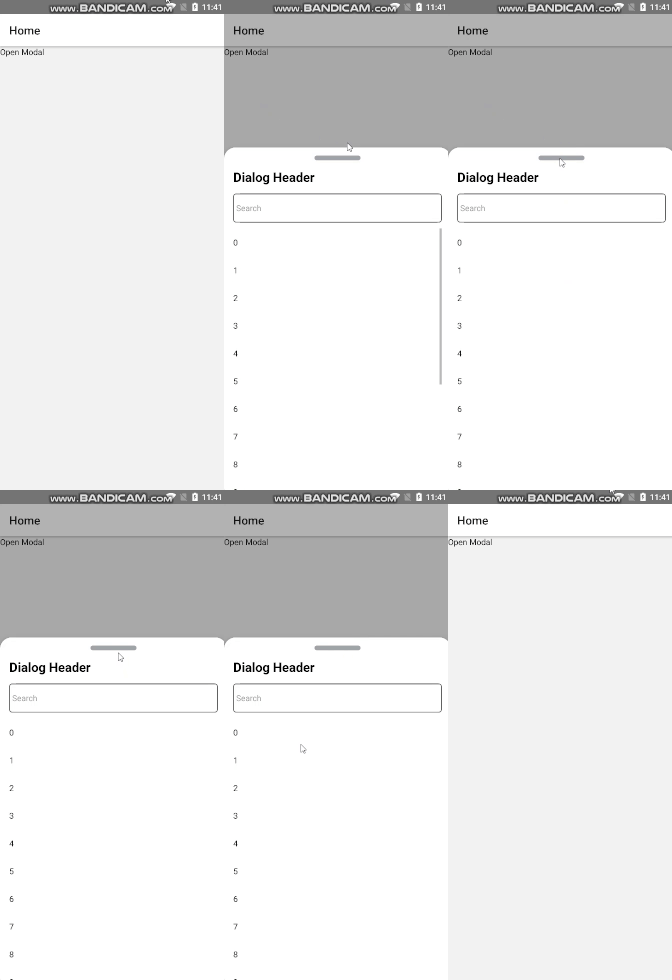
function HomeScreen() {
  return (
    <View style={{ flex: 1, alignItems: 'center', justifyContent: 'center' }}>
      <CustomComponent/>
    </View>
  );
}
const Stack = createStackNavigator();
function App() {
  return ( // doesn't work, PanGestureHandler `onGestureEvent` props doesn't fire
    <NavigationContainer>
      <Stack.Navigator>
        <Stack.Screen name="Home" component={HomeScreen} />
      </Stack.Navigator>
    </NavigationContainer>
  );
}
Expected Behavior
Want to fire even in NavigationContainer
How to reproduce
https://snack.expo.io/AW1BDdF_G (I don't know expo cannot drag my component)
Your Environment
| software | version |
|---|---|
| iOS or Android | Android |
| @react-navigation/native | ^5.7.3 |
| @react-navigation/stack | ^5.9.0 |
| react-native-gesture-handler | ^1.8.0 |
| react-native-safe-area-context | ^3.1.8 |
| react-native-screens | ^2.11.0 |
| react-native | 0.63.2 |
| expo | |
| node | node -v (v10.19.0 |
| npm or yarn | yarn -v (1.22.4) |
Contributor guide
First steps
- Read the whole issue, then the project's contributing guide.
- Comment on the issue to say you are picking it up — it saves two people doing the same work.
- Fork the repository and make your change on a branch.
- Open a pull request that references the issue number.
Research direction
Start with the CustomComponent.js and App.js examples in the issue, then compare the direct render with the NavigationContainer and Stack.Navigator case. Reproduce the Android behavior using the linked Snack and verify whether PanGestureHandler's onGestureEvent fires in both setups; done means the navigation-wrapped component responds consistently.
Written by the indexing model from the issue text.
Assessment
- Tech stack
- javascript, react-native
- Domain
- mobile
- Issue type
- Bug
- Difficulty
- 3/5
- Estimated time
- 1-2 days
- Activity status
- Stale
- Clarity
- Mostly clear
- Newbie friendliness
- 35/100