react-component / react-component/tabs
ScrollableInkTabBar - Left right tab arrows are not visible
Nobody has claimed this yet.
- Dominant language
- TypeScript
- Stars
- 572
- Forks
- 241
- Avg merge
- 4d 18h
- Merged PRs (30d)
- 4
Description
I have implemented Scrollable tabs. Few days ago, left right arrows were showing properly and functional. But now these stops working. Here is the code implemented for tabs:-
<Tabs activeKey={activeTabIndex.toString()} onChange={this.onTabChange.bind(this)}
renderTabBar={() => <ScrollableInkTabBar className='scrollable-tab-bar'
extraContent={
} />}
renderTabContent={() => }>
{
tabLayout.map(function (tabItem, index) {
return
}, this)
}
The current version of rc-tabs i am using is 9.1.10 but i have tried it with upgrade package to 9.2.0 as well but issue remain same. Here are the attached snapshot(For both UI and HTML rendered
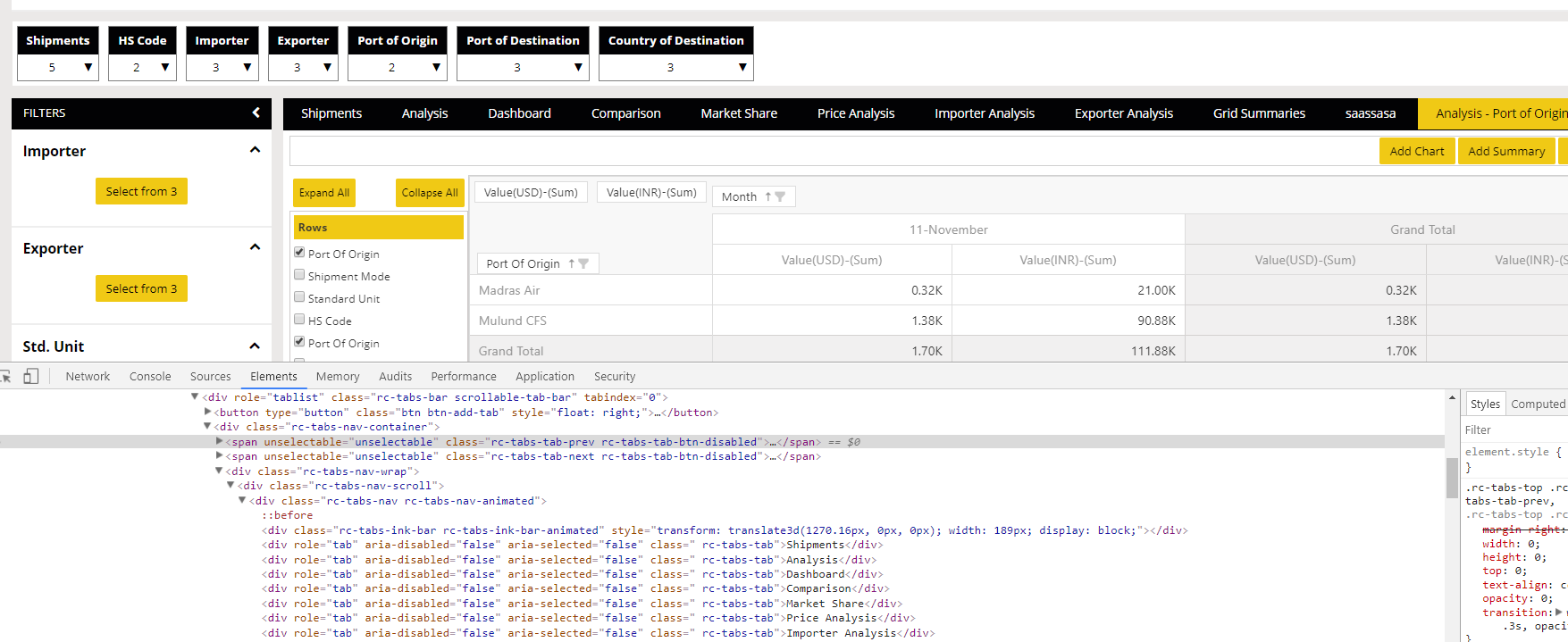

:-
Contributor guide
No contributing guide indexed for this repository
First steps
- Read the whole issue, then the project's contributing guide.
- Comment on the issue to say you are picking it up — it saves two people doing the same work.
- Fork the repository and make your change on a branch.
- Open a pull request that references the issue number.
Research direction
Start with the supplied Tabs and ScrollableInkTabBar usage, then compare the rendered HTML and screenshots for rc-tabs 9.1.10 and 9.2.0. Reproduce the case and verify whether the left and right tab arrows are both visible and functional; the issue is done when they work with this tab layout.
Written by the indexing model from the issue text.
Assessment
- Tech stack
- react, typescript
- Domain
- frontend
- Issue type
- Bug
- Difficulty
- 3/5
- Estimated time
- 1-2 days
- Activity status
- Stale
- Clarity
- Needs clarification
- Newbie friendliness
- 35/100