react-component / react-component/select
<Select /> with OptGroup in "tags" mode dropdown values display issue
Open
Nobody has claimed this yet.
- Dominant language
- TypeScript
- Stars
- 938
- Forks
- 482
- Avg merge
- 15h 8m
- Merged PRs (30d)
- 2
Description
Reproduction link

Steps to reproduce
- Type in 'g1v1'
- The problem shows.
What is expected?
Since the g1v1 is equals to the searching keyword, the first line of the dropdown menu should hide.
What is actually happening?
The first line of dropdown options was shown.
| Environment | Info |
|---|---|
| antd | 4.21.6 |
| React | 17 |
| System | win10 21H2 |
| Browser | chrome 103.0.5060.114 |
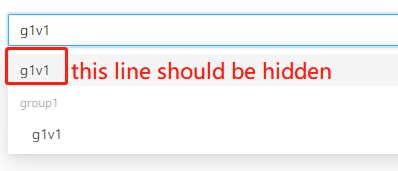
Is there anyone has similar experiences?
Thank you.
Contributor guide
No contributing guide indexed for this repository
First steps
- Read the whole issue, then the project's contributing guide.
- Comment on the issue to say you are picking it up — it saves two people doing the same work.
- Fork the repository and make your change on a branch.
- Open a pull request that references the issue number.
Research direction
Start with the linked CodeSandbox reproduction and its demo.js, then trace the Select filtering behavior for OptGroup in tags mode. Reproduce the g1v1 search case and identify the dropdown line that remains visible. Done means the matching first line is hidden as expected, with regression coverage for this case.
Written by the indexing model from the issue text.
Assessment
- Tech stack
- react, typescript
- Domain
- frontend
- Issue type
- Bug
- Difficulty
- 3/5
- Estimated time
- 1-2 days
- Activity status
- Stale
- Clarity
- Mostly clear
- Newbie friendliness
- 45/100