react-component / react-component/menu
Menu rendered inside a dropdown is not overflown properly in the second level
Nobody has claimed this yet.
- Dominant language
- TypeScript
- Stars
- 701
- Forks
- 266
- Avg merge
- 4d 11h
- Merged PRs (30d)
- 3
Description
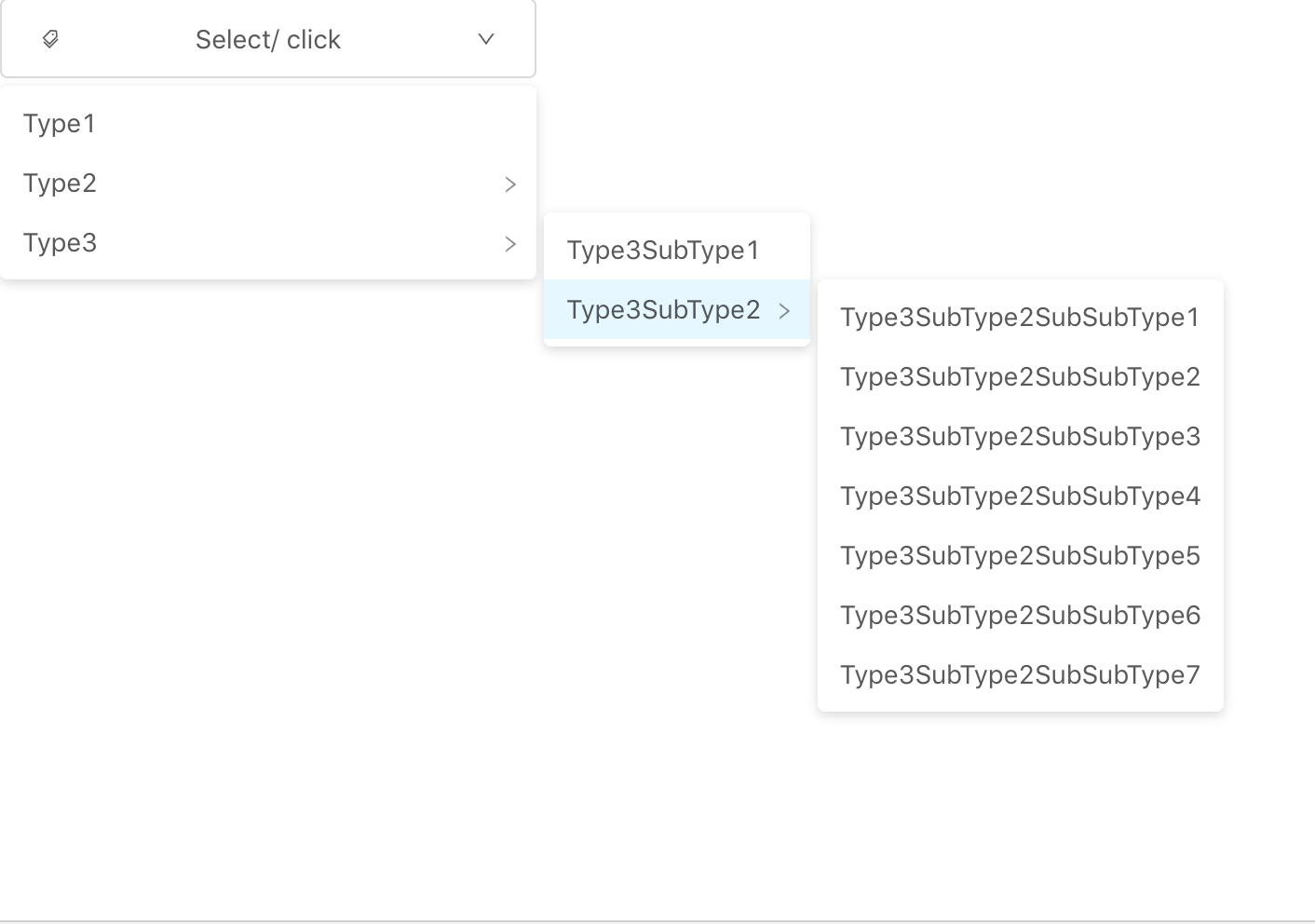
Aim: The menu(created using the recursive function) inside a dropdown, which has more than n items should overflow.
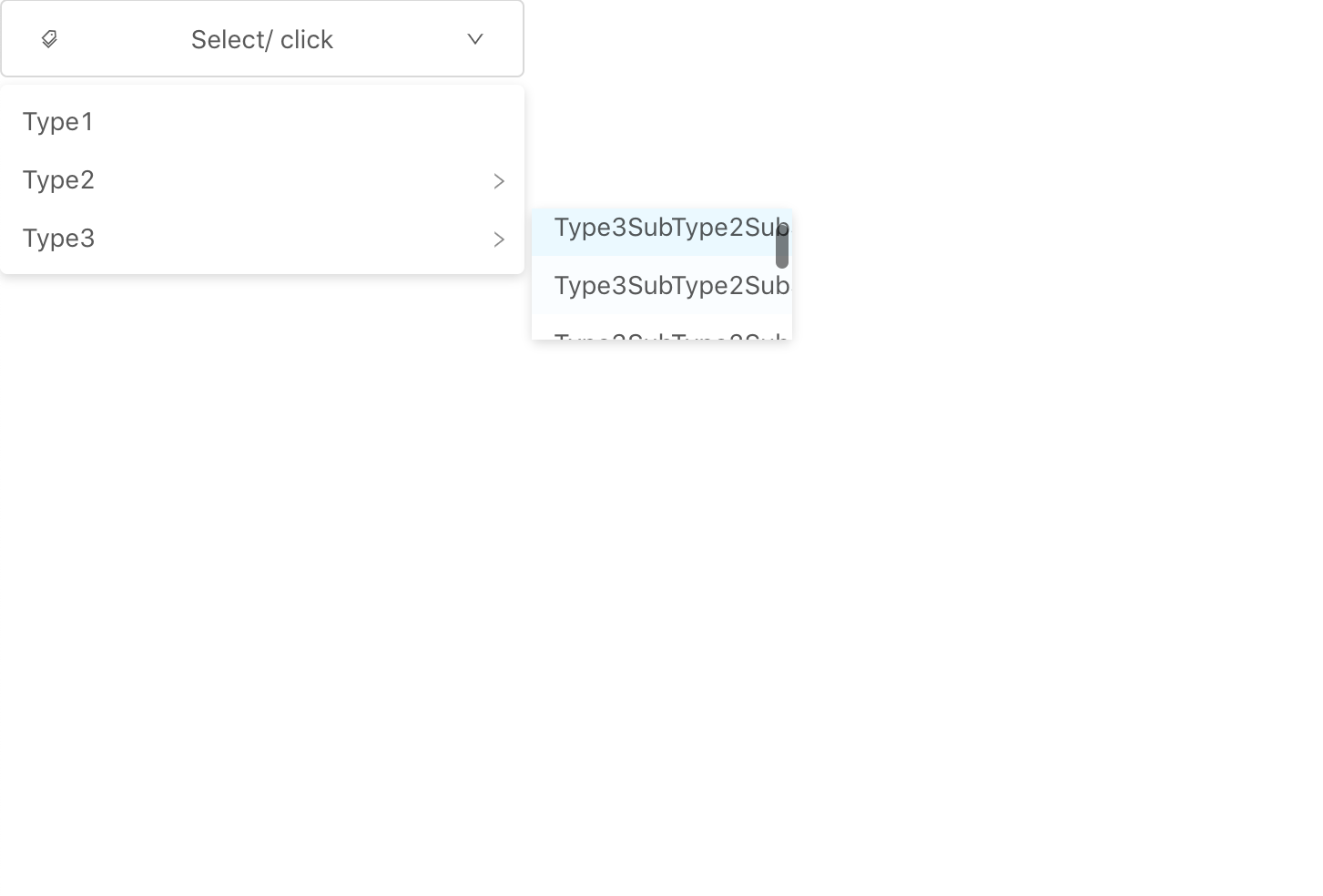
Issue: The list of items overflows in the second level(SubMenu component), but the third level(SubMenu within a SubMenu component) is rendered within the second level.
Preview
Menu rendered within a DropDown:

Overflow given to SubMenu:

Third level is rendered within the second level:
Where second level should have rendered with overflow:
Object Structure:
let obj = [{
  label: "Type1",
  value: 1
}, {
  label: "Type2",
  value: "Type2",
  children: [{
    label: "Type2SubType1",
    value: 2
  }, {
    label: "Type2SubType2",
    value: 3
  }, {
    label: "Type2SubType3",
    value: 4
  }, {
    label: "Type2SubType4",
    value: 5
  }, {
    label: "Type2SubType5",
    value: 6
  }, {
    label: "Type2SubType6",
    value: 7
  }, {
    label: "Type2SubType7",
    value: 8
  }, {
    label: "Type2SubType8",
    value: 9
  }, {
    label: "Type2SubType9",
    value: 10
  }, {
    label: "Type2SubType10",
    value: 11
  }, {
    label: "Type2SubType11",
    value: 12
  }, {
    label: "Type2SubType12",
    value: 13
  }]
}, {
  label: "Type3",
  value: "Type3",
  children: [{
    label: "Type3SubType1",
    value: 14
  }, {
    label: "Type3SubType2",
    value: "Type3SubType2",
    children: [{
        label: "Type3SubType2SubSubType1",
        value: 15
    }, {
        label: "Type3SubType2SubSubType2",
        value: 16
    }, {
        label: "Type3SubType2SubSubType3",
        value: 17
    }, {
        label: "Type3SubType2SubSubType4",
        value: 18
    }, {
        label: "Type3SubType2SubSubType5",
        value: 19
    }, {
        label: "Type3SubType2SubSubType6",
        value: 20
    }, {
        label: "Type3SubType2SubSubType7",
        value: 21
    }]
  }]
}]
Recursive Function:
const recursive = (items) => {
  return (items && items.length > 0 &&
    items.map(item => {
      if (item.children && item.children.length > 0) {
        return (
          <SubMenu
            key={item.label}
            title={item.label}
          >
            {recursive(item.children)}
          </SubMenu>
        );
      } else {
        return (
          <Menu.Item key={item.value}>
            {item.label}
          </Menu.Item>
        );
      }
    }))
};
and wrapping it up with;
<Dropdown trigger={['click']} overlay={
    <Menu triggerSubMenuAction={'click'} className="menu" mode="vertical">
      {recursive(obj)}
    </Menu>}>
Contributor guide
No contributing guide indexed for this repository
First steps
- Read the whole issue, then the project's contributing guide.
- Comment on the issue to say you are picking it up — it saves two people doing the same work.
- Fork the repository and make your change on a branch.
- Open a pull request that references the issue number.
Research direction
Start by reproducing the nested recursive Menu/SubMenu example inside a Dropdown, then inspect how the second-level SubMenu applies overflow to its children. Done means a third-level SubMenu is rendered outside the second-level overflow region while long second-level item lists still overflow correctly.
Written by the indexing model from the issue text.
Assessment
- Tech stack
- react, typescript
- Domain
- frontend
- Issue type
- Bug
- Difficulty
- 3/5
- Estimated time
- 1-2 days
- Activity status
- Stale
- Clarity
- Mostly clear
- Newbie friendliness
- 45/100