Add PIO SPI slave example
@Wren6991 is already working on this.
Since May 19, 2021.
Assessment
This issue has not been assessed yet.
Description
I currently have an Arduino Mega in SPI master mode, and a RPi Pico in slave mode, communicating over SPI. I was using the mega to troubleshoot some issues I was having.
My pinout is:
Arduino MOSI -> Pico GP16 (SPI0 RX)
Arduino SS   -> Pico GP17 (SPI0 CSn)
Arduino GND  -> Pico GND
Arduino SCLK -> Pico GP18 (SPI0 SCK)
Here is the Pico's code:
#include <stdio.h>
#include <string.h>
#include "pico/stdlib.h"
#include "pico/binary_info.h"
#include "hardware/spi.h"

int main() {
    stdio_init_all();

    printf("Initializing SPI...\n");

    // SPI initialisation. This example will use SPI at 1MHz.
    spi_init(spi_default, 1000*1000);

    spi_set_slave(spi_default, true);
    gpio_set_function(PICO_DEFAULT_SPI_RX_PIN, GPIO_FUNC_SPI);
    gpio_set_function(PICO_DEFAULT_SPI_SCK_PIN, GPIO_FUNC_SPI);
    gpio_set_function(PICO_DEFAULT_SPI_TX_PIN, GPIO_FUNC_SPI);
    gpio_set_function(PICO_DEFAULT_SPI_CSN_PIN, GPIO_FUNC_SPI);

    int bytesread = 0;
    uint8_t buffer[14];

    while(true)
    {
        bytesread = spi_read_blocking(spi_default, 0, buffer, 14);
        for(int i = 0; i < bytesread; i++)
        {
            printf("%02x ", buffer[i]);
        }
        printf("\n");
    }
}
and here is the Arduino's code:
#include <SPI.h>

void setup (void)
{
  SPI.begin();                            //Begins the SPI commnuication
  SPI.setClockDivider(SPI_CLOCK_DIV8);    //Sets clock for SPI communication at 1 MHz
  pinMode(SS, OUTPUT);
  digitalWrite(SS, HIGH);
}

//Hello, World! in hex
byte buf[14] = {0x48,0x65,0x6c,0x6c,0x6f,0x2c,0x20,0x57,0x6f,0x72,0x6c,0x64,0x21,0x00};

void loop(void)
{
  digitalWrite(SS, LOW);
  for(int i = 0; i < 14; i++){
    SPI.transfer(buf[i]);
  }
  digitalWrite(SS, HIGH);
  delay(100);
}
This code sends the byte array buffer over SPI, setting CS to LOW, completing the transfer, then setting CS back to HIGH, as this is how the SPI protocol is supposed to function. However, in doing so, the Pico only receives the first byte of each transfer, waiting until it recieves 14 bytes and then displaying all the first byte.
Pico serial output:
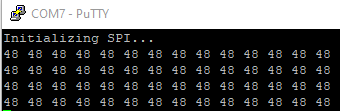
After doing some fiddling around with the code, I realized that if I change the loop to toggle CS on each byte sent, the Pico successfully receives all of the data.
void loop(void)
{
  for(int i = 0; i < 14; i++){
    digitalWrite(SS, LOW);
    SPI.transfer(buf[i]);
    digitalWrite(SS, HIGH);
  }
  delay(100);
}
New Pico serial output:
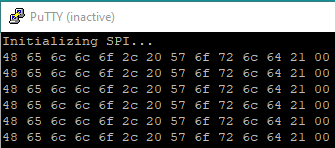
However, this is not how the SPI protocol should operate and makes the Pico incompatible with pretty much every SPI master device, and seems to be an issue in the pico's hardware_spi library, unless this is user error and if that is the case then I will gladly be corrected.
- Dominant language
- C
- Stars
- 3.9k
- Forks
- 1k
- Avg merge
- 1d 16h
- Merged PRs (30d)
- 1
Contributor guide
First steps
- Read the whole issue, then the project's contributing guide.
- Comment on the issue to say you are picking it up — it saves two people doing the same work.
- Fork the repository and make your change on a branch.
- Open a pull request that references the issue number.
More from raspberrypi/pico-examples
-
Difficulty 2/5 1-3 hours Newbie friendliness 68/100
raspberrypi/pico-examples#788 ·
-
Difficulty 1/5 Under an hour Newbie friendliness 72/100
raspberrypi/pico-examples#780 · 2 comments ·
-
Difficulty 1/5 Under an hour Newbie friendliness 68/100
raspberrypi/pico-examples#262 · 2 comments ·
-
Difficulty 1/5 Under an hour Newbie friendliness 75/100
raspberrypi/pico-examples#224 · 1 comment ·
-
Difficulty 4/5 3-5 days Newbie friendliness 55/100
raspberrypi/pico-examples#783 ·
All issues in raspberrypi/pico-examples
Similar issues
-
[adam] AdamNet network read doesn't cap to MAX_ADAM_PACKET_LEN, overflows client receive buffers Open
Difficulty 2/5 1-3 hours Newbie friendliness 88/100
FujiNetWIFI/fujinet-firmware#1649 · 2 comments ·
-
Difficulty 2/5 1-3 hours Newbie friendliness 68/100
HarbourMasters/Shipwright#7229 ·
-
Difficulty 2/5 1-3 hours Newbie friendliness 72/100
riscv-software-src/riscv-isa-sim#2435 · 1 comment ·
-
bug Self Built Image SNAPSHOT Supported Device target/ramips
Difficulty 2/5 1-3 hours Newbie friendliness 88/100
-
Difficulty 2/5 1-3 hours Newbie friendliness 76/100