CMIO4&rpi-5.10.y - DSI1(2lanes) cannot display
Nobody has claimed this yet.
Assessment
- Difficulty
- 4/5
- Estimated time
- 3-5 days
- Newbie friendliness
- 30/100
- Issue type
- Bug
- Clarity
- Needs clarification
- Activity status
- Stale
- Tech stack
- c, linux, raspberry-pi
- Domain
- embedded-iot, operating-systems
Research direction
Start by reproducing the reported setup with the rpi-5.10.y and mipi_dsi commits, using the /boot/config.txt settings and the supplied dts.txt and raspinfo.txt files. Compare the kernel and overlay behavior for the ST7701s two-lane DSI connection; done means the LCD displays the GUI rather than only the initialization or test screen.
Written by the indexing model from the issue text.
Description
Describe the bug
-
Problem description:
CMIO4 runs the latest rpi-5.10.y. The initialization code can be sent to MIPI LCD(ST7701s 2lanes) through lane0, but the GUI cannot be displayed. -
Raspberrypi kernel:
https://github.com/raspberrypi/linux.git
branch: rpi-5.10.y
commit: 4f86a599b4cd07e635f289451d6460b1fd6d78ed -
Test code:
https://github.com/Seeed-Studio/seeed-linux-dtoverlays.git
branch: mipi_dsi
commit: 668fdb0780c2e9685b9a6c96f15909d398398ada -
Test Method:
Config /boot/config.txt
dtparam=i2c_arm=on
dtparam=i2c_vc=on
ignore_lcd=1
dtoverlay=vc4-kms-v3d-pi4
dtoverlay=mipi_dsi-i2c10
Compile the code:
cd seeed-linux-dtoverlays
make all_rpi
sudo make install_rpi
sudo reboot
-
Hardware:
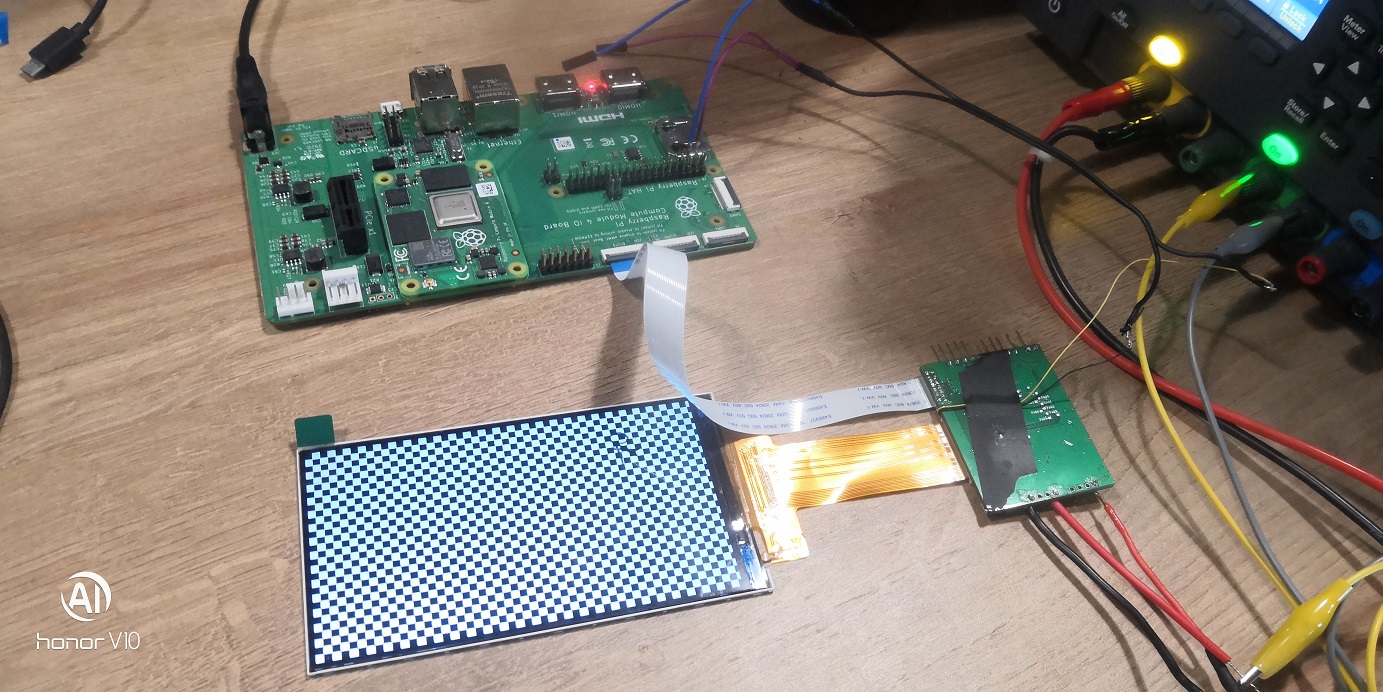
I have a bridge board, an MCU on the board controls the RESET and PWM backlight of the LCD, I2C connected to I2C1 of CMIO4, and the LCD MIPI pin is directly connected between the CMIO4. -
What I tried so far:
I can send test commands to the LCD, and the LCD can display the test screen, as shown in the picture below.
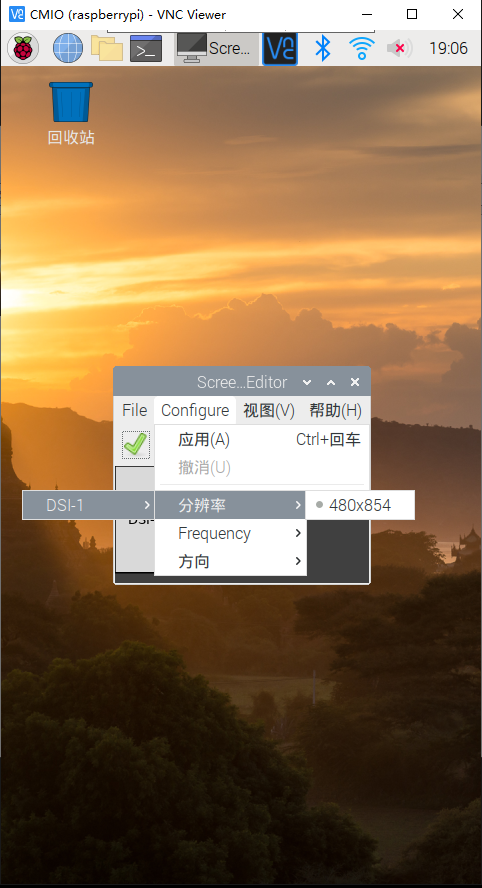
And I can see the correct display configuration through VNC.
Logs
raspinfo.txt
dts.txt
- Dominant language
- C
- Stars
- 13.2k
- Forks
- 5.5k
- Avg merge
- 2d 21h
- Merged PRs (30d)
- 21
Contributor guide
No contributing guide indexed for this repository
First steps
- Read the whole issue, then the project's contributing guide.
- Comment on the issue to say you are picking it up — it saves two people doing the same work.
- Fork the repository and make your change on a branch.
- Open a pull request that references the issue number.
More from raspberrypi/linux
-
Difficulty 2/5 1-3 hours Newbie friendliness 68/100
raspberrypi/linux#7415 · 2 comments · 1 reaction ·
-
rp1-cfe doesn't forward V4L2_EVENT_SOURCE_CHANGE event from csi-2 sensor driver to userspace app Open
Difficulty 2/5 1-3 hours Newbie friendliness 72/100
raspberrypi/linux#7399 · 1 comment ·
-
Difficulty 1/5 Under an hour Newbie friendliness 82/100
raspberrypi/linux#7357 · 1 comment ·
-
Difficulty 2/5 1-3 hours Newbie friendliness 68/100
raspberrypi/linux#7054 · 2 comments ·
-
Difficulty 4/5 3-5 days Newbie friendliness 48/100
raspberrypi/linux#7634 · 8 comments · 1 reaction ·
All issues in raspberrypi/linux
Similar issues
-
[adam] AdamNet network read doesn't cap to MAX_ADAM_PACKET_LEN, overflows client receive buffers Open
Difficulty 2/5 1-3 hours Newbie friendliness 88/100
FujiNetWIFI/fujinet-firmware#1649 · 2 comments ·
-
Difficulty 2/5 1-3 hours Newbie friendliness 68/100
HarbourMasters/Shipwright#7229 ·
-
Difficulty 2/5 1-3 hours Newbie friendliness 72/100
riscv-software-src/riscv-isa-sim#2435 · 1 comment ·
-
bug Self Built Image SNAPSHOT Supported Device target/ramips
Difficulty 2/5 1-3 hours Newbie friendliness 88/100
-
Difficulty 2/5 1-3 hours Newbie friendliness 76/100