Unable to boot PI3B from external USB HD anymore
Nobody has claimed this yet.
Assessment
- Difficulty
- 4/5
- Estimated time
- 3-5 days
- Newbie friendliness
- 25/100
- Issue type
- Bug
- Clarity
- Needs clarification
- Activity status
- Stale
- Tech stack
- c, linux, raspberry-pi
- Domain
- embedded-iot, operating-systems
Research direction
Start by reproducing both boot scenarios with the September 2019 Raspbian Lite image, the config.txt setting, and the SD card cmdline.txt change described in the report. Compare the available output with the attached screenshot and linked linux#3126, while collecting the missing raspinfo, firmware, OS, and kernel details. Done means identifying a reproducible kernel-related cause or confirming that the system boots from the external USB drive.
Written by the indexing model from the issue text.
Description
Is this the right place for my bug report?
An issue with booting the PI from an external USB -- this used to work. Bootloader comes up (sometimes), but the kernel won't finish loading.
Describe the bug
General boot failure when attempting to boot using an external USB Drive.
To reproduce
Two scenarios:
- External USB HD Only:
- Image an SD Card with https://downloads.raspberrypi.org/raspbian_lite_latest (version September 2019 - full version archived at https://downloads.raspberrypi.org/raspbian/images/raspbian-2019-09-30/2019-09-26-raspbian-buster.zip)
- Set config.txt setting
program_usb_boot_mode=1 - Boot PI (it works)
- Powerdown PI
- Image external HD.
- Set config.txt setting
program_usb_boot_mode=1 - Plug HD into powered usb hub, plug Hub into PI
- Boot PI.
- Boot on SD card, rootfs on External HD
- Set config.txt setting
program_usb_boot_mode=1 - Boot PI (it works)
- Powerdown PI
- Image external HD.
- update cmdline.txt file on SD card to load from root partition on external HD. (Note: balenaEtcher may set Disk UUIDs/PartitionUUIDs to the same value -- be sure to check and modify if required!)
- Insert SD & plug in External USB HD.
- Boot PI.
Expected behaviour
System boots
Actual behaviour
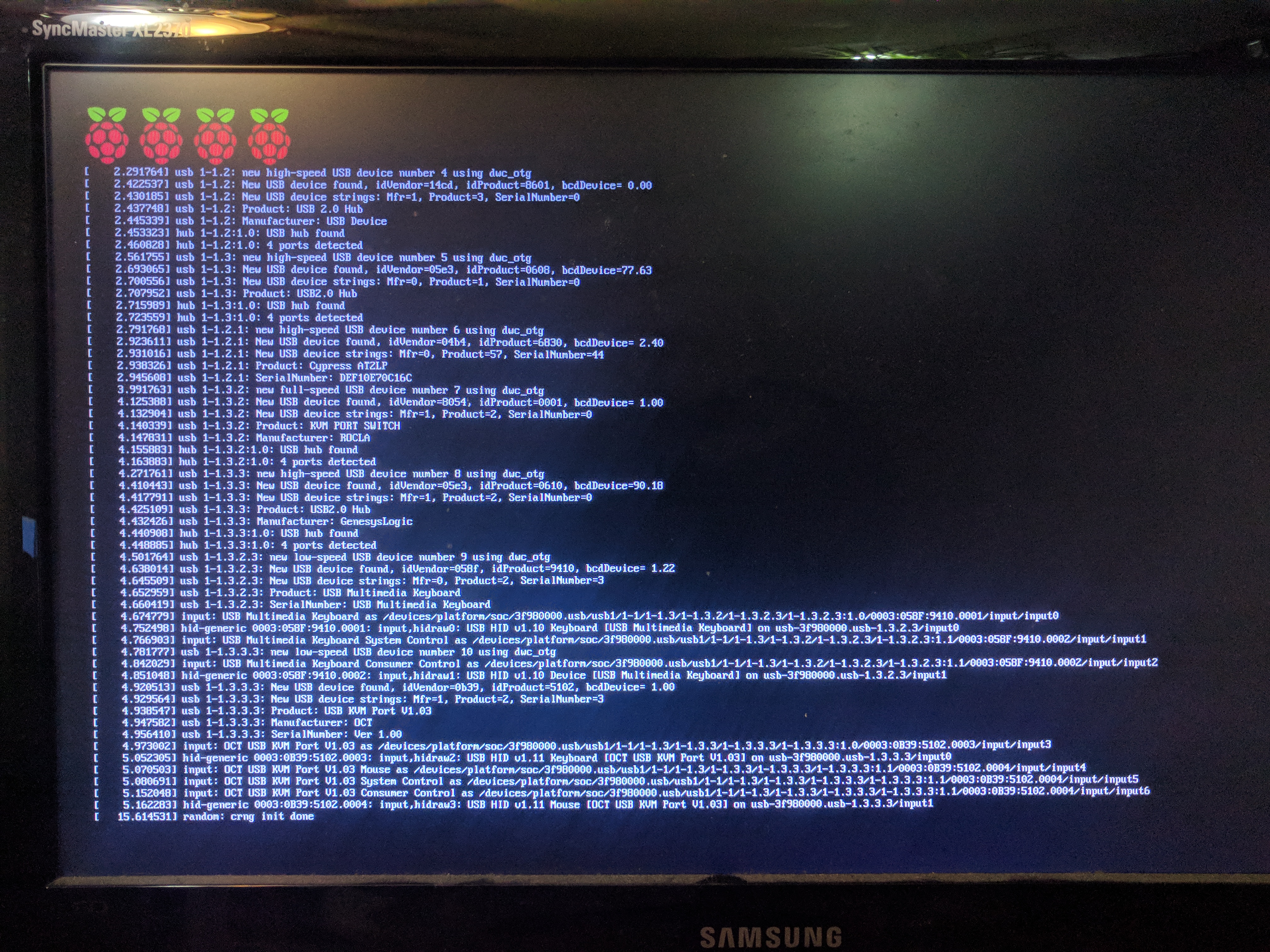
- First boot gets four Raspi's. Second boot, no splash or Raspi's. See https://github.com/raspberrypi/linux/issues/3126
- See attached Screen
System
Copy and paste the results of the raspinfo command in to this section. Alternatively, copy and paste a pastebin link, or add answers to the following questions:
- Which model of Raspberry Pi? e.g. Pi3B+, PiZeroW
- Which OS and version (
cat /etc/rpi-issue)? - Which firmware version (
vcgencmd version)? - Which kernel version (
uname -a)?
Logs
See screenshot of available output (Scenario 2)
Additional context
None currently available.
- Dominant language
- C
- Stars
- 13.2k
- Forks
- 5.5k
- Avg merge
- 2d 21h
- Merged PRs (30d)
- 21
Contributor guide
No contributing guide indexed for this repository
First steps
- Read the whole issue, then the project's contributing guide.
- Comment on the issue to say you are picking it up — it saves two people doing the same work.
- Fork the repository and make your change on a branch.
- Open a pull request that references the issue number.
More from raspberrypi/linux
-
Difficulty 2/5 1-3 hours Newbie friendliness 68/100
raspberrypi/linux#7415 · 2 comments · 1 reaction ·
-
rp1-cfe doesn't forward V4L2_EVENT_SOURCE_CHANGE event from csi-2 sensor driver to userspace app Open
Difficulty 2/5 1-3 hours Newbie friendliness 72/100
raspberrypi/linux#7399 · 1 comment ·
-
Difficulty 1/5 Under an hour Newbie friendliness 82/100
raspberrypi/linux#7357 · 1 comment ·
-
Difficulty 2/5 1-3 hours Newbie friendliness 68/100
raspberrypi/linux#7054 · 2 comments ·
-
Difficulty 4/5 3-5 days Newbie friendliness 48/100
raspberrypi/linux#7634 · 8 comments · 1 reaction ·
All issues in raspberrypi/linux
Similar issues
-
Difficulty 2/5 1-3 hours Newbie friendliness 88/100
zephyrproject-rtos/zephyr#119726 ·
-
[Bounty proposal] fix(web): memory insights count an evening memory on the next day ($25 proposed) Open
Difficulty 2/5 1-3 hours Newbie friendliness 84/100
BasedHardware/omi#15320 ·
-
[adam] AdamNet network read doesn't cap to MAX_ADAM_PACKET_LEN, overflows client receive buffers Open
Difficulty 2/5 1-3 hours Newbie friendliness 88/100
FujiNetWIFI/fujinet-firmware#1649 · 2 comments ·
-
Difficulty 2/5 1-3 hours Newbie friendliness 68/100
HarbourMasters/Shipwright#7229 ·
-
Difficulty 2/5 1-3 hours Newbie friendliness 72/100
riscv-software-src/riscv-isa-sim#2435 · 1 comment ·