Usability setting breakpoints: Allow setting at linen umbers, always show points in debug and/or enlage points
Nobody has claimed this yet.
- Dominant language
- Racket
- Stars
- 516
- Forks
- 103
- PR merge metrics
- No merged PRs in 30d
Description
Story: As a programmer, I want to debug my programs and find out what the code does at certain points.
Context: I assume the user is not an expert in using DrRacket yet and has possibly some experience in other IDEs.
Current way:
-
Run the application once
-
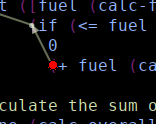
Hover over a bracket
-
Keep hovering, move over the red dot
-
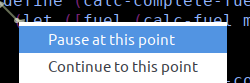
right mouse down on red dot
-
keep mouse button pressed, hover "pause at this point"
-
release right mouse button
Problem: It is hard to find out how to set a breakpoint, and even if you know how to do it there are several ways that cause it to be easily messed up, particularly for users who have problems with fine motor skills. Here are some of the difficulties users face:
- Setting breakpoints by clicking in the line numbers does not work (this might be known from other IDEs)
- There is no modelessly available command to set breakpoints (modeless means that the IDE does not need to be in a specific state)
- The mode the IDE needs to be in is hidden twice:
- For one, the application needs to have run
- The user needs to hover a bracket (hard to hit) and have a small point appear. Only then can the breakpoint be set IF they right click.
- Right click on a small dot can easily shift the mouse and by that miss the dot.
Possible solutions:
- allow setting breakpoints via line number bar.
- Since the line numbers allow only stopping once in each line: Why not make the breakpoints visible all time as soon as the program is in debug mode? Build in dev tools of browsers to this already, see this:
 (the light-blue is a not-activated breakpoint). This would also do away with the right click, since you could toggle via primary mouse button.
 - Some fixes like making the area that triggers showing of the breakpoint larger as well as making the dots itself larger.
Contributor guide
No contributing guide indexed for this repository
First steps
- Read the whole issue, then the project's contributing guide.
- Comment on the issue to say you are picking it up — it saves two people doing the same work.
- Fork the repository and make your change on a branch.
- Open a pull request that references the issue number.
Research direction
Start by tracing DrRacket's existing breakpoint UI from the described run/debug workflow, including the bracket hover, red breakpoint dot, and line-number bar. Done should make breakpoint placement discoverable and usable through the proposed line-number or always-visible controls, while addressing the stated mouse-targeting problems.
Written by the indexing model from the issue text.
Assessment
- Domain
- accessibility, devtools
- Issue type
- Feature
- Difficulty
- 5/5
- Estimated time
- Over a week
- Activity status
- Stale
- Clarity
- Needs clarification
- Newbie friendliness
- 35/100