quarto-dev / quarto-dev/quarto
VSCode: "Getting Started" walkthrough text appears cut-off at small widths
Nobody has claimed this yet.
- Dominant language
- TypeScript
- Stars
- 645
- Forks
- 62
- Avg merge
- 17h 42m
- Merged PRs (30d)
- 13
Description
See the attached screenshot; the "Edit an equation" text appears cut-off in the middle of the page:
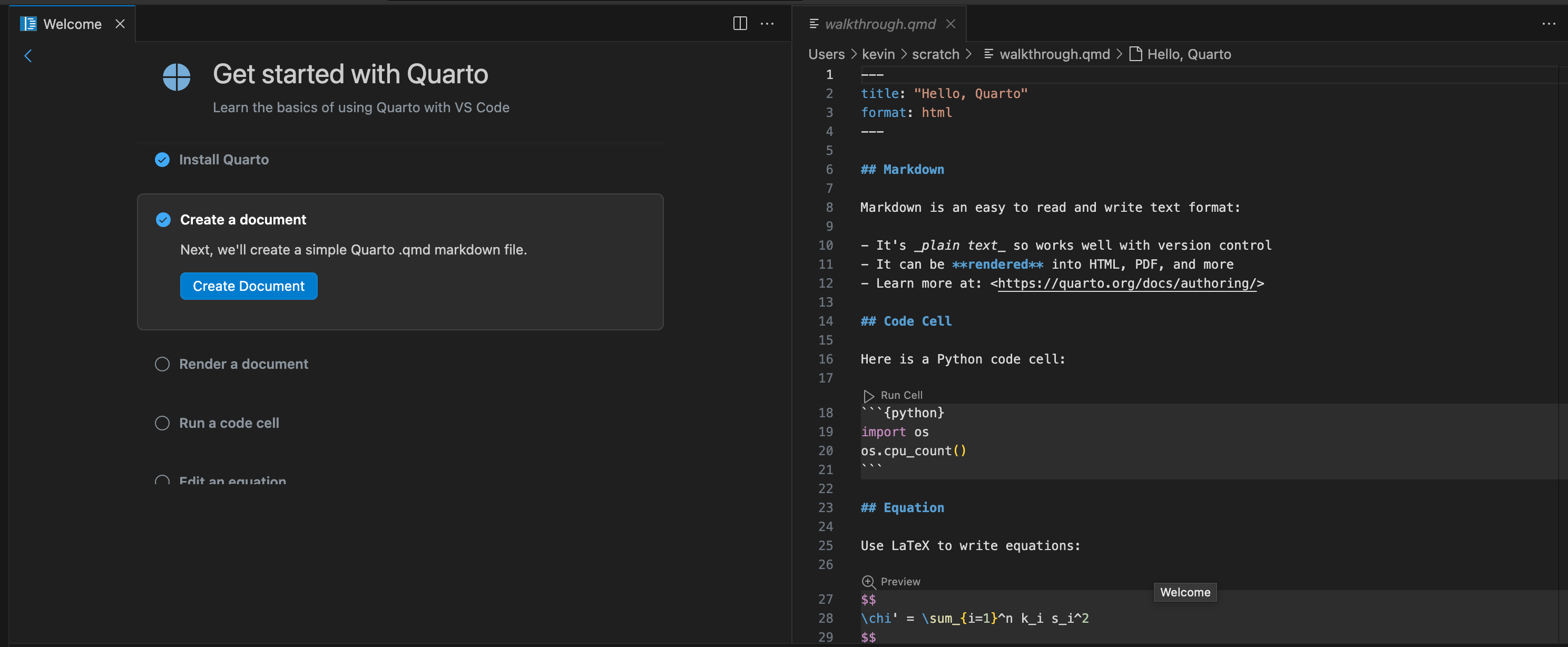
Comparing with other walkthroughs, I think the confusion arises because other examples always use an accompanying image, and the walkthrough resizes the image so that it displays either beside or below the walkthrough content...


Minor, but it is a bit confusing at first glance.
Contributor guide
No contributing guide indexed for this repository
First steps
- Read the whole issue, then the project's contributing guide.
- Comment on the issue to say you are picking it up — it saves two people doing the same work.
- Fork the repository and make your change on a branch.
- Open a pull request that references the issue number.
Research direction
Start by reproducing the VSCode "Getting Started" walkthrough at a small window width and compare the "Edit an equation" walkthrough with examples that include images. Trace the walkthrough layout entry point and verify that the text is fully visible at narrow widths without disrupting the other walkthroughs.
Written by the indexing model from the issue text.
Assessment
- Tech stack
- typescript, vscode
- Domain
- frontend
- Issue type
- Bug
- Difficulty
- 3/5
- Estimated time
- 1-2 days
- Activity status
- Stale
- Clarity
- Mostly clear
- Newbie friendliness
- 35/100