Software executed using subprocess.Popen() or os.system() may encounter errors due to DLLs.
Nobody has claimed this yet.
Assessment
- Difficulty
- 4/5
- Estimated time
- 3-5 days
- Newbie friendliness
- 20/100
- Issue type
- Bug
- Clarity
- Needs clarification
- Activity status
- Stale
- Tech stack
- python
- Domain
- operating-systems
Research direction
No CPython source file, test, or entry point is identified. Start by reproducing the subprocess.Popen() and os.system() examples on Windows 10 with Python 3.11.0, then compare them with manually launching C:\BackUp\Backup.exe. Done requires a confirmed, reproducible CPython problem with a defined expected behavior.
Written by the indexing model from the issue text.
Description
Bug report
The following two lines of code execute the software, but the software fails midway due to a missing DLL: "Failed to execute 'regsvr32 /s CommonEvent.dll'".
subprocess.Popen('C:\\BackUp\Backup.exe', shell=True)

os.system('C:\\BackUp\Backup.exe')
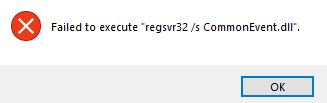
When manually executing C:\BackUp\Backup.exe, the program runs and completes its task without issue. I have looked for a solution but have not been able to find the cause of the problem. I would appreciate any help.
Your environment
OS: Windows10
Python 3.11.0
- Dominant language
- Python
- Stars
- 77.2k
- Forks
- 36k
- Avg merge
- 1d 9h
- Merged PRs (30d)
- 558
Contributor guide
First steps
- Read the whole issue, then the project's contributing guide.
- Comment on the issue to say you are picking it up — it saves two people doing the same work.
- Fork the repository and make your change on a branch.
- Open a pull request that references the issue number.
More from python/cpython
-
docs pending
Difficulty 2/5 1-3 hours Newbie friendliness 78/100
-
stdlib type-feature
Difficulty 2/5 1-3 hours Newbie friendliness 78/100
-
stdlib type-feature
Difficulty 2/5 1-3 hours Newbie friendliness 72/100
-
build type-bug
Difficulty 2/5 1-3 hours Newbie friendliness 76/100
-
stdlib topic-email type-feature
Difficulty 2/5 1-3 hours Newbie friendliness 70/100
Similar issues
-
Difficulty 2/5 1-3 hours Newbie friendliness 82/100
-
Difficulty 2/5 1-3 hours Newbie friendliness 84/100
-
Difficulty 2/5 1-3 hours Newbie friendliness 68/100
-
Difficulty 2/5 1-3 hours Newbie friendliness 86/100
-
🐛 Bug 🔔 Pending processing
Difficulty 2/5 1-3 hours Newbie friendliness 84/100
jumpserver/jumpserver#17584 ·