python-pillow / python-pillow/Pillow
Backup font for missing characters when drawing text
Nobody has claimed this yet.
- Dominant language
- Python
- Stars
- 13.8k
- Forks
- 2.5k
- Avg merge
- 2d 8h
- Merged PRs (30d)
- 89
Description
Description of the request
I want to use a specific font but also draw characters which are not available in that font. Replace them with characters from another "generic" font, like Arial-Bold for example.
Similarly to how web browsers work when they are missing characters from fonts - the OS fills that void from a default font.
from PIL import Image, ImageFont, ImageDraw


temp_canvas = Image.new("RGBA", (1200, 300), (255, 255, 255, 255))
draw_canvas = ImageDraw.Draw(temp_canvas, "RGBA")

font = ImageFont.truetype(r"C:\fonts\BarlowSemiCondensed-Bold.ttf", size=150)
text_string = "hello ಠಠ world"

draw_canvas.text((100, 100), text_string, fill="#000000", font=font)

temp_canvas.show()
The output is:
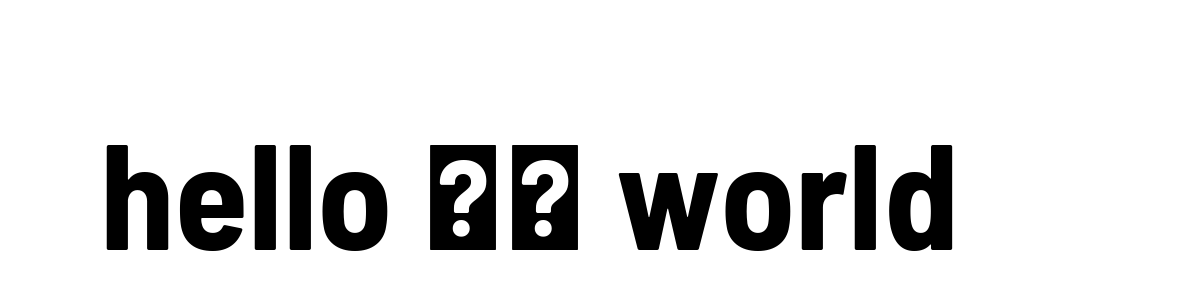
Proposed solution
Add an argument to ImageDraw.Draw().text() like backup_font , which would be used when the first font doesn't have the character specified in text_string . Like ಠ in this example
Contributor guide
First steps
- Read the whole issue, then the project's contributing guide.
- Comment on the issue to say you are picking it up — it saves two people doing the same work.
- Fork the repository and make your change on a branch.
- Open a pull request that references the issue number.
Research direction
Start at the ImageDraw.Draw().text() entry point described in the request and inspect how the supplied font handles characters missing from its glyph set. Done means text can use a specified backup font for missing characters, including the shown ಠ example, while preserving the primary font for supported characters.
Written by the indexing model from the issue text.
Assessment
- Tech stack
- python
- Domain
- computer-graphics
- Issue type
- Feature
- Difficulty
- 5/5
- Estimated time
- Over a week
- Activity status
- Stale
- Clarity
- Mostly clear
- Newbie friendliness
- 35/100