scale() has unintended behavior with negative values when used in conjunction with image() ~~scale() is broken for negative values~~
Nobody has claimed this yet.
- Dominant language
- JavaScript
- Stars
- 24k
- Forks
- 3.8k
- Avg merge
- 3d 16h
- Merged PRs (30d)
- 25
Description
Most appropriate sub-area of p5.js?
- Accessibility
- Color
- Core/Environment/Rendering
- Data
- DOM
- Events
- Image
- IO
- [x ] Math
- Typography
- Utilities
- WebGL
- Build Process
- Unit Testing
- Internalization
- Friendly Errors
- Other (specify if possible)
p5.js version
1.5.0
Web browser and version
Chrome 108.0.5359.125 64bit
Operating System
Windows 11
Steps to reproduce this
Steps:
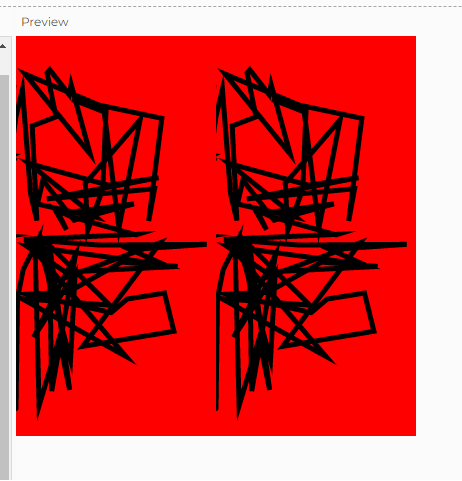
use the following code in editor.p5js.org and notice that the right side of the screen is not properly mirrored despite usage of scale(-1, 1).
Many answers on StackOverflow suggest this and show it working but it is seemingly broken on new releases? Repro's locally for me
Snippet:
This snippet fills the main canvas with blue on the left and red on the right along with a random squiggle drawn (to be able to tell if it's properly mirroring or not)
This code DOES copy the red right side of the canvas to the left but does so without properly mirroring (ignoring the negative value passed into scale())
let canvas;

function setup() {
  createCanvas(400, 400);
  canvas = createGraphics(width, height);
  noStroke();
  canvas.noStroke();

  background(255);

  // fill left with blue
  fill(0, 0, 255);
  rect(0, 0, width/2, height);

  // fill right with red
  fill(255, 0, 0);
  rect(width/2, 0, width/2, height);

  // draw random squiggle in black to be able to test for mirroring properly
  push();
  strokeWeight(5);
  stroke(0);
  translate(width/2, height/2);
  beginShape();
  for (let i = 0; i < 150; i++) {
    let angle = map(i, 0, 150, 0, TWO_PI);
    let x = sin(angle) * random(width/2);
    let y = cos(angle) * random(height/2);
    vertex(x, y);
  }
  endShape();
  pop();
}

function draw() {
  // NOTE: this still doesn't work properly when wrapped with push()/pop()
  copy(width/2, 0, width/2, height, 0, 0, width/2, height);
  scale(-1, 1); // **seemingly broken line**
  image(canvas, 0, 0, width/2, height, width/2, 0, -width/2, height);
  noLoop();
}
output of this script looks like this but should have the left side of the canvas mirrored across the y axis
Contributor guide
First steps
- Read the whole issue, then the project's contributing guide.
- Comment on the issue to say you are picking it up — it saves two people doing the same work.
- Fork the repository and make your change on a branch.
- Open a pull request that references the issue number.
Research direction
Start by running the provided sketch in editor.p5js.org or locally with p5.js 1.5.0, focusing on the scale(-1, 1) and image() calls in draw(). Trace the scale and image rendering entry points to determine why the negative value is not mirrored. Done means the red canvas region and random squiggle are correctly mirrored across the y axis while preserving the existing behavior.
Written by the indexing model from the issue text.
Assessment
- Tech stack
- javascript
- Domain
- computer-graphics
- Issue type
- Bug
- Difficulty
- 3/5
- Estimated time
- 1-2 days
- Activity status
- Stale
- Clarity
- Mostly clear
- Newbie friendliness
- 45/100