When creating an image with createGraphics(), the image is corrupted if the size is specified as a decimal
Open
@xrcyz is already working on this.
Since Sep 7, 2022.
Area:Image
Bug
- Dominant language
- JavaScript
- Stars
- 24k
- Forks
- 3.8k
- Avg merge
- 3d 16h
- Merged PRs (30d)
- 25
Description
Most appropriate sub-area of p5.js?
- Accessibility (Web Accessibility)
- Build tools and processes
- Color
- Core/Environment/Rendering
- Data
- DOM
- Events
- Friendly error system
- Image
- IO (Input/Output)
- Localization
- Math
- Unit Testing
- Typography
- Utilities
- WebGL
- Other (specify if possible)
p5.js version
1.4.0
Web browser and version
102.0.5005.115 (Official Build) (x86_64)
Operating System
MacOSX 10.15.7
Steps to reproduce this
When creating an image with createGraphics(), the image is corrupted if the size is specified as a decimal.
Snippet:
Using the code in loadPixels() as a reference, I wrote code to repeat the image created in createGraphics(), up and down.
Normal case

let img;

function setup() {
  createCanvas(200, 200);

  img = createGraphics(width, height);
  img.background(252, 186, 3);
  img.textAlign(CENTER, CENTER);
  img.textSize(180);
  img.text("🦄", width / 2, height / 2);

  let d = img.pixelDensity();
  let halfImage = 4 * (img.width * d) * ((img.height * d) / 2);
  img.loadPixels();
  for (let i = 0; i < halfImage; i++) {
    img.pixels[i + halfImage] = img.pixels[i];
  }
  img.updatePixels();

  image(img, 0, 0);
}
Buggy case
If the size of createGraphics() is a decimal, the color and position of the image is bugged.
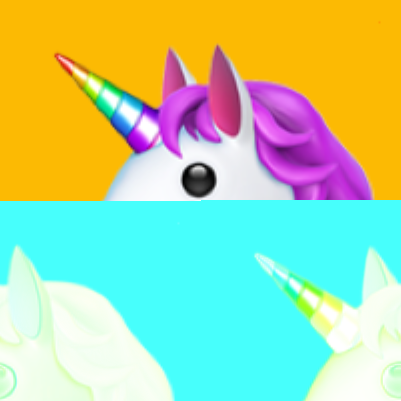
let img;

function setup() {
  createCanvas(200.5, 200.5);

  img = createGraphics(width, height);
  img.background(252, 186, 3);
  img.textAlign(CENTER, CENTER);
  img.textSize(180);
  img.text("🦄", width / 2, height / 2);

  let d = img.pixelDensity();
  let halfImage = 4 * (img.width * d) * ((img.height * d) / 2);
  img.loadPixels();
  for (let i = 0; i < halfImage; i++) {
    img.pixels[i + halfImage] = img.pixels[i];
  }
  img.updatePixels();

  image(img, 0, 0);
}

let img;

function setup() {
  createCanvas(200.9, 200.0);

  img = createGraphics(width, height);
  img.background(252, 186, 3);
  img.textAlign(CENTER, CENTER);
  img.textSize(180);
  img.text("🦄", width / 2, height / 2);

  let d = img.pixelDensity();
  let halfImage = 4 * (img.width * d) * ((img.height * d) / 2);
  img.loadPixels();
  for (let i = 0; i < halfImage; i++) {
    img.pixels[i + halfImage] = img.pixels[i];
  }
  img.updatePixels();

  image(img, 0, 0);
}
Contributor guide
First steps
- Read the whole issue, then the project's contributing guide.
- Comment on the issue to say you are picking it up — it saves two people doing the same work.
- Fork the repository and make your change on a branch.
- Open a pull request that references the issue number.
Assessment
This issue has not been assessed yet.