primefaces / primefaces/primereact
DataTable: Filter icon gets highlighted even without clicking on the apply button.
Nobody has claimed this yet.
- Dominant language
- CSS
- Stars
- 8.3k
- Forks
- 1.2k
- PR merge metrics
- No merged PRs in 30d
Description
Describe the bug
In the primereact dataTable the filter icon gets highlighted even without clicking on the apply button.
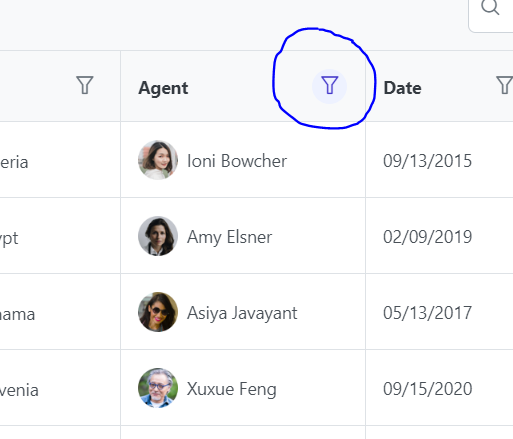
Selected 'Amy Elsner' from agent column-> did not click on apply-> closed the filter popup-> filter icon is highlighted
Reproducer
https://primereact.org/datatable/#filter
PrimeReact version
8.6.1
React version
17.x
Language
ES6
Build / Runtime
Next.js
Browser(s)
Chrome
Steps to reproduce the behavior
- Select 'Amy Elsner' from filter of agent column in DataTable.
- Do not click on apply
- Close the filter popup
We can see the Filter icon highlighted.
Expected behavior
Filter icon should be highlighted, only when filter is applied (after clicking the apply button).
Contributor guide
First steps
- Read the whole issue, then the project's contributing guide.
- Comment on the issue to say you are picking it up — it saves two people doing the same work.
- Fork the repository and make your change on a branch.
- Open a pull request that references the issue number.
Research direction
Start with the DataTable filter reproducer at https://primereact.org/datatable/#filter and reproduce the behavior using the agent column. Trace the DataTable filter implementation and verify that closing the popup without clicking Apply does not highlight the filter icon, while applying the filter does.
Written by the indexing model from the issue text.
Assessment
- Tech stack
- javascript, react
- Domain
- frontend
- Issue type
- Bug
- Difficulty
- 3/5
- Estimated time
- 1-2 days
- Activity status
- Stale
- Clarity
- Mostly clear
- Newbie friendliness
- 45/100