pnp / pnp/sp-dev-fx-controls-react
Dynamic Form - Column 'MediaServiceImageTags_0' does not exist
Nobody has claimed this yet.
- Dominant language
- TypeScript
- Stars
- 433
- Forks
- 418
- Avg merge
- 5d 6m
- Merged PRs (30d)
- 19
Description
Category
Bug
Version
Please specify what version of the library you are using: 3.12.0
- SPFx : 1.16.1
- React: 17.0.1
Expected / Desired Behavior / Question
Control should be rendered in all the document libraries and lists with all the available item properties.
Observed Behavior
Dynamic Form has been used in a SharePoint Online ListView Extension project. Item properties are loading fine in all the Lists and Document Libraries, except in one Document Library.
Following is the code segment:
public render(): JSX.Element {
return (
<DynamicForm
// eslint-disable-next-line @typescript-eslint/no-explicit-any
context={this.props.clientContext as any}
listId={sessionStorage.getItem('listID')}
listItemId={this.props.itemID}
onCancelled={this._onCancelled}
onBeforeSubmit={async (listItem) => { return false; } }
onSubmitError={(listItem, error) => { alert(error.message); } }
onSubmitted={async (listItemData) => { this._onSubmitted() } }
/>
);
}
Steps to Reproduce
For this particular Document Library, file properties are not getting loaded and hangs on with the message "Loading.. Please wait.."
When I did a network inspection, I got the below error.

I have not created or deleted a custom column called "MediaServiceImageTags_0" in the Document Library. Even though I had, shouldn't the Dynamic Form capture the changes and render the available columns?
I am attaching a screenshot with the error message below.
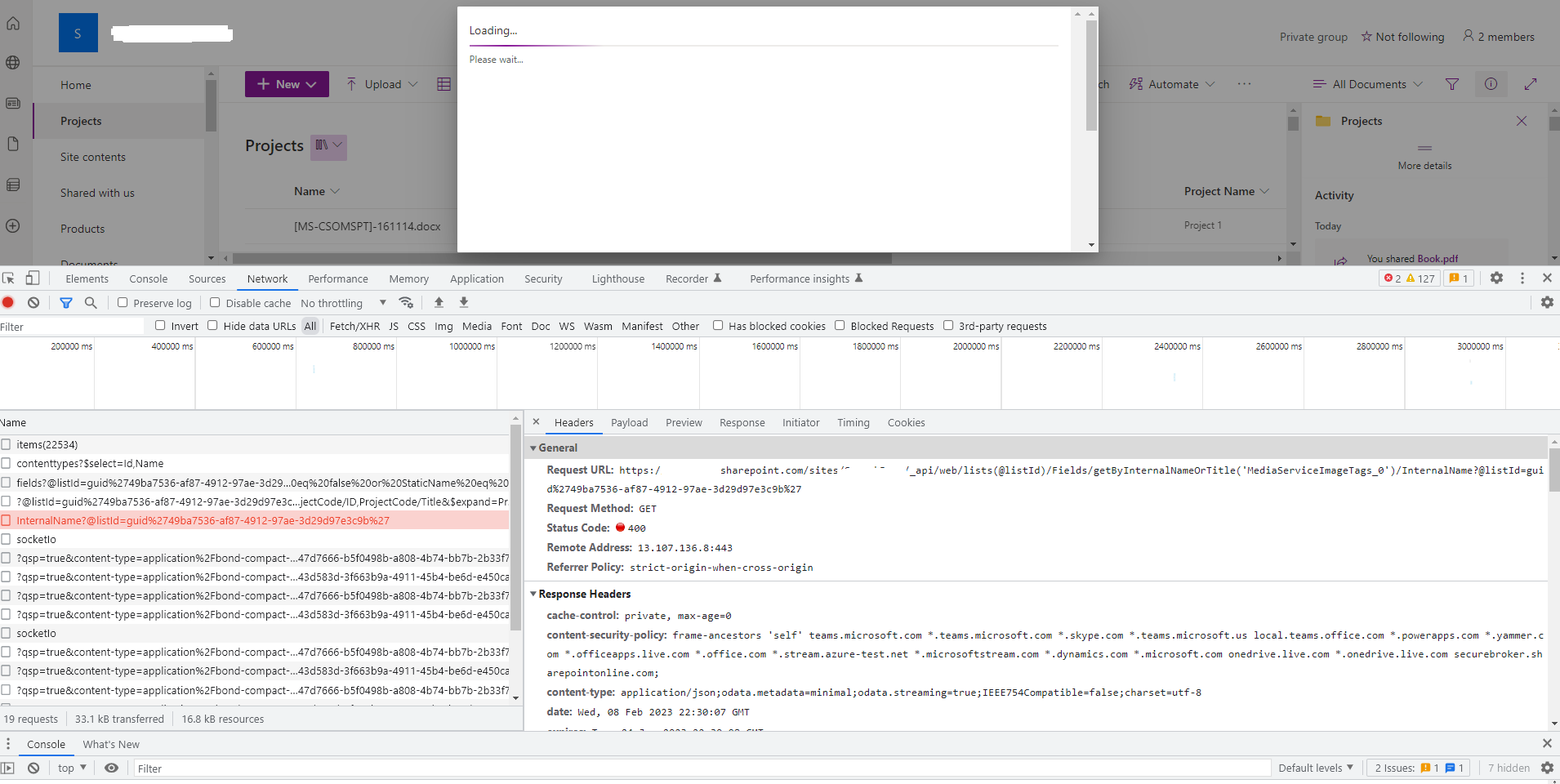
Can you please help on this?
Thanks!
Contributor guide
No contributing guide indexed for this repository
First steps
- Read the whole issue, then the project's contributing guide.
- Comment on the issue to say you are picking it up — it saves two people doing the same work.
- Fork the repository and make your change on a branch.
- Open a pull request that references the issue number.
Research direction
Start with the DynamicForm usage shown in the issue and inspect the network request that fails for the missing MediaServiceImageTags_0 column. Compare the affected document library's fields with a working list or library, then trace how the control handles that missing property. Done means the form loads and renders the available item properties instead of remaining on "Loading.. Please wait..".
Written by the indexing model from the issue text.
Assessment
- Tech stack
- react, typescript
- Domain
- frontend
- Issue type
- Bug
- Difficulty
- 4/5
- Estimated time
- 3-5 days
- Activity status
- Stale
- Clarity
- Mostly clear
- Newbie friendliness
- 35/100