pnp / pnp/sp-dev-fx-controls-react
How to add class in group header row of ListView control?
Nobody has claimed this yet.
- Dominant language
- TypeScript
- Stars
- 433
- Forks
- 418
- Avg merge
- 5d 6m
- Merged PRs (30d)
- 19
Description
Category
Question
Version
3.5.0
Question
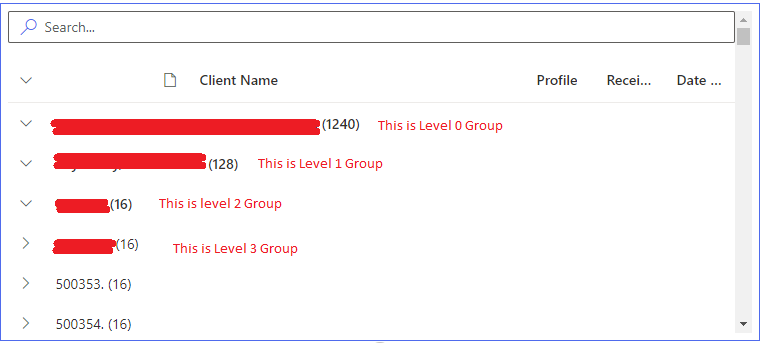
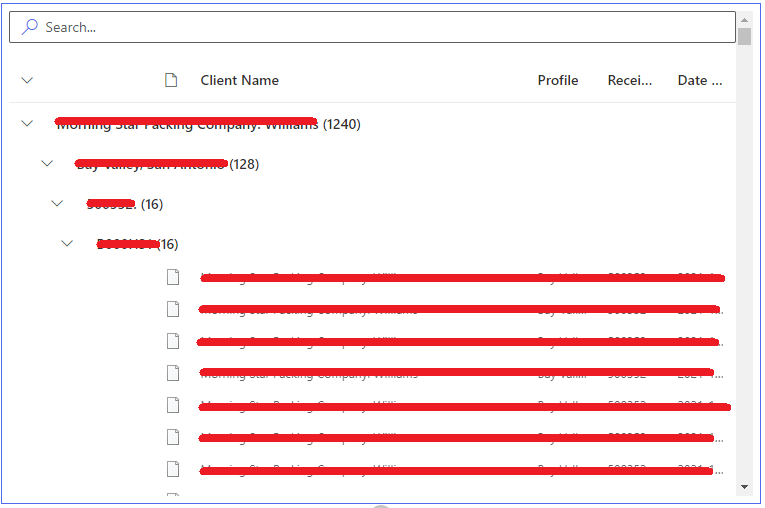
I am trying to group the data with multiple fields. But the list view shows the groups in same level even though it is a sub group.
This is what I get:
This is what I want (Tabbed View):
Steps to Reproduce
`
import * as React from 'react';
import { PnPGridProps } from './Interfaces/IGridProps';
import { ListView, IViewField, SelectionMode, GroupOrder, IGrouping } from "@pnp/spfx-controls-react/lib/ListView";
import { FieldTextRenderer } from '@pnp/spfx-controls-react/lib/FieldTextRenderer';

export default class RSPLGrid extends React.Component<PnPGridProps, {}>{
    private _renderTitle(item?: any): any {
        return <FieldTextRenderer text={item.Title} className='RowClass' />;

    }
    protected readonly viewFields: IViewField[] = [
        {
            name: "Title",
            displayName: "Test 1",
            render: this._renderTitle
        },
        {
            name: "field_1",
            displayName: "Test 2"
        },
        {
            name: "field_5",
            displayName: "Test 3"
        },
        {
            name: "field_6",
            displayName: "Test 4"
        }
    ];
    protected readonly groupByFields: IGrouping[] = [
        {
            name: "Title",
            order: GroupOrder.ascending,
        },
        {
            name: "field_1",
            order: GroupOrder.ascending
        },
        {
            name: "field_5",
            order: GroupOrder.ascending
        },
        {
            name: "field_7",
            order: GroupOrder.ascending
        }
    ];
    private _getSelection(items: any[]) {
        console.log('Selected items:', items);
    }
    public render(): React.ReactNode {
        return (
            <>
                <ListView
                    items={this.props.listItems}
                    viewFields={this.viewFields}
                    iconFieldName="ServerRelativeUrl"
                    compact={true}
                    selectionMode={SelectionMode.none}
                    selection={this._getSelection}
                    showFilter={true}
                    defaultFilter=""
                    filterPlaceHolder="Search..."
                    groupByFields={this.groupByFields}
                    dragDropFiles={true}
                    stickyHeader={true}
                    listClassName='listClassName'
                    className='controlClassName'
                />
            </>
        );
    }
}
To resolve my issue I am thinking to add one custom class in the group row to make it tabbed view. But I don't see any way to do so. Is there any way I can achieve this?
Thanks!
Contributor guide
No contributing guide indexed for this repository
First steps
- Read the whole issue, then the project's contributing guide.
- Comment on the issue to say you are picking it up — it saves two people doing the same work.
- Fork the repository and make your change on a branch.
- Open a pull request that references the issue number.
Research direction
Start by reviewing the ListView grouping API, especially IGrouping, groupByFields, listClassName, and className, along with the existing issue discussion. Determine whether group header rows support a custom class and whether the requested nested or tabbed presentation is supported; document the result and any confirmed extension point.
Written by the indexing model from the issue text.
Assessment
- Tech stack
- react, typescript
- Domain
- frontend
- Issue type
- Feature
- Difficulty
- 5/5
- Estimated time
- Over a week
- Activity status
- Stale
- Clarity
- Needs clarification
- Newbie friendliness
- 25/100